



- Русский
- English
- Português
Personal company knowledge base
Discover how to build a personal knowledge base using ASCN Agent to streamline data storage and retrieval. This automation enables marketing and operations managers to efficiently organize insights and links, saving time and boosting overall team productivity.


Using ASCN Agent to enhance the method of effectively storing and retrieving information. Also, improving the process for capturing and organizing data.
General Description
The company will have its own personal knowledge base which is designed for the marketing and operations managers to help them make the most effective use of the information they have for both storage and retrieval. This particular knowledge base is designed with a low level of complexity, which means that anyone will be able to use it regardless of their technical background. The ability to integrate with platforms like Google Drive and Notion, along with a web-based search function makes it easy to sync data with these platforms.
By using this automation, you can dramatically reduce the time it takes you to remember and organise information. You will also be able to quickly find what you need because our user-friendly interface allows you to search through a large number of records quickly. The ability to quickly find information is especially important in today's fast-paced business environment where every minute spent searching for information can be a critical differentiator.
You not only have a place to save ideas and notes, but you can also manage these effectively in your personal knowledge base; this will enhance team productivity overall. For example: An operations manager might quickly take conflicting ideas that came up in a meeting and later access them for further analysis.
How the Automation Works
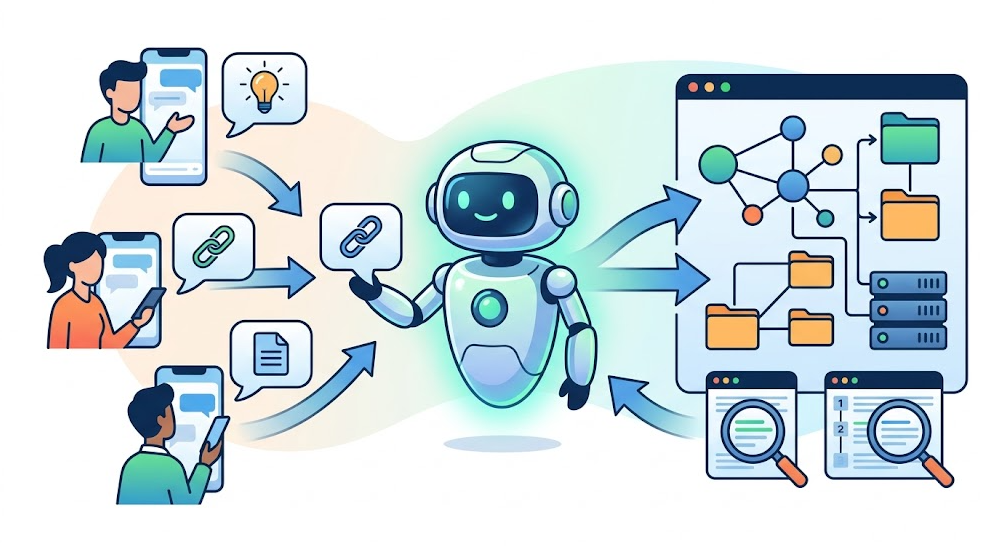
The automation for building the company's personal knowledge base is based on simplicity and user interaction. Users can communicate with their ASCN Agent by sending text messages through popular messengers such as Telegram, iMessage or Discord. Users will be able to capture important ideas and links as soon as they come to mind using very simple messages and not be distracted by complex user interfaces.
The ASCN Agent memory system stores all incoming messages for an unlimited amount of time and allows you to access any item in the database. There's no need to worry about losing your notes or ideas. A simple user interface allows you to quickly search and retrieve any note or record and provide instant access to what you need — all with minimal effort in terms of organizing your notes.
The automation of remembering and using your notes is not only faster, but easier — giving you more time to devote to other tasks rather than managing notes. For example, marketers use their notes to quickly save links to interesting articles, etc. for discussion with the entire team.
Why This Is More Effective Than Manual Work
Automation of the company's personal knowledge base significantly reduces the complexity of recording information. Recording information becomes as easy as sending a text message with no requirement for a complex interface or redundant steps, which would otherwise require lengthy processing time or commitment to your own or another individual's time to retrieve information.
The speed of retrieving information is instant because users have access to every record, allowing them to quickly find the information they were seeking without going through a lengthy organizational system. In contrast to traditional methods of tracking records, each record accumulated in the company's personal knowledge base will continue to increase in value and accessibility, regardless of the number of items or records contained within the company knowledge base.
By using automation, both the retrieval and presentation of timely and accurate information to employees save time. It is possible for companies to become more effective and efficient in conducting their daily operations, because team members will be able to respond to changes in projects more quickly, as they now have access to the data.
What Results Users Get
By automating a company’s personal knowledge base, the amount of time it takes to process data is reduced and this is very important to both operations managers and marketers. When using the personal knowledge base, users can find the records they want very easily and do not have to spend a lot of time organizing that information due to the system’s easy-to-use interface and instant search capability.
The knowledge base accumulates data, so the knowledge base grows in value as it accumulates data. All of the different pieces of data that are added to the knowledge base make it much easier for users to use and can improve team productivity. As such, users get many benefits from using the knowledge base. These benefits include:
- The streamlining of the data memorization process.
- The time spent searching for data is significantly reduced to just seconds.
- The ability to access previously acquired knowledge that can maximize team productivity via efficiency related to the retrieval of that knowledge.
- Reduction in workflow due to the ability to automate processes related to knowledge management allows teams to spend time on higher value tasks.
- Teams can base their decisions on the latest available information.
User feedback provides convincing evidence that the knowledge base improves team productivity.
Implementation Examples
Currently, there are no specific examples of implementation of the company's personal knowledge base; however, in many other cases, examples of deploying automated processes to various aspects of a business have been successful. Operations managers and marketers have found that automating the process of storing and retrieving information from the knowledge base allows them to be able to spend their time on higher value tasks, rather than storing and/or searching for information.
Automation has proven to be useful for the following purposes:
- Procurement and storage of ideas that are generated during the course of the work process — this assures that an important thought is not missed during the course of the work process.
- Improving the ability of users to access information stored in the knowledge base of a company (the knowledge bases are very important tools that allow employees to be successful in a rapidly changing business world).
- By reducing time spent organizing data, the team can respond and make decisions more quickly.
As a result of the implementation of the system, there has been an increased overall productivity and efficiency of work as supported by positive feedback from users of the system, and the increased use of an automated personal knowledge base for the company has become vital for optimizing the flow of work and teams collaborating together.
What You Receive
Using the company's personal knowledge base provides its users many advantages that lead to increased work efficiency. One option is the system has a user-friendly interface making storing and retrieving of information easy. This allows users to retrieve data in a timely manner without having to go through complicated organization processes to find data.
A second option is the system can automatically store and retrieve ideas and links, both of which are important because business changes at a fast pace so users are able to quickly capture all ideas before they are lost by going through additional steps.
A final option is that users have access to all of the information they have accumulated at any time, and therefore, it can be used to respond rapidly to any business changes, in addition, making informed decisions because of the large amount of data in memory. The personal knowledge base has accumulated enough data at this point that it will only continue to increase in value as data continues to be collected. It is important to note that with any additional item that is added to the personal knowledge base, the added item becomes even more beneficial and makes it easier for the team to find information.
Summary of Advantages:
- User-friendly interface to store and retrieve information.
- Ability to quickly enter ideas and links for fast retrieval.
- Anytime access to all accumulated information.
The implementation of the company's personal knowledge base is one step closer to optimizing the efficiency of work for teams and increasing the overall productivity of teams working in an organization or business as noted in user testimonials regarding how the personal knowledge base is an effective knowledge management tool to help operate more efficiently.
Launch Instructions
If you would like to begin to utilize your company's personal knowledge base, follow these easy steps:
- Connect your ASCN Agent with your preferred messaging platform whether it be Telegram, Discord or others. This gives you the opportunity to communicate with your ASCN Agent by sending it a message with any ideas or notes you want to save.
- Once your ASCN Agent is connected to your messaging platform, you can immediately use it to save any thought, idea or link you want to remember. By sending your ASCN Agent a text message, you will no longer need to remember or write down anything else; the ASCN Agent will automatically store that text message in the ASCN Agent's memory for you.
- After saving your ideas, links or other thoughts, your next step is to configure the search interface in your ASCN Agent. By asking your ASCN Agent what it will take to set up the search configuration, you will enable yourself to find all of the saved ideas, links or other records with extreme ease and increase the overall organization of your accumulated data and records.
When users have all of this information available at their fingertips through their ASCN Agent, they will have a powerful knowledge management tool that will be available to them 24 hours a day to provide assistance whenever they may need it. The testimonials from users regarding how much more productive they now are and how much better the quality of their work is due to using the ASCN Agent as a personal knowledge base are substantial.
