



- Русский
- English
- Português
Automate company data enrichment with ZoomInfo, Serper & Oxylabs to Google Sheets
ASCN.AI simplifies B2B company data enrichment by utilizing the Serper API and Oxylabs to extract relevant information directly from ZoomInfo profiles. This automated pipeline allows you to enrich 1,000 company records for a fraction of the cost of a traditional subscription, saving thousands of dollars in manual labor.

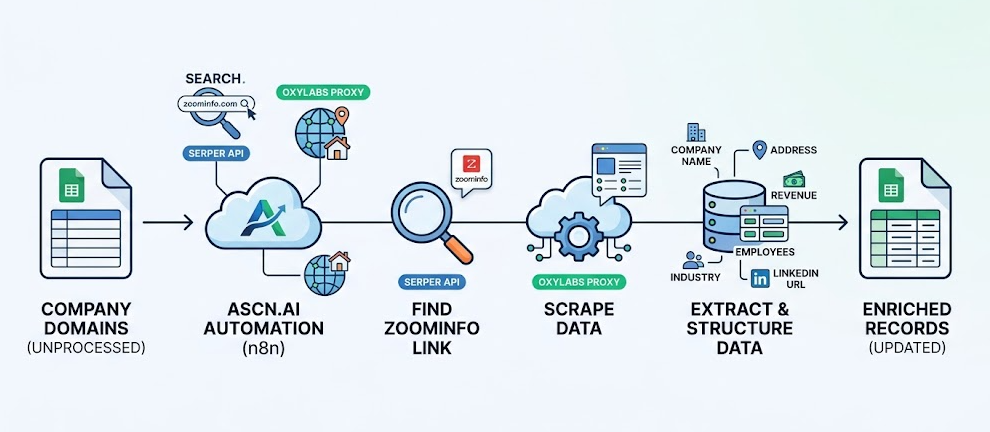
ASCN.AI simplifies your B2B company data worldwide by utilizing the Serper API to find a relevant link from the ZoomInfo database and obtain data like an address for a specified company.
The total price to do this will be about $65 for the first run where you will have the following 5 items added to each firm's record: company Name, Address, Total Revenue or Headcount (# of Employees), and Industry type (if available), and LinkedIn URL (if available). This will allow you to enrich your data base of 1000 company records, which will save you several thousand dollars in labor costs (manual enrichment costs $2,083 in labor).
Here is how you would set up the automation process for enriching your company records:
- Obtain a list of company domains from Google Sheets
- Get a link for each company's ZoomInfo profile page using the Serper API
- Obtain data from each of their public company pages using Oxylabs Residential Proxy
- Use the collected information to create your enriched records from the list
- Once created, write back to Google Sheets and indicate that each record has been updated
The Problem: B2B Data Decays Faster Than You Think
The B2B data decays faster than you think. B2B data decays at a 2.1% rate per week which is an approximate 67% of the annual rate (Cleanlist, State of B2B Data Quality 2026). The previously quoted 30% number is outdated, and not close to reality, 67% is accurate.
What does this mean? Companies change headquarters. Revenue amounts fluctuate after a funding round or acquisition; telephone numbers become obsolete; employee headcount changes; and you continue to call on the telephone numbers that were last active over a year ago, sending leads to the incorrect company and wondering why they are not converting.
The numbers are not encouraging. According to Validity (2025), the estimated amount of money lost annually to "bad quality" data across all CRM Users is 37%. Another study has shown that 44% of all companies lose more than 10% of their revenue due to data quality issues. If you can fix the problem with data, you can gain 25–27% in sales productivity and up to 66% in additional revenue. Clean data has a short payback period.
As an alternative to manual enrichment, which doesn't have scalability, you can get an annual minimum subscription to ZoomInfo for a minimum cost of $14,995 (the median deal cost is $31,875 per year based on 1,313 verified contracts — per Factors.ai). The traditional model was designed to give an enterprise solution for an enterprise budget. Most teams can't afford that solution.
Fortunately, there is a turnkey solution.
7-Step Pipeline — How the Automation Works
The 7-step pipeline is executed inside n8n. ASCN.AI builds, configures, tests, and hands off the automation to you, fully installed and operational.
Step 1 — Load Unprocessed Domains
In Step 1, the unprocessed domains will be populated into Google Sheets. The workflow reads a template and only pulls the rows where the "processed" column is blank or equal to false. You can also change the batch size to process a maximum of 50, 100, or up to 500 rows at one time. All processed rows will be skipped, so you can rerun the entire automation and will not have any backtracking.
Step 2 — Search ZoomInfo Profiles via Serper API
In Step 2, using the Serper API, you can query ZoomInfo for the profiles of each domain. In 1 to 2 seconds, Serper will return a targeted query for each domain: site:zoominfo.com/c/ "company.com". This method should allow you to complete 300 queries per second at an average cost of $0.001 per query (for more information visit serper.dev). If you do not receive a response, the workflow will display that the "domain was not found" and automatically continue to the next domain. You will not experience any crashes or get stuck in an infinite loop due to a lack of response.
Step 3 — Scrape the Company Page via Oxylabs Proxy
For Data Extraction, in Step 3, you will scrape the company page from ZoomInfo by using Oxylabs Proxy. Since ZoomInfo is blocking standard HTTP requests to its website, the Oxylabs Proxies will route your scraping efforts through their residential IP Proxies. Residential IP Proxies will use actual residential IP addresses and actual home devices. Over 177 million residential IP addresses across 195 different countries provide a remarkably high level of accessibility (99.82% success rate). There is also a requirement to implement rate limiting and allow for 1–2 seconds of breaks between requests.
Step 4 — Extract Company Data in a Structured Format
The workflow retrieves data from the HTML response and organizes it into several different fields: Company Name; Headquarters Address; Main Phone Number; Revenue Range; Number of Employees; Industry Sector; LinkedIn Profile URL; Company Website; Category Tags. Normalization is essential in the process of mapping the company name; “IBM” and “International Business Machines” are both the same piece of information when normalized to a single record.
Step 5 — Write Enriched Data to Google Sheets
Only the newly extracted fields will be placed in their individual columns, for each domain in the correct row. Existing non-blank rows will not be deleted — only those with blanks will be used to fill blanks in columns from the newly enriched data.
Step 6 — Processing Completed and Handling Errors
Every Domain will be identified as ‘Processed = true’ including a Timestamp for reference. There are three levels of Error Handling: 1) If the return from Serper is empty, skip and log the error. 2) If a request times out with Oxylabs, retry once after a 5 second pause and provide a log of the attempt. 3) If parsing fails, set a flag of “parse_error” indicating it should be reviewed. No errors will be silently ignored.
Step 7 — Scheduling and Monitoring (Growth Plan)
Replace manual triggers on each run with a recurring cron job to run on a daily or weekly basis; whichever best conforms to your workflow. When each job completes, a report is generated and delivered via Slack, or email. ASCN.AI monitors for the success or failure of all requests and resolves any issues identified in the HTML structure before you are aware of any problems. For more than 50,000 domains/month, you will need the Enterprise plan to batch process.
What Data You Receive — 14 Data Fields in Google Sheets
| Field | Example | Notes |
|---|---|---|
| Company Name | Acme Corporation | Legal or trade name from ZoomInfo |
| Address | 123 Main St, Austin TX 78701 | Full street address |
| Phone | +1 (512) 555-0100 | Main Line phone number |
| Revenue Range | $10M–$50M | Annual Revenue Range as shown = Public ZoomInfo Range |
| Employee Count | 51–200 | Number of Employees as shown in Publicly Visible Data |
| Industry | Software | Classification Based on Zoominfo |
| LinkedIn URL | linkedin.com/in/acme | — |
| Website | acme.com | — |
| Tags | SaaS, B2B, CRM Software | — |
| Processed | True | — |
| Status | Enriched/ N/A/ Error | — |
| Enriched at | 2022-04-27T14:32:00Z | — |
| Data Source | Zoominfo/ Serper/ Oxylabs | — |
ASCN.AI vs Alternatives
| Option | Cost/1K Domains/Mo. | Setup Time | Ownership |
|---|---|---|---|
| ASCN.AI Pipeline | ~$5-$10 plus API or $0 to $29 Service fee | 48 hours | You own the workflow |
| Zoominfo Subscription | ~$1,250/Mo Annual Plan | 1 to 2 Weeks | Locked In with Vendor |
| Apollo.io | $49-$99 a month with limits for exporting. | 1 to 2 Days | Locked In with Vendor |
| Manual Research | ~$2,083 in labor | 83 hours | Your Time Has Left Forever |
| DIY n8n Template | $5 - $10 only API | 8-20 hours development time | You Own It You Maintain it |
Pricing and Timeline
| Plan | Setup | Monthly | What's Included |
|---|---|---|---|
| Starting | $59 | $0 | Workflow building, Google Sheets Template, one Revision and Handoff calls |
| Growth | $99 | $29 | • Schedule Calls, Slack/Email alerts, Monitor activities, maintenance |
| Enterprise | Custom | Custom | • Syncing with your CRM, Custom Fields, 50,000+ Domains/Month, SLA |
All API costs are separate. They are paid directly by you to the Serper and Oxylabs companies. For example, $5-$10 total for 1000 domains a month. Deployment Deadline: Two (2) business days from kickoff (with sign-off to begin at end of first business day) will be the time frame expected to get working with the enrichment automation.
Requirements
- Serper: Free account provides up to 2,500 queries for testing; after using the free account, you may purchase Serper paid plan for approx $50/month, which gives you 50,000 queries total use. Cost to scrape using Serper with 1,000 domains is approximately $1.
- Oxylabs: Free Trial Account available for up to two (2) weeks of testing; Pay-As-You-Go $8 per GB (or rate of payment will change depending upon fluctuating prices), if 1,000 domain scrapes roughly $4; Monthly Plans from $99+ for larger amounts of scraping.
- Google Account: Need a Google Account to use Google Sheets; create Regular Gmail or Workspace account and enable Sheets API (takes approx 5 minutes).
Do not need ZoomInfo account — simply scrape information from publicly available company profiles with ASCN.AI. No ZoomInfo API Key Needed.
Frequently Asked Questions
Is it legal to scrape ZoomInfo?
Yes — ZoomInfo public company profile pages are publicly available to anyone who has access to a browser. ASCN.AI is scraping publicly available company information at company level (name, address, revenue range, employee range, industry). Scraping Company Info in public domains is generally legal due to publicly displayed company data. (Disclaimer: this is NOT LEGAL ADVISE; regulations are different depending upon each state).
Will I need a ZoomInfo Subscription?
No! ASCN.AI is scraping ZoomInfo's public company profile pages; you do not need to have a ZoomInfo account, API key or subscription to use ASCN.AI.
How many companies can you process per day?
(A) Default Process Rate: 200 - 500 domains per day. (B) IF you use Oxylabs Advanced Plan: Up to 1,000 - 2,000 company profiles processed per day. Process time usually takes approximately 25 minutes if scraping 1,000 total company profiles.
What if there are not any ZoomInfo profiles on a specific domain?
The ASCN.AI database will mark that domain as NOT_FOUND and allow the process to continue without crashing. You will receive a clean log of which of the domains that could not be found.
Does this work with HubSpot or Salesforce?
Currently set up to output in Google Sheets; however, a CRM sync is available as an Enterprise add-on.
What will happen if ZoomInfo changes their website structure?
If you are on either a Growth or Enterprise plan, ASCN.AI is responsible for adjusting for changes in HTML Structure; on a Starter Plan, when HTML structure changes you will be charged $29 for on-demand fix.
Will this scrape over 50,000+ companies?
Yes. The Enterprise Plan uses Batch Processing + Monitoring, and as such will process up to 50,000+ domains scraped per month.
Is this in compliance with GDPR?
Firmographic data on companies is NOT personal data under GDPR generally. This process is only collecting firmographic information from companies. Contact your company's Legal Team regarding your legal jurisdiction in this case.
Let's Get Started; Automate Your Enrichment Within 48 hours
There is no need to continue to pay for data that can be automated. You don't need to spend hours searching for data that could go stale in six months.
ASCN.AI will deploy your enrichment pipeline with ZoomInfo + Serper + Oxylabs within 48 hours; Starter Plan Cost from $59; Approximate cost of tools is $5 - $10 per month for each 1,000 companies.
Book your Free 20 Minute Scoping Call; we will confirm that the enrichment pipeline will fit your requirements before you have to make any payments.
