



- Русский
- English
- Português
Smart task manager
Learn how to automate your task management process by integrating ASCN Agent with Todoist and Telegram. This guide explains how solo entrepreneurs and founders can optimize workflows and increase productivity by focusing on strategic goals rather than routine operations.

Utilize ASCN Agent and Todoist integration for automating your task management process. Enhance your workflows by working smarter with this automation and effectively increase your productivity.
General Overview
Smart Task Manager can assist solo entrepreneurs and founders with optimizing their task management solutions through system integration with Todoist and Telegram, which allows process automation to occur, thus enabling productivity expansion. The Smart Task Manager allows you to operate on a schedule instead of in real-time, which will streamline your tasks and provide you with a more transparent means of performing your tasks.
The integration allows for easy task management while providing minimal effort with data migration and systems configuration. The Todoist API is open and accessible to all, and the Telegram native integrations will allow easy usage. Users will find it easy to create automated workflows and use them to focus on more essential business requirements and tasks rather than routine tasks.
Moreover, once task automation has been completed, you will be able to manage all of your task statuses in a more convenient manner. This is particularly relevant to many solo entrepreneurs and founders who are looking for a viable tool to assist them in managing their task processes.
How Automation Works
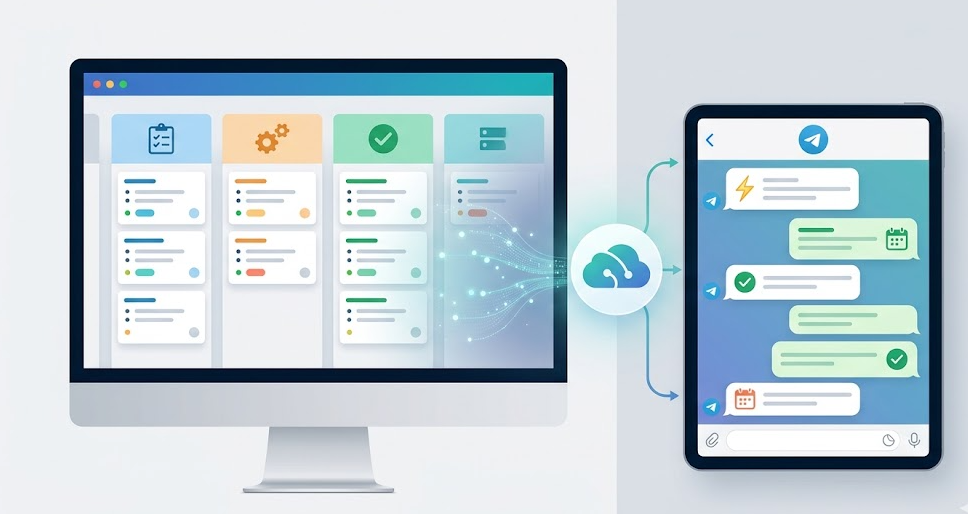
The automation of the task management process is initiated with the creation of a project through the integration of the ASCN Agent and Todoist system using the following method. When creating projects, the users will want to establish sections for all of the different states of tasks (i.e., 'In Progress', 'Waiting', and 'Done') so that their workflow is organized, and they can see their progress clearly.
Once the user has created a project with the different sections, the ASCN Agent will then utilize the project to perform task creation and task management to facilitate the synchronization of tasks between the ASCN Agent and Todoist through automatic updates to the tasks in Real-Time, rather than requiring manual updates to task statuses, which will provide the user with the ability to see the status of an entire organization's tasks within the same framework, which substantially improves process transparency. The ASCN Agent works alongside Todoist to automate the assignment, completion and documentation of tasks for employees in a simple task management system that streamlines the entire process. As a result, these features create a structured framework for completing tasks, which means a large amount of time is saved.
Why It Is More Efficient Than Manual Work
By using the ASCN Agent and Todoist integration to automate task management, the time spent on completing the same repetitive processes has been reduced. The time that was previously taken up with routine can now be used towards higher-value items such as developing long-term plans or working with customers.
Automation also removes the requirement for manually recording the status of each task as the system automatically synchronizes the current status of all tasks so there is no more confusion and errors related to manual data entry. This means that users will receive real-time status updates about their tasks, which will enhance their productivity.
In addition, using Todoist has provided further transparency for users to see where all their tasks are in relation to each other and how this relates to the overall time and resources that are available to complete tasks. Automation using the ASCN Agent and Todoist integration provides a much more efficient method of managing tasks compared to the traditional manual task management systems.
Results Users Achieve
There have been significant changes in how users are managing tasks and an increase in how productive they are. By automating processes using the ASCN Agent and Todoist integration, users have reduced the time required to complete routine functions and have focused their efforts on tasks that are of a greater importance or have higher priority. By continuing to synchronize the status of tasks, as well as the comments regarding the progress of completing those tasks, users are receiving real-time updates on what is the status of their tasks in a timely manner. When the system is implemented, the following key results were achieved:
- Time savings that enable effort to go towards strategic tasks.
- Increased transparency of processes that provide users with visibility into the current state of tasks and their progress.
- Fewer errors associated with manual data entry, because the system will automatically update task status each time a new task is created.
When considered collectively, these benefits show task management automation offers both convenience and effectiveness to solo entrepreneurs and company founders who want to optimize their workflows.
Implementation Examples
Since we do not currently have any specific case studies available for implementing the “Smart Task Manager,” we will highlight several key aspects of implementation experience that users have found to be useful. Automating your task management with the ASCN Agent/Todoist integration has simplified workflows and significantly improved overall productivity for users.
Users have commented on how helpful the system is in reaching the following goals:
- Task distributions based on current status. Users are able to quickly orient themselves to their current workload.
- Synchronization of status notifications via “real-time” notifications through Telegram to keep users engaged.
- Automatic updates of task statuses on a set schedule, which eliminates the need for manual supervision and reduces the risk of error.
When all factors are considered, these advantages make automation particularly attractive to solo entrepreneurs and founders who are looking to optimize their processes. Additionally, integrating with Todoist and Telegram improves task management and enables a continued focus on more important aspects of the business, while routine operations will now be handled by automation.
What You Get
Integrating ASCN Agent with Todoist for automated task management will yield several significant benefits. First, you’ll have the benefit of automating the task management process, which saves time on repetitive daily tasks (i.e., freeing-up the resources utilized on routine tasks to perform the more critical things, such as strategy).
By using Todoist's automated integrations with Telegram (in addition to Todoist), it allows you to simply see where your tasks are currently located, allowing for not only better visibility of the process, but also allows you to use your time better. In addition, the ability to provide reminders in Telegram, allows the user to continue seeing new task changes without having to check the app continuously.
Another benefit of the integration is the ability to set the automation up to automatically update the status of tasks based on the assigned schedule via the agent, which reduces the need for manual monitoring and helps to reduce any possibility of human error. All of these factors make task management automation an exceptional tool for solo-preneurs and founders, who are trying to better their workflow.
Setup Instructions
To establish a working automated task management system using ASCN Agent and Todoist integrations, complete the following steps:
- You must first create a project in your account on Todoist. After signing up for your Todoist account, you'll need to create a new project that will be designated to manage tasks. You'll want to write down this project's ID number, as you'll need to reference it in the future;
- You must enter in your project task sections that reflect the status of the task (e.g., In Progress, Waiting, and Completed). This will provide a way for you to visualize the progress of your tasks;
- You will be using your ASCN Agent to create scripts that will connect to the Todoist API to perform the necessary steps involved in creating, updating, and tracking tasks. Having these scripts in place will make the task management process much easier.
Following these steps will enable you to execute a fully functioning automated task management solution that will run on a defined schedule and remain in sync with the Todoist application. This will provide the individual with the opportunity to focus on their business's more essential functions while spending very little time performing daily repetitive functions.
