



- Русский
- English
- Português
Finding Leads from LinkedIn by ICP Profile
Use the ASCN Agent to streamline your search for potential customers and quickly fill your lead generation pipeline with quality contacts. This automated technology leverages natural language processing to find prospects based on your Ideal Customer Profile across major platforms.

Use the ASCN Agent to streamline your search for potential customers. Quickly fill the lead generation pipeline with quality contacts through our technology.
Overview
As your lead researcher for LinkedIn, Crunchbase, and Y Combinator, the lead search technology finds prospects based on the information provided as a description of the Ideal Customer Profile (ICP). The solution is something that startups and solo entrepreneurs can benefit from.
Through automated searches, this system performs data analyses, and this is how substantial time savings are achieved in prospecting. With the assistance of the agent, the search gets more accurate too since it is equipped with natural language capabilities.
How Automation Works
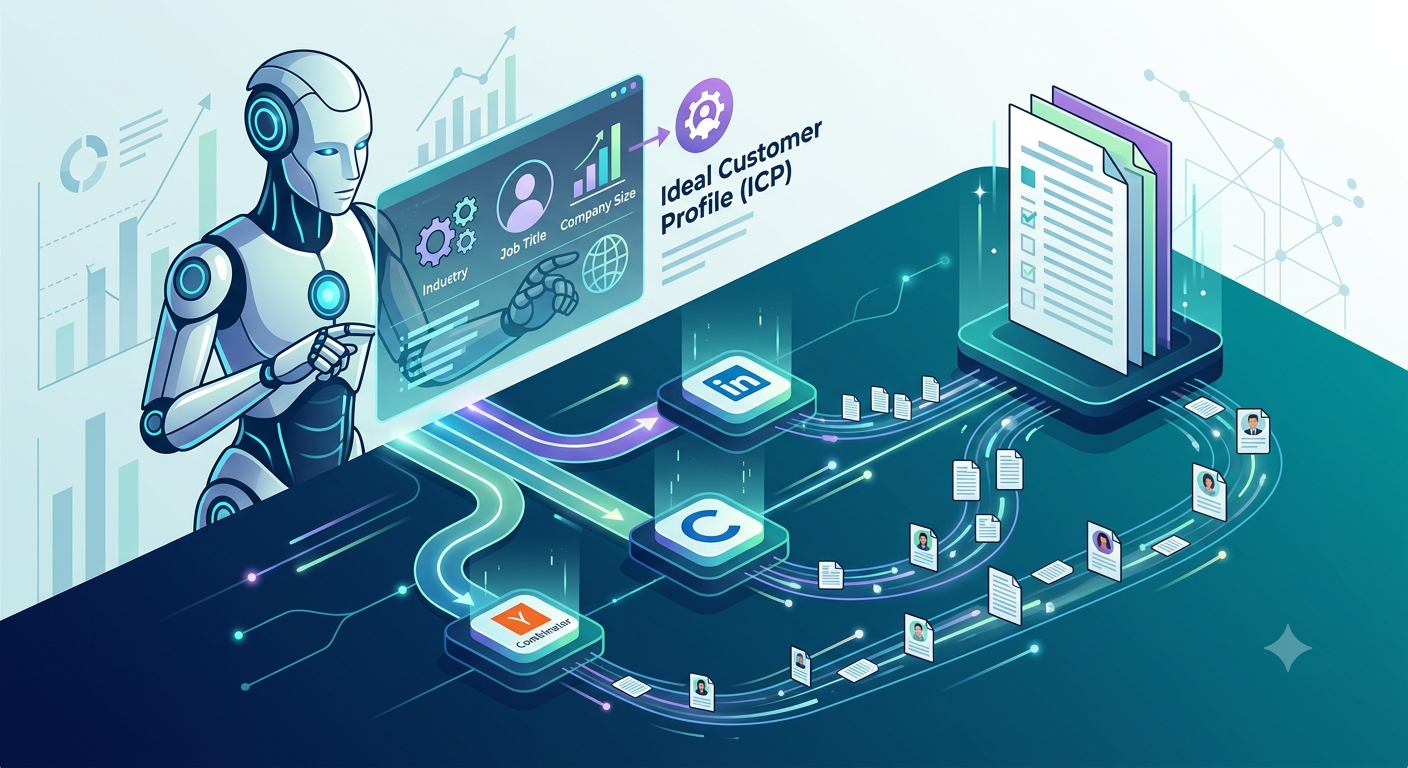
Automated lead search technology uses natural language to process the input referring to the Ideal Customer Profile. Based on this analysis, the agent classifies the input and conducts a search in the popular sources like LinkedIn, Crunchbase, and Y Combinator.
After that stage, the agent enriches the data about the first-tier leads. This allows the system to build a complete picture of the leads in question. The method discussed here is more effective than the manual approach since it allows for saving time.
How It Is Better than Manual Labor
Thanks to the automated search process, one does not spend much time on searching anymore. In comparison to manual searches, which can last for hours, automated queries get the necessary information in less time, namely in just minutes. Thus, the start-ups and individuals can focus on other important business activities.
Moreover, as we have already mentioned, the effectiveness of the leads is greatly increased because the Ideal Customer Profile (ICP) is identified accurately. The agent processes data from many sources and uses it for finding the right contact. Consequently, one receives leads of better quality.
The less direct involvement of people improves the efficiency too. It is crucial in reducing the number of mistakes that might occur during the manual process. Most importantly, this applies to sophisticated queries in which various factors must be considered.
What Results Users Get
The users have reported positive changes in the search process, namely, they got better leads in a much shorter period. By applying technology prepared specifically for entrepreneurs they will not need to be involved in mundane processes without losing efficiency in other fields of business.
The effects of using such solution are as follows:
- Increasing number of qualified leads corresponding to the required criteria
- Decreasing time spent on lead generation from hours to minutes
- Better customization of approaches to clients
The effects mentioned will help to better manage clients and close more deals. Lead search automation helps to improve companies’ targeting positions in the market.
Implementation Cases
The practice shows that automation helps significantly improve the process of searching for leads. Founders/companies using the technology observe improving quality of contacts and time required for finding leads decreasing. Entrepreneurs, thus, are able to concentrate on what matters: building relationships with prospects and planning their activities.
Automation of the lead search as well as reduction of routine operations will lastly enable one to perform more focused actions and to customize his/her actions for various market segments. On top of that, the technology allows for integrating with other software to make it even more applicable in business. Therefore, automation in lead search becomes an essential part of any successful business strategy, ensuring increased efficiency and productivity in a competitive world.
Achievements
With the help of the LinkedIn ICP-based lead search agent, you will be able to accomplish several important tasks that facilitate the lead generation process. First and foremost, you will obtain a detailed list of the first ten leads, as well as their evaluations and explanations, which enables you to quickly detect the most effective contacts for further cooperation.
The agent brings you a lot of important data about companies that include useful events for personalizing the lead approach. If you know about the recent events connected with the life of the company, it becomes much easier to build effective relations with a potential customer.
Furthermore, the results include a tailored approach to each contact, which enhances the success rate. This depth of information allows for making the process of selling smooth and efficient. Consequently, provided leads allow for obtaining better lead generation results and facilitating business growth.
How to Start
To start using LinkedIn ICP-based lead search automation, you should take a few simple steps. Firstly, add the agent to ASCN’s marketplace. This will allow you to obtain the needed instruments for effective lead searching. Following this, install the lead search plugin, allowing the system to carry out lead search requests.
After the plugin installation, you will be able to utilize commands to find leads according to the ICP, which may include characteristics of the target audience, including job position, company size, geographical location, etc. All those factors will allow you to obtain the needed contacts.
Overall, following these steps will allow you to use the tool for lead search effectively, thereby concentrating on other aspects of your business.
Note: The agent does not have the capability to filter leads based on the gender or other criteria and also may not function properly when asked complex questions.
