



- Русский
- English
- Português
Automate Airtable inventory tracking and purchase order creation
ASCN.AI streamlines inventory tracking in Airtable by automating stock monitoring and purchase order generation. The system eliminates manual data entry and reduces stock-outs by 40% through a seamless automated workflow, allowing businesses to manage stock levels and supplier orders efficiently without spreadsheets.

ASCN.AI streamlines the process of tracking inventory in Airtable so businesses can easily manage their stock based on the sales volume. With ASCN.AI, businesses can track their inventory automatically and without the need for spreadsheets, enabling the process to happen quickly and accurately. ASCN.AI has accomplished this by automating the tracking of inventory and creating purchase orders when inventory falls below the reorder point, generating PDF files for vendors to receive automatically through email, and updating Airtable after receiving shipments.
Quick Facts
- Deployment Timeline: ASCN.AI is typically setup and deployed within 48 hours of initial contact
- Stock out Reduction: Companies utilizing automated inventory systems like ASCN.AI see approximately 40% fewer stock-outs than those using manual tracking methods.
- Purchase Order Processing Speed: Automated processing of Purchase Orders is approximately 70 – 80% faster than processing manually.
- Average cost of manually created Purchase Orders: The cost for processing a manually created Purchase Order is between $35.88 and $506.52. The same Purchase Order processed using ASCN.AI will cost 80% less.
- Airtable API limit: The Airtable API has a data usage limit of 5 requests/second. In addition, the number of monthly requests for the Team Plan is limited to 100,000.
- Support for SKUs: In the standard deployment, ASCN.AI can support between 50 and 500 SKUs, as well as the processing of orders for between 1 and 20 suppliers.
- Account Integration: ASCN.AI integrates with QuickBooks Online and Xero.
How ASCN.AI works to complete the re-stock cycle
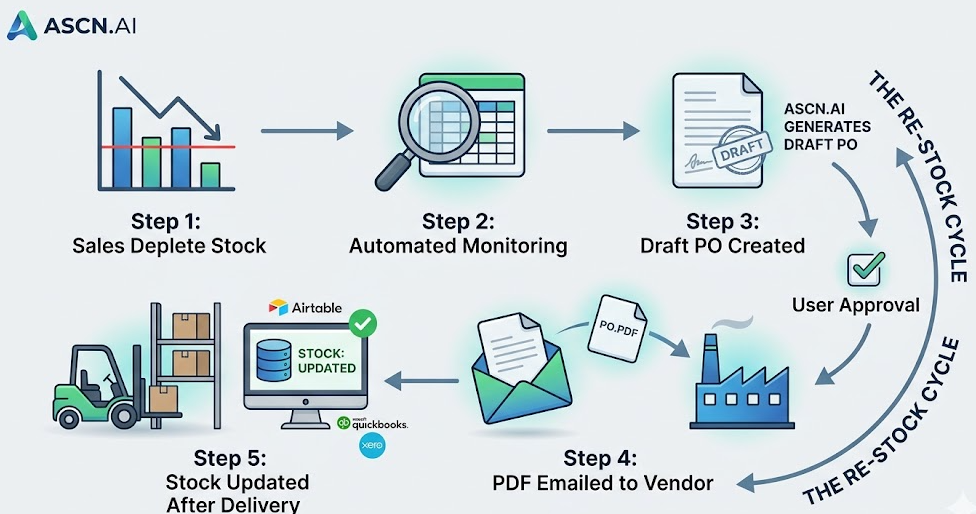
ASCN.AI provides a system that uses a scheduling process to monitor inventory levels and create draft Purchase Orders automatically when re-order levels are reached as well as generating PDF Purchase Orders and emailing them to suppliers automatically. The system then uses the "confirmation loop" to update inventory counts for materials received.
The majority of inventory problems begin when someone either fails to place an order or does not have access to the latest updated inventory information. Thus, Stock becomes depleted, and sales are lost. The reason manual tracking methods fail is that they are often cumbersome, complicated, and have too many steps that require an individual to notice and make a decision for each step. By automating the entire inventory-replenishment process, ASCN.AI eliminates the need for manual processes. ASCN.AI will monitor your inventory, create Purchase Orders automatically when stock levels are at the reorder point, generate PDF Purchase Orders, email Purchase Orders directly to the vendor, and update Airtable for inventory levels after materials have been delivered. Automated inventory systems help to reduce stock-outs by 40%. For example, one distributor had 200 SKUs from 8 different suppliers and previously spent 6 hours per week sending reorder emails compared to now, under 20 minutes to review their PO drafts.
Inventory automatically tracks every sale or order
In Airtable, the Products table has a Current Stock formula field which pulls a value from a linked Stock Movements table. Each time an order records a unit sold, a new stock movement row is automatically created and the Current Stock formula is automatically recalculated. There is no manual data entry and no nightly batch update!
When the current stock for any particular product is below the reorder point, a purchase order is created
Each product has a Reorder Point field and a scheduled automation queries all Product records where Current Stock < Reorder Point and creates a Draft PO for each supplier that has items below the threshold. The reorder point calculation is as follows: Reorder Point = (Daily Sales Rate x Supplier Lead Time) + Safety Stock Buffer.
The PDF lands in your vendor's inbox — no manual email
Once a Draft PO is approved, the corresponding automated email creates a PDF with your company logo, PO number, line items, payment terms, etc. and sends the email with the automatically generated PDF to the email address for that Supplier in Airtable. All addresses are stored in Airtable — not hard coded.
Airtable updates the moment delivery is confirmed
In addition, Airtable updates the Current Stock measures as soon as receipt of delivery is confirmed. When your team confirms the delivery of the goods, a new Stock Movement entry is created, and the Current Stock field is instantly updated. The status of the purchase order is updated to be "Fulfilled."
How the System Works: 5-Step Automation Flow
Step 1 — Sales deplete inventory in Airtable automatically
When the sales deplete your inventory in Airtable, your Orders Table will be creating records every time a sale occurs. Each line item in the order will be linked to a Product record, including Sold Qty. Also, A Stock Movement record will automatically be created each time a product is sold from your Inventory. You have a Current Stock Rollup in the Product record, which represents all Stock Movement quantities for that product; therefore, you do not need to record this amount manually.
Step 2 — Scheduled check scans every product against its reorder point
Scheduling Automations will run every hour (by default) and will check all your Products to see if the Current Stock is below the Reorder Point.
Step 3 — Draft PO grouped by supplier, pending approval
The Automations will create a Purchase Order (PO) record for each Supplier that has at least one Product below the Reorder Point. Before creating the PO, the Automation will check if a Draft PO record already exists in Airtable for that Supplier. If one exists, the Automation will add the new line items for the Products to the existing PO. At the time of creation, the PO Status will be “Draft.”
Step 4 — PDF generated and emailed to supplier on approval
Once the PO Status changes to "Approved," the Automation will pick it up immediately. The Automation then fetches all line items from the approved PO and generates a PDF (through CraftMyPDF - cost average is $0.01-$0.05 per document) using the line items from the approved PO as the criteria. The generated PDF will be attached to the PO record and emailed to the Supplier. The PO Status will then change to "Sent" once delivery is confirmed.
Step 5 — Delivery logged, stock count restored in Airtable
The warehouse team enters delivery confirmation using either a delivery form or by updating the Received Qty fields, which creates a stock movement entry and triggers the current stock to recalculate and moves the purchase order status to fulfilled.
Airtable Base Architecture for Inventory Automation
The Airtable base structure needed for inventory automation requires four tables as follows: Products - which contain the stock levels, reorder points, and supplier links; Suppliers - which contain the contact email addresses of suppliers as well as lead times; Purchase Orders - which manage the lifecycle of the purchase order and contain the associated PDF attachments; and Stock Movements - which serve as the transaction ledger for stock movement transactions.
Products table
| Field Name (data type) | Description |
|---|---|
| Product Name (single line text) | The primary identifier for the product being managed in the products table. |
| SKU (single line text) | The product's SKU must be a unique identifier. |
| Unit Cost (currency) | The unit cost for each stock item and used to calculate the total for each line item on the PO. |
| Reorder Point (number) | The reorder point for each SKU as set by the operations team. |
| Reorder Quantity (number) | The quantity of each product to order for each SKU. |
| Current Stock (Rollup/Formula) | The rollup or formula reads from the Stock Movement Table to identify the current stock of each SKU. |
| Supplier (Linked Record) | Linked to the Suppliers table for easy linking to suppliers for each SKU. |
| Below Threshold? (Formula) | To verify whether the current stock is below the reorder point or not. |
Reorder point calculation
The following is the calculation used to determine the reorder point for multiple SKUs based on the following criteria: Sales Per Day x Lead Time (in days) + Safety Stock = Reorder Point.
| SKU | Sales Per Day (units) | Lead Time (days) | Safety Stock (units) | Reorder Point (units) |
|---|---|---|---|---|
| SKU-001 | 5 units | 7 days | 15 units | 50 units |
| SKU-002 | 2 units | 14 days | 6 units | 34 units |
| SKU-003 | 20 units | 3 days | 20 units | 80 units |
Common Errors of Inventory Automation in Airtable
1. Setting the reorder point too low — Stockout of product occurs during weeks with long lead time for certain suppliers. Solution: Add a buffer of 20-30% above the calculated reorder point for suppliers with variable lead time.
2. Failure to provide the supplier's email address in Airtable — A PO will have nowhere to go when the supplier's email address is missing from Airtable. Solution: ASCN.AI has added a validation step prior to sending the PO. If no supplier email exists, a Purchase Order (PO) will be created but will be flagged and an alert will be sent via Slack/email. There will never be any silent failures.
3. Duplicate POs on re-run — When duplicate POs are created but the scheduled check has already found the same below threshold products, it will cause duplicate orders. The solution is to implement deduplication logic that automatically checks for any open POs before creating new POs. This process is inherent in every ASCN.AI deployment by default.
ASCN.AI Managed Deployment — Live in 48 Hours
What is included:
- Setup of Airtable Base with a table for the PO, Line Items, Supplier List, and Stock Movements. Each of these tables will include fields, formulas, and linked records and views.
- Workflow Automation including scheduled stock checks, PO creation, approval gate for PO creation, PDF generation, email generated for PO, and delivery loop for PO delivery.
- Company branded PDF templates for your POs.
- Integration with Suppliers through Email (Gmail or SMTP)
- Sync with Quickbooks or Xero
- Test run with your actual data prior to go live.
- 30 days of post-production support.
What do you need to provide:
- Airtable Team Plan account
- Current product listing of items with SKU numbers and current stock levels.
- List of Suppliers with their contact emails and lead times for each product.
- Historical sales data (last 3 months) to determine the average reorder point.
Frequently Asked Questions
Can I use this with the free version of Airtable?
Yes, a pilot of this will work on the free version of Airtable (1000 records per base and 1000 API calls per month). To run this on a production level with 200+ SKU items and daily movement of stock requires a Team Plan ($20/user/month annual payment) which includes 50,000 records/base and 100,000 API calls per month.
Can I use multiple warehouses / locations with this system?
Yes, we have added a Location/Warehouse field to the Products and Stock Movements tables. You can scope stock checks and purchase orders by locations and have independent reorder points for each warehouse.
Does this work with partial deliveries?
Yes. The PO Line Item includes information on the number of items ordered and number of items received. When you receive a partial delivery, the number of items received is adjusted in this field. The status of the PO is adjusted to Partial Fulfilled, and the stock is updated based on how many units you have actually received.
What accounting software is this system compatible with?
Currently, this system supports Quickbooks Online and Xero out of the box. FreshBooks, Wave and Sage will be added as custom features. We can export POs as a CSV file to any accounting software that does not have API access.
How long does it take to create my first automated purchase order?
If you have a product at or below your reorder point, we will create your first automated purchase order within 1 hour of going live, assuming that the scheduled stock check runs once an hour by default.
