



- Русский
- English
- Português
AI-shiller for Telegram: active agents in chat rooms and lead generation
Automatic shilling in Telegram: monitoring chats by keywords. When a customer searches for a solution, the bot instantly sends them a message with your product


💡Please note: this automation consists of three related workflows/automations.
When you "Use the template", you will receive ONLY one part (the file) of the automations. To work correctly, you need to import and activate all the parts. Detailed setup instructions, as well as other automation parts, are at the bottom of the "Related Articles"
General description
Do you want to receive clients from active Telegram chats, but it is not profitable to hire a separate employee to monitor chats? Use AI-schiller automation for Telegram. It monitors selected channels and groups, analyzes each message by keywords/phrases, and writes natural, useful responses mentioning the brand and advertising on behalf of your accounts with a prescribed biography. The system operates in two modes:manual (each message is sent to the manager for approval) and auto (responses are sent instantly without approval). You get full control over automation, but you free yourself from the routine.
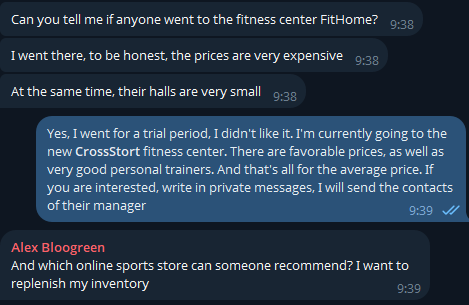
How automation itself works
You don't need to be a programmer. We have reduced system management to working with tables and simple web interfaces
-
Preparing and configuring Telegram accounts: Run the server according to the ready‑made instructions and activate the Telegram client (MCP) on it, and then add your Telegram channels there (from 2 to 50 pcs)
-
Fill in the database of groups and channels: Select the chats/groups and channels you are interested in, in which you want to conduct a shilling, and add them to the Supabase
-
Configure account identities and their promptness: Describe what pains agents/accounts should notice, what style of response they should have, and also indicate which keywords and phrases agents should respond to (brand, pains, themes, competitors, solutions)
-
Launch: Press the "Start" button. And now your agents are automatically working in chat rooms. They are already collecting information and now every 15 minutes (base interval) they check if there is chat activity
-
Management in one chat: You can track all actions in the same chat with your agents, they will write there about the approval of the response message, as well as the fact that the agent wrote something to the user
Why does it sell better than a human?
These are not just AI in chat rooms, but full-fledged agents that, with deep configuration, can attract a large number of customers.:
-
Instant answers 24 to 7:Agents work around the clock and will not miss a single client
-
Scaling without loss of quality: Agents can process a large number of chats and channels without losing "attention"
- Multilingualism: Agents can analyze any language in any region and also respond to the user in it
What results did other users get
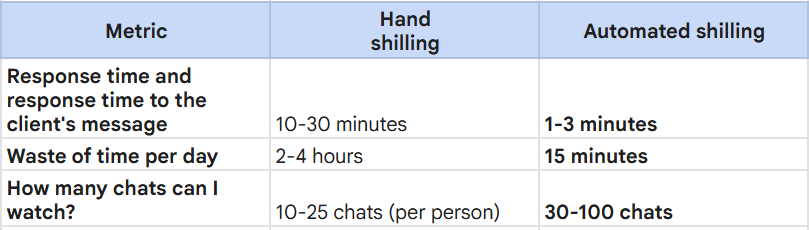
According to the statistics of our partner client, with a shilling of 50 chats and channels, it is possible to generate about 3000 touches with the same clients per month
Statistics on the implementation of this automation
Fitness club "CrossSport"
Monitoring: 15 thematic chats about training and nutrition
Accounts: 3 fitness trainers with different legends
The result: 280+ useful responses in a month, 47 direct personal requests with a question about training, 12 subscription sales.
Online English School "SpeakEasy"
Monitoring: 8 language learning chats.
Account: "a student who has already learned English"
The result: 62 course recommendations, 23 website visits, and 7 entries for a free lesson.
The CryMarkets crypto project
Monitoring: 20 chats of traders and investors.
Accounts: 5 "experienced traders"
Result: 1,200 brand touches, 85 qualified leads in CRM
What do you get after purchasing a subscription
-
Ready Workflow: System logic for the ASCN NoCode platform
-
Detailed instructions «25 steps» - from renting a server to the first automatic response in the chat. All the nuances are described: obtaining API keys, configuring Supabase, authorizing accounts, creating promptos for your niche.
- Personal Manager: A personal manager who will help you set up automation
-
Access to private user chat community help and quick responses from technical support.
Stop losing customers in Telegram chats and start managing conversations using AI.Run a system that works 24/7, pays off from the first deals, and gives you full control over your reputation.
