



- Русский
- English
- Português
Automate call scheduling with Voice AI receptionist using Vapi, Google Calendar & Airtable
ASCN.AI offers a 24/7 voice AI receptionist that answers every call, books appointments directly into Google Calendar, and logs full transcripts to Airtable. This automated solution helps small businesses recover thousands in lost revenue by ensuring no inbound call goes unanswered.

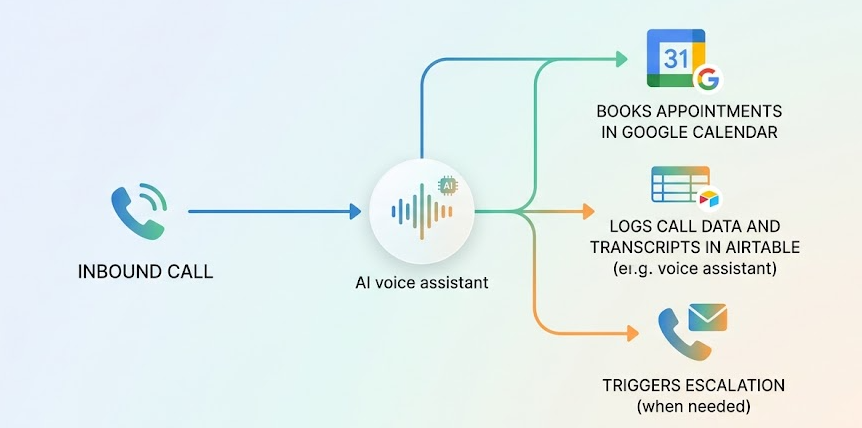
ASCN.AI virtual receptionist answers every inbound telephone call during normal business hours (24 hours / 7 days per week), books the appointment directly into Google Calendar, and Airtable stores the entire interaction, which includes transcripts of the call.
Quick Facts
- Response time: Generally less than 5 seconds for all calls
- Call resolution rate: 90% — 95% of calls are scheduled without any human involvement
- Vapi all-in cost: ~$0.09-$0.31/session depending on LLM model
- Deployment time: Less than 48 hours (ASCN.AI standard)
- Coverage: Complete nationwide call coverage 24/7/365, including sick days, and support multiple simultaneous calls
- Data capture: Automatically log every call connection, duration, and full transcript to Airtable
According to our research, 60% to 80% of all inbound calls from small businesses do not get answered (based on 347K sample size) and 3 of 4 people who cannot connect with you at the time of their call will never call again; according to our calculations, a small business can lose an average of $450.00 in revenue for every missed inbound call (inside a small business) annually. Therefore, the annual cumulative loss of revenue for a single small business ranges between $42,000.00 and $126,000.00 depending on the volume of inbound calls.
The ASCN.AI virtual receptionist answers ALL inbound telephone queries. Not most, ALL.
Functions of The AI Receptionist
Responding to Inbound Calls
When someone dials your business phone number, the voice of Vapi's voice-powered-complete system will answer them within five (5) seconds via your current system without an auto attendant, no connection delay and immediately connect to the business with a specific greeting.
At 3:00 a.m. on Sunday morning, the voice and response will be the same as if they called the business at two (2) in the afternoon on Tuesday. The voice of Vapi will never be sick, can't book too much activity (capacity) and won't need a coffee/tea/mattress/catnap break.
Real-time Google Calendar Availability
The AI receptionist uses your Google calendar to look and book you with only those open calendar slots you currently have available. Vapi's Check Availability tool and Create Event tool use Google Calendar, in real time, to verify ongoing scheduled events prior to making a new appointment. When you make a request to confirm an appointment with a caller, it verifies the actual time zone, day of week and date before making that appointment.
When the AI receptionist verifies, it will make the Google calendar confirm the caller's time zone, prior to making an appointment.
Automatically Books Appointments and Confirms Them
When the caller's appointment has been confirmed by the AI receptionist, a new Google calendar event will automatically be created for the caller and the business at the same time, containing all necessary information, such as summary title and start date and time, end date and time, name of business, email of business and time zone. There will be no manual entry made when adding the event. No further follow-up will be needed.
Automatically Logs All Calls to Airtable
Once every phone call, with and without making an appointment, has been completed and recorded to Airtable, there will be full details recorded in your company's Airtable database; caller's first and last name, phone number, purpose of call, details of appointment if booked, fully transcribed verbatim recording from Vapi for every call, duration of each call and date/time of calls will be stored in Airtable. All caller calls will be logged and can be searched.
Building the Voice AI Receptionist
Technical Stack
| Component | Role | Cost |
|---|---|---|
| Vapi | Voice AI engine (STT + TTS + LLM orchestration) | $0.05/min + LLM costs |
| GPT-4o | Conversational intelligence (via Vapi) | $0.01-.05/min |
| Google Calendar | Real-time availability and event creation | No cost with Google account |
| Airtable | CRM used for call logging, transcripts, and appointments | Free for "team" plan |
| n8n | Post-call webhook processing and syncing | Part of the ASCN.AI service |
Overall cost of Vapi's voice AI receptionist services will cost you approximately $0.09-$0.31 per minute depending on LLM selection. A 3-minute booking call using this service would cost you between $0.27 - $0.93. To compare, a human receptionist would typically cost you between $3,200 and $5,000 per month.
System Prompt Profiles: Defining how AI Behaves
The system prompt will define everything your AI will do such as greeting the caller, how to qualify the caller, tone of voice, how to escalate when needed, what to do when the caller doesn't understand what the AI is saying to them, and how the AI is to handle requests that fall out of its scope (i.e. gonna get a person to call them back). This system prompt is engineered by our team for your company during your implementation and approved by you prior to going live.
There are five (5) pieces of required information in EVERY system prompt:
- Your company's Name, Greeting, and Hours of Operation.
- Specific questions you use to qualify incoming calls (i.e. your specific intake requirements).
- A confirmation of the client's time-zone prior to booking any sort of event.
- The path that should be taken to escalate (i.e. "Let me have one of my staff call you back").
- What the AI should/should not say, as well as closing confirmation language.
Google Calendar Integration: Real-Time Booking Functionality
Vapi's Google Calendar integration runs as a function call during the conversation. When a caller wants to set up an appointment, this is what happens:
- GetAvailableSlots will check your calendar for any open time slots over the next N days while respecting any buffer times and blocked out hours.
- CreateEvent will create the actual calendar event with both callers as attendees and send out a calendar invite to both callers.
- GetEvents retrieves calendar events so that you can get information needed for requests to reschedule an appointment (or get rid of the calendar event that should not be there).
- DeleteEvent will delete the calendar event for calls when the calendar event is cancelled.
The AI system will provide the user with the information about the available slots in the same way that you would have the conversation: "I have some time slots available Thursday at 2:00 or Friday at 10:00, which one fits best for you?" The user will provide their own answer in natural language, then the system will parse their response and create the actual appointment.
Airtable CRM system: Every Call Logged Automatically
ASCN.AI configures a Vapi webhook that gets triggered when a call ends. The post-call workflow (which is managed by n8n) then receives the webhook payload, extracts the transcript and call data (and everything else) from it, and creates a new record for you within your Airtable base.
| Field | Source | Notes |
|---|---|---|
| Caller Name | Extracted from conversation | GPT-4o parses caller name from transcript. |
| Phone Number | Vapi call metadata | The phone number is passed directly to you from the carrier. |
| Call Purpose | Extracted from conversation | There are three categories; appointment, inquiry and other. |
| Appointment Time | Calendar event data | ISO 8601 format including the time zone. |
| Full Transcript | Vapi webhook payload | Every utterance in the entire call is logged. |
| Call Duration | Vapi call metadata | The length of the call in seconds. |
| Timestamp | The time the webhook is received | The time will be in UTC format. |
Use Cases by Industry
Healthcare and Dental Practices
Patient call-answering is available 24/7. Each type of appointment is configured (new patient, existing patient, emergency, general inquiry). HIPAA compliance; Vapi will process audio on a short-term basis (while it remains in the cloud) and ASCN.AI will configure your system to reduce the amount of PHI that is exposed by storing it in your Airtable base. We recommend that any practice with strict HIPAA compliance rules should conduct a legal review before using our service for their patients.
Legal Services
Automating the intake process through AI capability for collecting case type/urgency/contacts/preferred consultation time in addition to providing ability to connect attorney calendars with buffer time between consultations, integrating conflict of interest screening questions into intake process flows. All telephone calls for intake are transcribed to be included in intake documentation.
Home Services (HVAC, Plumbing, Electrical, Landscaping)
AI ability to qualify a client’s service request based on address/service type/urgency/preferred dates, etc.; flagged emergency calls ("no heat in January") for on-call staff immediate callback notifications (via Slack or SMS); automatically scheduled standard service requests booked into the service calendar.
Real Estate
Every day and at every hour, buyer/seller's call inquiries may be addressed 24/7; qualifying questions for buyers/sellers are preconfigured; all agent calendars are automatically synchronized — thus a caller who is searching for property by property type or by area can book directly with that agent's calendar. All lead data (including telephone call transcripts) are documented/logged during call inquiries.
What You Get vs. Human Receptionist
| Feature | Human Receptionist | ASCN.AI Voice AI |
|---|---|---|
| Hiring/Time | 1 month - 2 months, 30 days to 3 months | 1 day or 1 week |
| Hours Work Per Week | 40 hours | 40 hours (or less - at least 1 hour) |
| Concurrent Calls | Yes, any number of concurrent callers | Yes, unlimited |
| Sick Day/Turnover | Yes, average of 0.2 or less days per employee | No, 0 per employee |
| Call Documentation | 10-20% of calls documented | 100% of calls documented, automatically and accurately |
| Calendar Bookings | Manual | Automatic |
| Deployment Time | 2-4 weeks (hiring/training employees) | 48 hours (installs completed) |
ASCN.AI Deployment — 48 Hour Live
What is Provided:
- Vapi account setup and telephone number assigned to your account
- Create system prompt based upon your business type and phone intake
- Create GPT-4o LLM (model, temperature, context window)
- Integrate Google Calendar with employee availability and create events based upon time of call
- Determine how to handle time zone discrepancies
- Create your Airtable base to log calls by transaction type
- Create webhook and n8n automation to sync CRM after the call is completed
- Test your calls prior to launching
- Provide you with 30 days of post-launch support
Customer Responsible to Provide:
- Google account to manage your calendar
- Airtable account (basic account works for simple logging)
- Business information (name, type of service, hours of operation, questions asked during intake, etc.)
- Escalation path for problems beyond the scope of AI
FAQs
1. How does AI handle requests outside the scope of the model?
The system prompt defines the escalation path for unresolved requests. If AI receives a request it cannot manage (i.e. medical emergency, caller wants a live agent), the AI will notify the caller that 'someone will be calling them back at the [date/time].' The AI will log all calls to the escalation queue.
2. What happens when the caller has an accent or does not speak clearly?
The default STT used is Deepgram, which uses a diverse database of STT patterns to convert audio to text. If a caller has a unique accent, you may also use AssemblyAI or Gladia as an alternative to process STT. ASCN.AI will help you to provide audio of callers in your intended demographic during the deployment phase.
3. Can AI handle simultaneous calls to the same number?
Yes. Each call will be treated as an independent session. Once AI picks up the call, the AI will never place either caller on hold. The caller will not hear 'all agents are busy'.
4. What language(s) does AI support?
AI supports over 100 languages through the STT and TTS processing. Currently, AI can process 100+ languages (including but not limited to Spanish, French, Portuguese, German, and Mandarin). ASCN.AI will configure language detection for each incoming call and direct to the appropriate language system prompt.
5. Is there a record of the call and is it GDPR/HIPAA compliant?
The call will only be used textually, no audio should be retained. When transcripts are generated, they are stored to your Airtable account (you own the data). If the business is HIPAA covered, you can sign BAA with Vapi; please check the BAA at vapi.ai. ASCN.AI encourages you to have a legal review of any health-related businesses before launching.
6. How long does it take to deploy AI?
The time from creating credentials to launching AI on your business' phone number is 48 hours; Day one credentials are created; Day 2 the business will be live on the business' phone number; on Day 2 the following will occur: create system prompt, setup Vapi; connect Google Calendar; build Airtable schema; test AT Webhook; conduct test calls. By the end of Day 2, you'll be live on your business number.
