



- Русский
- English
- Português
AI Video Prompt Generator (Higgsfield)
Artificial intelligence (AI) transforms original ideas into ready-to-use scripts for platforms like TikTok and Instagram Reels. This automated process provides marketers and entrepreneurs with a quick and efficient way to create high-quality video content without technical complexity.

Artificial intelligence (AI) can be used to create high quality videos from an original idea into a 15-25 line script ready for use on any platform including TikTok, Instagram Reels, YouTube Shorts, and LinkedIn. This automated process provides marketers, entrepreneurs, and small business owners with a quick and easy way to create high quality video content.
General Description
Video Prompt Generators provide users detailed video prompts covering all aspects necessary to create a high quality video. These areas include timing, camera angle, and lighting. This level of detail in the prompts will produce an engaging and high-quality video to keep users watching. In an age where content is abundant, having high-quality videos produced at will can give players within industries a competitive edge.
How the Automation Works
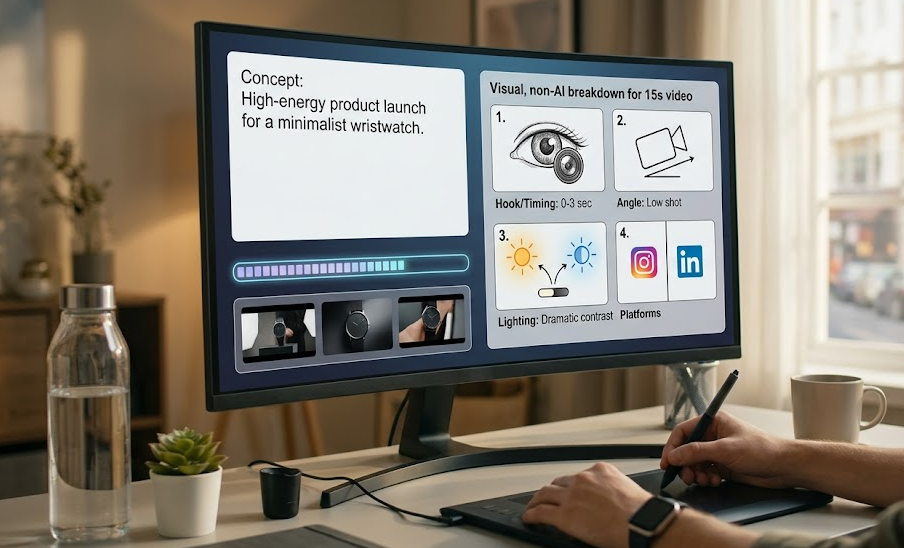
The process to automatically create video prompts from a concept is technologically simple and efficient. Users begin by entering their idea or concept (i.e., 10 second product launch video). Based on the user provided concept, the system generates a full video prompt (including time, angle, and lighting) that will ultimately produce a quality final video product.
The complete video prompt may be copied and pasted into the Higgsfield video platform by the user, which will produce a complete video meeting the user's above mentioned requirements. Overall the automated system to develop video prompts provides users a more time efficient, less labor intensive way of developing quality video. Users may focus on the creative aspects of video production without being distracted by the technical aspects of video production. The automation will work for marketers, or solo entrepreneurs who want to create the highest quality videos possible, without learning how to create a video. You’ll be able to turn your ideas into short videos quickly that will attract people’s attention and help grow your business.
Why It Is More Effective Than Manual Work
Using the AI video prompt generator allows you to achieve a higher quality video than you can create the video manually. The AI video prompt generator creates each prompt with the following elements included in each video generated (i.e. 2 sec hook + audio visuals synced together).
Also, using an automated system allows you to avoid mistakes that occur when writing prompts (e.g. uncertainty, lack of detail). An automation tool creates specific instructions for each video that include all aspects of video production (which will save time and effort for marketers and solo entrepreneurs trying to separate themselves from the competition).
The AI video prompt generator creates consistent results that are of studio-quality. Therefore, users can create studio-quality videos, which will increase their chances of successfully promoting their content on social media and other platforms. The prompt generator is a more efficient & profitable way for their business to generate digital content.
Results Users Achieve
Users report they have created significantly higher quality content using the AI video prompt generator. With this tool's prompt generation, you will have access to professional-grade videos rather than just the standard outputs generated by AI technologies. Using precise instructions outlining specifics like timing, camera angles and lighting, every video produced is exponentially more professional and appealing to viewers.
Furthermore, automation of the video creation process greatly reduces the amount of time spent preparing content. On average, users save about 40–60 minutes per day which gives them more time to work on other areas of their business, such as strategy and creativity. The possibility to quickly create high-quality videos for platforms such as TikTok and Instagram greatly enhances the chances of promotion success and viewer engagement.
Consequently, using the prompt generator is a cost-effective approach for marketers and solo entrepreneurs to differentiate themselves from competitors and achieve superior results in their efforts.
Implementation Examples
The AI video prompt generator has numerous use-cases across a multitude of industries confirming its flexibility and efficacy. One common usage for the generator is to create videos for SaaS application launches. Automating this process allows marketers to produce an appealing high-quality video in order to attract potential customers and demonstrate the features and benefits of the product.
Another popular use of the generator would be to create promotional videos for courses or training. By automating the content creation process, users can showcase the most significant points about the course or training and generate an attractive video for their intended audience. This is especially important in the saturated educational services industry.
The use of an AI prompt generator has proven, through implementation, to decrease video preparation time and to improve video quality. Many users have found that their final results have led to a greater level of engagement from viewers as well as an increase in revenue. All of this has led to a significant rise in the use of automation technologies by both marketers and independent entrepreneurs looking to promote their products or services effectively.
What You Get
There are several key benefits associated with the use of an AI video prompt generator.
Combining both a full video prompt with detailed instructions (in regard to timing, camera angles and lighting) allows users to produce their video product with more confidence and assurance of a higher-quality final product. Each individual prompt generated for video production contains very specific aspects that provide for the creation of a more professional, attractive video for viewing purposes.
The collection of prompts available within the system also includes a variety of examples of how to create videos across different types of platforms or styles. This will greatly streamline your content creation process and allow you to quickly apply your ideas as required; whether that is for use on TikTok, Instagram Reels or YouTube Shorts. The provision of ready-written examples will save time and energy on your part and allow you to devote yourself to the creative component of your work.
The AI video prompt generator is rapidly becoming an essential component for marketers and independent entrepreneurs who are focused on creating quality video content. You will not only be able to improve the quality of your videos but to do so in a much more efficient manner which will help you to promote your business more effectively.
Setup Instructions
With respect to using the AI video prompt generator, below are detailed instructions outlining how to set up and begin using this system in order to produce high-quality video clips:
Clone the repository located within your Claude skills folder so that you have access to every tool and template needed for the creation of your video.
Once the cloning process is completed, you will also need to execute the installation script in order to make sure you are working with the right skills for your purposes. The installation script will enable you to customize your own experience by providing you the ability to work in the manner that best suits your needs and preferences.
Once the installation process is complete, you should have access to all of the existing video prompts. With the available prompts, you will be able to develop a high-quality script in a very quick manner and make the video production process much simpler than before. By utilizing these instructions to help you with developing your content through the use of the prompt generator, you will be able to create higher-quality videos!
