



- Русский
- English
- Português
Sales and Operations Automation
ASCN.AI provides automated sales and operations solutions for founders and managers to improve business processes that consume daily time. This platform increases team productivity and performance through advanced methods of AI-driven automation.

Use the ASCN.Agent platform to improve your sales and operational process using AI agents.
Overview
ASCN.AI provides automated sales & operations automation for founders and operations managers to create and improve upon their business processes that take time away from your daily tasks and increase your team’s productivity & performance through these methods of automation.
Please note, the integration process with CRM and ERP systems via API may require some initial effort and resources during this implementation phase depending on the need for integration between those software packages and the ASCN platform. For example, integrating with CRM will give agents new information regarding customers, deals, and other information.
In addition, generating legal documents directly within the ASCN.Agent will help eliminate the need to use third-party services for documentation and mitigate risk involved in transferring data between systems. Therefore, with this type of automation, you can focus your attention on strategic activities rather than routine operational activities, which is very important in today’s fast-paced and competitive business environment.
How Automation Works
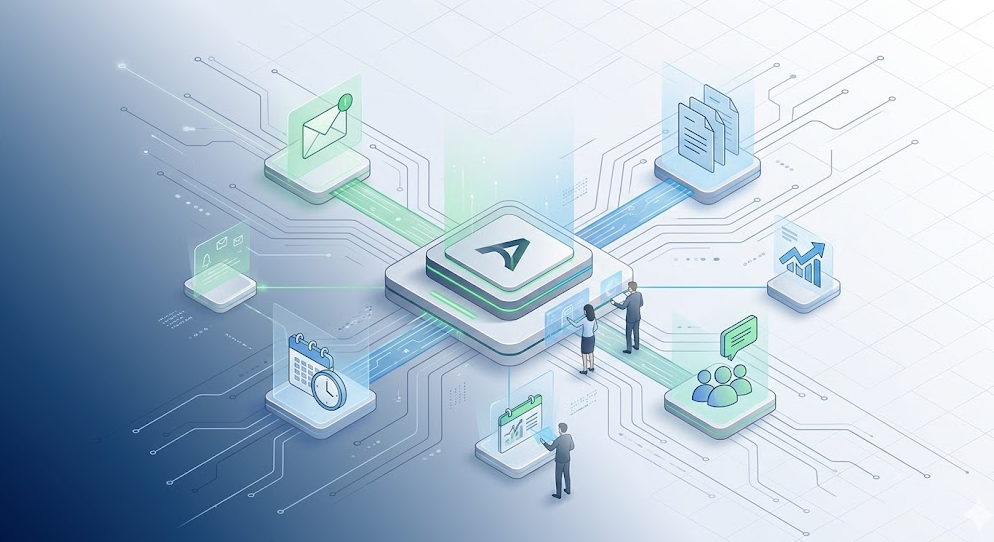
Automation on the ASCN.Agent platform provides the ability to automate sales and operations activity through the combination of integration with multiple application systems and services. Agents will operate according to schedules (tasks defined and scheduled for execution without active monitoring), which will enable users (operations managers and founders) to concentrate on other high-impact business activities.
Automation requires integration with CRM and ERP systems through API to provide access to real-time data for agents to perform various tasks such as processing incoming email messages, creating reports, and producing legal documents. Algorithmic rules and limits on performing operations and errors.
All operations have rules and algorithms to follow, reducing risk of errors during an operation, such as automating the processing of incoming email to reduce the time between receiving a response from a client.
Integrating with top collaboration system (i.e. Gmail and Slack) can make it easier to collaborate with your co-workers and clients. Sending automatic digests to Telegram will give all agents access to current information and they can quickly respond to the changes in their business.
Why Is Automated Work More Effective Than Manual Labour?
When comparing AI automation of sales and operations to the manual processes used by businesses on ASCN.AI, automating the process will result in an increase in efficiency. For example, by using an automated process to manage incoming email and legal documents you will spend less time on routine tasks; in addition, your employees will have more time to engage in more productive work.
Automating processes also reduces the number of errors due to human intervention; AI agents follow algorithms that dictate exactly what tasks are to be performed. Therefore, there can be no errors (e.g. typographical errors) in critical documents (e.g. legal documents); every word and punctuation mark counts. For example, errors in a contract could result in liability for your business in the millions.
In addition to valuing instantaneous updates regarding large events, the benefit of an automatically generated digest system (i.e. the ability to be notified instantly via Telegram) will result in your staff being aware of changes sooner than if they were not.
Only the Results Will Show
As an application, users of sales and operations automation using ASCN.AI’s platform can report substantial benefits from the improvement in business process management. The amount of time saved by automating the system can provide users with an estimated 40-60 minutes less on a daily basis from routine tasks. This equates to over 15 hours saved each month, allowing users to concentrate their time on other more strategic tasks ultimately increasing the overall productivity of the team.
Automation also improves the accuracy of operations because agents are making decisions based on predefined algorithms, thus reducing the risk of operator error resulting from the human factor (e.g., making decisions based on the same set of instructions). The automation system is especially important when considering various legal documents and financial reports where accuracy is critical in terms of influencing management decisions dependent upon this data.
Finally, the automation system provides immediate notification to the users of team members through the automated distribution of digests via Telegram. Therefore, users will be able to react to changes that occur in their business environment and subsequently will be able to make more informed decisions as a result. Users will receive both time savings and a greater degree of quality work completed, making automation by far a more profitable alternative than previous methods of processing.
Examples of Application
Numerous companies have employed both sales and operations automation through ASCN.AI’s platform and they are collectively documenting the operational success of this process. The various founders and operations managers have provided feedback testifying that they have significantly reduced the time spent on routine operational tasks using the automated system which has directly increased their overall team productivity. Automating the processing of incoming mail is just one example of how businesses can save up to 60 minutes every day by eliminating the need for manual labor.
In addition, business teams benefit from being able to quickly interact with each other through integration with popular applications like Gmail and Slack and receiving up-to-date information. Companies can keep employees informed about recent changes or critical events with digests sent to their employees' Telegram accounts and respond quickly to those changes. This is an important factor for businesses in today's fast-paced and constantly changing marketplace.
From experience, companies utilizing automation report an increase in quality of work completed and reduced error rates associated with human error. Agents that perform tasks by following pre-defined algorithms reduce risk and increase accuracy of operations. As a result, users of automation gain both a substantial reduction in time spent on non-essential tasks and create a substantially improved level of business process management.
What You Will Gain
Companies that provide sales and operational automation through the ASCN.AI platform will see tremendous benefits. Users will have access to powerful tools to automate and improve efficiency within the business. Benefits of utilizing the ASCN.AI include:
- Saves between 40-60 minutes per day for up to 15 hours per month in time spent performing routine tasks;
- Elimination of potential risk associated with the use of third-party document creation services;
- Ability to interact immediately with the team and external customers via integration with popular applications such as Gmail and Slack;
- Ability to send automatic digests containing notifications of critical events and business changes to Telegram to enable an immediate response to business environment changes;
These benefits provide users with a substantial reduction in time expended on non-essential activities and substantial improvements in the quality of work completed, making automation a greater overall return than previous methodologies. Users are experiencing improvements in business process management and reductions in human error, resulting in improved decision-making and long-term strategic planning for the future of the company.
Instructions for Implementation
Multiple steps must be followed in order for an organization to be successful in launching sales and operational automation using the ASCN.AI platform. Organizations will need to ensure that any functionality that will utilize API connections to their current CRM and ERP systems will require prior configuration to accommodate the automation. These instructions will guide you in the integration of the operations of the ASCN.AI platform with your business processes.
- Connect the necessary APIs. You will need to have direct access to the data that will be utilized by the agents to perform their job functions.
- Establish schedules for the agents. Set up agents to perform routine tasks on an on-going basis without on-going supervision. Doing this will allow you to begin to concentrate on more urgent aspects of your organization.
- Complete the integration process. Connect with your team and external vendors by utilizing existing popular applications such as Gmail and Slack.
- Configure automatic digests. Set agents to automatically send daily digests via the application Telegram to all employees, providing them with immediate notification of important business occurrence or change.
- Confirm all configurations. Ensure that all settings for the ASCN.AI platform are in place and functioning properly before attempting to use the platform. This will alleviate any interruptions to the productivity of your organization during the launch period.
If you have any questions regarding the use of the ASCN.AI platform or require assistance regarding any aspect of its implementation, you may contact either the ASCN.AI platform documentation or the support service. These sources will help you quickly solve issues that may occur during the implementation of the automation process. Review of frequently asked questions will assist in clarifying further issues associated with the installation and integration of the ASCN.AI platform with the various business processes of your organization.
