



- Русский
- English
- Português
Automate personalized cold emails with Apollo lead scraping and GPT-4.1
ASCN.AI automates the entire cold outreach workflow by integrating Apollo.io, Apify, and GPT-4.1 to generate highly personalized icebreakers based on a prospect's website. This system allows businesses to boost reply rates from 3.4% to 18% while saving up to 16 hours of manual research per week.

ASCN.AI integrates with Apollo.io and uses Apify to scrape leads and GPT-4.1 AI to create personalized icebreakers for each lead based on that lead's company website. The setup is ready in 48 hours. Pricing for 800 personalized emails starts at $147 per month.
Quick Facts
- Apollo.io database — 275 million verified B2B contacts with a 95% email accuracy rate
- GPT-4.1 cost to create an icebreaker — cost is $0.003 to $0.008 per icebreaker
- Average reply rate for generic cold email in 2026 — 3.43%
- Average reply rate for personalized cold emails in 2026 — up to 18%
- Time saved on research per 100 leads — 8 to 16 hours per week; at $50/hour = $400 to $800/week
- Monthly total cost for 800 emails — ~$147
- Time to complete setup — 48 hours, no programming is required
Cold emailing will be a math problem by 2026. The average reply rate of generic cold email templates is 3.43%. When company-specific personalization is added, they produce an average of 18% reply rate.
Everyone knows that personalizing your emails works, but the problem is the time it takes to personalize; 5-10 minutes per lead. If you have 100 new leads each week, that is at least a full day of time spent on personalization alone.
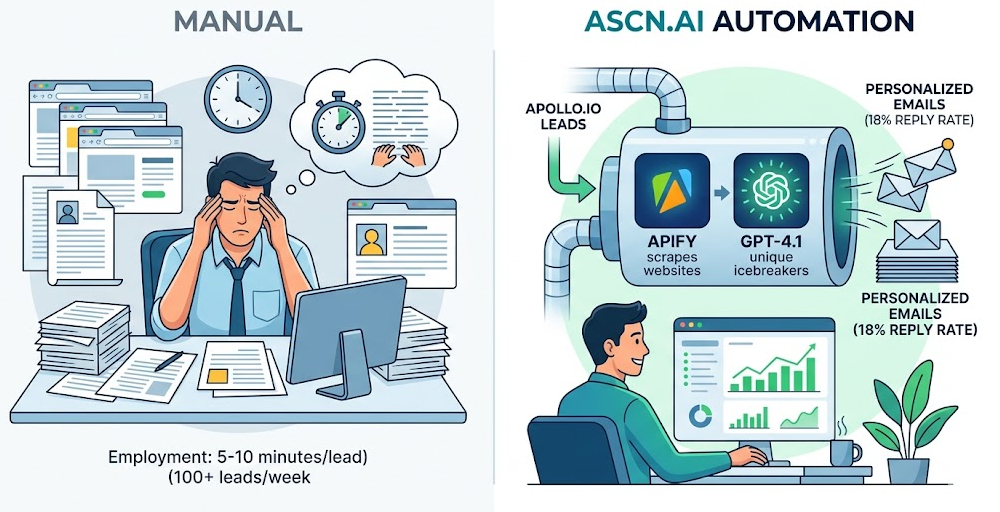
ASCN.AI provides the automation for the entire process. Apollo will scrape leads from the Apollo.io platform. Apify pulls the company website associated with each lead. GPT-4.1 creates a unique icebreaker specifically for each lead. n8n handles delivery and sequencing of the emails and synchronizes the lead data to your CRM.
The Real Cost of Manual Cold Outreach in 2026
If you were to manually personalize cold email to 100 leads, you would spend 8-16 hours researching each week. Assuming a labor rate of $50/hour, the cost associated would be $400-$800 per week.
Personalized campaigns will see an average of 18% reply rates. On the other hand, generic templates average 3.43%. Follow-up emails generate 42% of all replies; however, 48% of sales people do not send follow-up emails.
How ASCN.AI Automates Personalized Cold Emails
ASCN.AI automates the entire workflow of crafting personalized cold emails to new leads by scraping leads from Apollo.io via Apify, validating the emails, pulling down each company's website, feeding that context to GPT-4.1 to have it write a unique icebreaker for each lead, and then by sending authenticated emails at high volume while logging into the CRM.
Step 1 — Lead Extraction from Apollo via Apify
Using Apollo.io you define your Ideal Customer Profile (ICP). After defining your ICP, you use the Apify scraper to extract the following pieces of information about your leads: Name, Email address, LinkedIn URL, Company website, Job title. Apollo has one of the largest databases of 275 million verified B2B contacts with a 95% accuracy guarantee.
Step 2 — Filtering and Validating
Once you have the raw exports from Apollo, the next step is to filter out the unverified emails (these are determined by ZeroBounce), as only clean leads will be contending for an icebreaker.
Step 3 — Company Website Scraping
Next, you will scrape each company's homepage. The content found on each of these homepages will be the personalization brief that you provide to the GPT-4.1.
Template: "Hi Sarah, saw you work at Acme. Thought you might be interested in our solution".
GPT-4.1: "Hi Sarah, I saw Acme's post about async first workflows, and was wondering if the scheduling burden that you brought up is still a concern for your operations department".
Step 4 — GPT-4.1 Writes the Icebreaker
The GPT-4.1 will be fed the lead information, website snapshot, and system prompt. It will return a personalized introductory line and subject line. Total cost of this workflow to send one email is between $0.003 - $0.008. Therefore, you can send out 100 emails for a total of less than $1.
Step 5 — Authenticated Delivery + CRM Sync
Emails are sent using either the Gmail API, Microsoft Outlook or SMTP with SPF/DKIM authentication. Each domain sends between 20 - 50 emails. All results recorded to HubSpot, Salesforce or Google Sheets.
As Your Lead Source, Use Apollo.io
| Plan | Monthly/User Cost | Usage/Best Value |
|---|---|---|
| Free Plan | Zero cost | Use for Testing |
| Basic Plan | $49/User/Month | For Solo and Small Team Use |
| Professional Plan | $79/User/Month | To Dial + Purchase More Credits |
| Organization Plan | $119/User/Month | To Partake as a Team (3 Minimum) |
Why GPT-4.1 vs GPT-4o
- GPT-4.1 Replaces GPT-4o (4/2025)
- 20% Cheaper
- 1M Token Context Window
- More Consistent Structured Output at Volume
Deliverability (What Will Be Required Next Year)
Google and Yahoo No Longer just Filter Email without DMARC, DKIM and SPF (Will Automatically Reject). ASCN.AI Will automate Configuration of DMARC, DKIM and SPF During Setup. Gmail Postmaster's Messages target: <0.1% Spam Rate.
New Domain Launch = 4 to 10 Per Day Mailings with Ramp (4 to 6 Week Timeframe) and 50 to 100 Per Mailbox Per Day Production Limit.
Overall Cost + ROI
| Tool | Total Cost/Month |
|---|---|
| Apollo.io Basic | ~$49 |
| Apify (800 leads) | ~$49 |
| OpenAI GPT-4.1 API | ~$4 |
| n8n Cloud Starter | ~$20 |
| Email Infrastructure Cost | ~$25/month |
| Total | ~$147/month |
Manual Equivalent = around $1,600 to $3,200/month in Labor. Drilling Down: (if I estimate 10% reply to 800 emails) = 80 Replies from 800 Emails = 20 Discovery Calls from 80 Replies = 6 New Opportunities per Month.
Who Is This For
Founders of B2B SaaS Companies, Agencies Executing Client Outreach, Sales Teams with Quotas, Recruiters Seeking Passive Candidates, Consultants Targeting Specific Market Verticals.
FAQ
Is Cold Email Legal in 2026?
YES (CAN-SPAM in the USA Only (must comply): Have Unsubscribe Mechanism, Provide Physical Address, Use Honest Subject Lines); GDPR in the EU Would Generally Allow B2B Cold Emails to Office Addresses in Pursuit of Legitimate Interests.
Can I Use the Apollo Free Plan?
Yes – for Testing (100 Exports/Month); No to Use in Production (200 or more Leads/Week): Must Move to Basic ($49/Month).
What Does GPT-4.1 Refer To?
Must Be Something From Their Company Website such as Product Feature, Customer, Market Category, or Mission Statements Language, NOT “I see You’re in SaaS.”
What Happens When Someone Replies To One Of Your Emails?
Replies Are Delivered to Your Inbox; Follow Up Sequence Is Automatically Paused When a Reply Is Detected.
How Long Does Setup Take?
48 hours from kickoff to First Batch of Emails for When You’ll Review Three Sample Ice Breaker Emails before Go-live.
Can You Support More Than 1 ICP or Client?
Yes – by Different Apollo.io URL, Prompt, Send Domain, and CRM Target for Each ICP.
What is the sending Ceiling Per Day?
50-100 Emails Sent Daily per Warmed Domain. Three Domains equals 150-300 Emails Sent Daily.
Set Up Once/Recurring Service
Both Are Available; Pricing Determined during Setup Call.
Note: Can Change Pricing for Tool Usage + Cold Email Compliance is Jurisdiction-Specific.
