



- Русский
- English
- Português
Automate newsletter creation & client delivery with GPT-4O, Google Sheets
ASCN.AI integrates your Google Sheets with GPT-4o and email delivery systems to automate the entire newsletter production process from generation to delivery. This solution helps agencies save dozens of hours weekly and boost revenue by 332% through efficient, AI-driven content pipelines.

ASCN.AI integrates your Google Sheets topic list with GPT-4o and your email delivery system, allowing you to generate and send completely finished newsletters to clients automatically for as low as $59 a month and in just 48 hours from setup to first delivery.
Key Facts:
- Each time you send a newsletter through GPT-4o, it costs between $0.01 and $0.02
- Time saved per newsletter per client 2-4 hours
- Open rates are increased by 20% to 40% through the use of AI generated subject lines
- Automated newsletters have been shown to generate 332% more revenue than sending multi-client newsletters in batches manually
- Setup takes just 48 hours and can be accomplished without the need for coding knowledge.
- The projected return on investment from email marketing will be $47 for every $1 spent in 2026.
You wake up Monday morning to see a list of clients that have been waiting for their newsletters that are due to go out today. Five topics. Five audiences. Five different voices -- and now it's Tuesday.
This is a part of the agency trap.
When you initially start producing newsletters, you think producing newsletters for 10 clients should not be that much work. Then you spend 20 hours per week producing newsletters, making it the bottleneck for you to take on new clients. And then all of a sudden, the one thing that you wanted to create this agency to get free from becomes the very thing you are now chained to.
ASCN.AI solves this problem through a single automated pipeline. Topics go into your Google Sheets. Your newsletters are produced through GPT-4o. Your clients get their newsletters on time each week. You do not touch it at anytime after that.
Manual Newsletter Production Problems
On average, a company sending out newsletters through manual production spends 2-4+/- hours to produce each newsletter. A company producing newsletters for 5 clients, each with a weekly newsletter would spend 10-20+/- hours each week doing repetitive, fully automatable tasks when producing those newsletters.
The numbers don't lie; marketing managers average 12.2 hours a week doing manual tasks that can be automated. The number one way to improve efficiency and productivity in an agency is through the newsletter. You research, write, format, get approval, revise, send, and log. Weekly you do this for each client. And you will be doing this indefinitely.
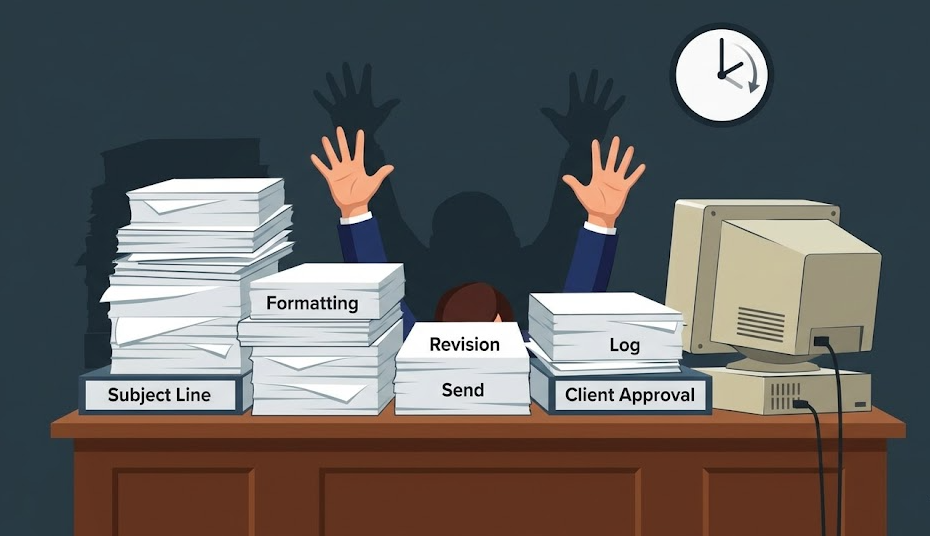
The Weekly True Cost of Newsletters
They are costing you hours per newsletter. Five clients. Four times a month, you spend 60 hours on newsletters. At your $50/hour billable rate, that's a $3,000 opportunity cost to you every month; you can't take other work because you're busy writing subject lines for clients of other companies.
In addition to the opportunity cost, there are also hidden costs of inconsistency, missed deadlines, and client churn due to drop in quality because a writer is burned out or ill. Manual processes cannot scale. They only grow increasingly expensive as their size expands.
What happens to your agency when you try to scale across multiple clients?
For one client, you can manage their brand voice (tone/phrasing, etc.), their audience (niche, etc.), and their editorial calendar (content schedule). For five clients, though, there are now five brand voices to manage, five audiences, and five calendars. Therefore, running a content operation versus simply managing as an individual now has to be done.
Most agencies will deal with this by using freelancers to cover the gaps and shifting to previously used templates. ASCN.AI is able to fix this issue by employing a deterministic, automated process that cannot call in sick and does not require an explanation of a creative brief four times.
Here's How the Newsletter Automation Operates
The automation utilizes Google Sheet topics, generates a fully completed newsletter in GPT-4o, optionally routes for human review, delivers to clients via SendGrid or Mailchimp, and updates the row in Sheets — no manual entry required after the initial setup (48 hours).
1. Your Editorial Calendar Exists in Google Sheets!
That's where the entire process begins. To add a record, please input a topic, audience, tone, length, client email, and the status (Pending).
Schema for each record is: Topic | Audience | Tone | Length | Status | Client_Email | Sent_Date. The n8n Workflow will read the record marked as "Pending" by the configured schedule (Weekly, Daily, or Triggered).
2. GPT-4o will create a Newsletter
GPT-4o will generate a subject line, a preheader, the body copy (500-800 words) and CTA for the newsletter, based on the topics you provided and the brand voice prompt (configured once during the setup and stored permanently in the workflow). In addition to text, your newsletters will have full HTML formatting, and there will be a plain text fallback generated automatically.
Costs: The standardized rates for using GPT-4o are $0.02 per newsletter based on input/output tokens (in USD). Costs will be substantially lower for budget-sensitive solutions, as GPT-4o-mini will save 94%. For 20 newsletters per month, there would be a cost of approximately $0.40 in GPT-4o charges.
3. Optional Review Gate for Clients
If the client requires approval for delivery, the workflow will pause, and send a draft of the newsletter to your inbox for one-click approval. If rejected, you can add notes for GPT-4o to recreate with. This can be configured on a per-client basis.
There will be three testing generations prior to launching any newsletters for each client, and will be reviewed and approved by you, so that all live emails sent out are approved first.
4. Automatic Delivery to Clients
After the client approves the newsletter, it will route directly to your Email platform (SendGrid, Mailchimp or Direct SMTP - ASCN.AI forms integration with all three). The workflow will automatically handle SPF/DKIM authentication, rate limiting and list management.
5. Status Updates back into Sheets
When the newsletter is sent out by the Email platform, the record will change to "Sent" and the change will populate into the record with the time stamp. To designate a failed delivery, a "failed" status will be assigned to the email and an associated error code will be assigned. A virtual spreadsheet will create a real-time log of email deliveries as they occur.
Delivery History – Client Example
ASCN.AI works with SendGrid, Mailchimp, and SMTP to provide each client with built-in features of rate limiting, SPF/DKIM for creating authenticated messages to reduce bounce backs, bounce processing, and automatic processing of unsubscriptions.
Email Service Providers in Use by Clients
Basic SendGrid Essentials - periodic (52 week/annual) for $19.95/month (50,000 emails/month). Mailchimp is designed to be for clients already established on that platform. Direct SMTP e-mail will be for clients utilizing enterprise infrastructure.
Client Scheduling & Delivery Frequency
Each client's schedule operates independently, e.g., some clients have delivery on Monday mornings; others, Thursday afternoons; yet others, vary each week (different days of the week) across all clients delivered the same day. A single Google Sheet can be created to manage multiple (unlimited) clients, all of whom can execute e-mail on their own schedule using the e-mail service provider of choice; thus, allowing each client to express their own unique brand voice.
Preventing E-mail Delivery Failures
During setup, ASCN.AI configures SPF/DKIM for each client to ensure that all e-mails will be delivered as expected. When ASCN.AI routes complaints and bounces from SendGrid, they will require all CAN-SPAM-required unsubscribe headers (e.g., Consents required) to be included with each e-mail.
GPT-4o Newsletter Components
Subject line; Preheader; Salutation; 3 or 5 separate Content Sections with Subheaders; Data Block (as requested); CTA Text; CTA URL/placeholders; and Closing; and Fallback Format (Plain Text). A/B subject line variants will be created upon request.
Prompt Engineering (Tone, Brand Voice)
Every client will have their own system prompt consisting of a number of attributes regarding their brand voice and tones; forbidden phrases; business requirements of formatting for e-mails; Brand Message Call to Action style. The AI uses the system prompt to generate consistent content throughout all e-mails. The system prompt is used by the AI to differentiate e-newsletters with content that is 'human-like' from e-newsletters that are not 'human-like'. ASCN.AI has over 50 system prompts to create e-newsletters; however, as ASCN has been built as a Proof-of-Concept, none of them are presently in use or are available until the system is built out.
The Technology Stack
| Item | Function | Price |
|---|---|---|
| n8n | Workflow management | Free (self-hosted) or $24/month Cloud version |
| Google Sheets API | Manage topics and status | Free |
| OpenAI GPT-4o API | Produce content for use | ~$0.02/newsletter |
| SendGrid/Mailchimp/SMTP | Deliver emails | Starting at $19.95/month |
If you want to create your own newsletter solution using ASCN.AI, you can use the n8n workflow template at no cost. However, you must build it on your own, which typically requires 8-20 hours of configuration, debugging of authentication, per-client prompt engineering, and ongoing maintenance. By contrast, ASCN.AI has deployed the workflow of automating newsletter production more than 50 times.
Results: What to Expect
Time Savings
A content agency manages 8 different clients; it reduced the amount of time spent producing a newsletter from 32 hours to 4 hours/week. The 4 hours now consists of selecting and approving topics with a client, versus the 28 hours that were previously spent on manual production.
That defines the real value proposition for the service. It is not the automation itself; rather, it is what it returns to a customer in terms of the return of the time that they have through automated production of their newsletter.
Consistency and Volume
Emails sent via automated newsletters are sent on time every time. In 2026, the average open rate of email was 45.1%. Subject lines generated by AI will receive 20%-40% more open rates than subject lines created manually. Emails sent using an automated process generated 332% more revenue than emails sent in a batch manually.
Per-Newsletter Cost
Using AI to generate a newsletter costs $0.01-$0.02/newsletter. SendGrid costs $0.0004-$0.001/recipient. The n8n Cloud starter plan costs $24/month. A total cost of less than $30/month for infrastructure for 20 newsletters. ASCN.AI management has a base cost of $59/month.
Pricing and Setup
Prices start at $59/month for scheduling automation and can be set up within 48 hours. All plans include setting up the workflow, integration with ESPs, engineering client brand, and support for 30 days after launch.
| Plan | Newsletters/month | Clients | Review Gate | White Label | Price |
|---|---|---|---|---|---|
| Starter | Up to 20 | 1-3 | Optional | — | $59/month |
| Growth | Up to 60 | 4-10 | Includes | ✓ | $129/month |
| Agency | Unlimited | Unlimited | Includes | ✓ | $249/month |
48-hour Setup Coverage
- Deploy the workflow
- Provide a Google Sheets template
- Provide ESP log-in
- Provide brand prompts for all clients
- Create three test versions; you review
- Confirm end-to-end delivery is complete
- Provide you with the completed system live
Frequently Asked Questions
Can I use my newsletter template?
Yes. GPT-4o is designed to generate HTML to match your existing template's structure. During setup, we track all your custom layout(s).
What happens if the AI creates low-quality content?
All content created by our automated systems is subjected to a review by a designated reviewer before it is sent to any customer. All system prompt rules establish the quality standard for content. Test generations conducted before launch confirm that the output of the system meets your clients' voices.
Does the system automatically handle unsubscribes?
All emails sent using SendGrid and Mailchimp will have an unsubscribe link. Both SendGrid and Mailchimp keep track of non-subscribed contacts. Any time they unsubscribed, there are never any more emails sent to them.
Can I pull from RSS feeds or websites?
Yes. The extended variant can read RSS feeds or any URL for source material, summarize it using GPT-4o, and generate a digest-format newsletter describing the source material.
Can I use more than one language?
Yes. GPT-4o can generate documents in more than 50 different languages. When using the system with customers, you specify which language is associated with each of your customers in the system prompt.
Is your application compliant with the CAN-SPAM Act and GDPR?
CAN-SPAM: yes; there is an unsubscribe link, postal address, and straight subject lines provided as part of the standard. The technical aspects of producing the application are compliant with the GDPR; however, you must ensure that you collect the appropriate consent.
Can I send from my own email address?
Yes, you can send as your email address. The domain of each email that is sent is authenticated against SendGrid SPF and DKIM. All welcome letters will have an automated system in place to send them to your clients.
Can I migrate away from Zapier/Make?
The workflow logic used in both Zapier and Make can be translated into n8n workflows; the process to install them is different. ASCN.AI is an n8n expert; therefore we will include the cost of migrating to any of those systems as part of your startup cost.
