



- Русский
- English
- Português
Automate CV screening & candidate validation with AI & email parsing
Learn how to transform your recruitment process using automated CV screening and AI-powered email parsing. This article explores how ASCN.AI can reduce manual screening time from 23 hours to minutes by automatically scoring candidates, detecting fraud, and syncing data with your existing tools.

Automated CV Screening Early on; Full Automation has been around about as long. Email parsing creates a streamlined way to find CVs. ASCN.AI provides a comprehensive solution where your emails are monitored 24/7, CV’s are parsed in less than 3 seconds, candidates are scored and ranked against your job description, and fraudulent applications are flagged. Qualified candidates go directly into an interview pipeline, while rejected applications receive automatic notifications. Automated reporting is done daily and synced to your ATS, Notion, or Google Sheets. System and software setup completed in less than 48 hours. Starting at $59.00/month.
Automatic CV Screening — Early on; Full Automation
Automate CV screening in 9 easy steps with AI & email parsing:
- Email CV Trigger
- Parse PDF and Extract Text Using GPT-4
- Post Job Description and Credentials
- Send skinny version of PDF to both recruiters/candidates
- Score Candidates Against Job Description
- Validate CVs (Contact Reference)
- Candidates Who Pass Go Directly Into Interview Pipeline
- Emails go to All Applicants for: "Your CV Was Received."
- All candidate and recruiter sync'd data is automatically updated to ATS, Google Sheets, Notion.
The Reality of Manual Screening
With Automated CV Screening; after reviewing 200 CV's, you'd spend 23 HRS (average for recruiter per position) on average reviewing the 200 CV’s before you'd even do 1 interview. 78% of those 200 CV’s have already presented some material misrepresentation (Source — Checkster — 3,000 Hiring Managers Surveyed).
Bottom Line; you will clearly see from where the value comes and recognize how CV Screening Automation will solve your challenge(s). The recruitment process is being streamlined by a state-of-the-art online application that continuously monitors your email inbox and retrieves CVs from the moment they arrive, utilizing artificial intelligence for analysis and average scoring based upon your desired candidate criteria. Candidate information is then automatically verified for red flags before either being routed to an interview pipeline or politely rejected. This process is performed by ASCN.AI as a complete service, which includes establishing the workflow, configuring the appropriate AI scoring criteria, connecting to an email and storage platform, and providing users a working system within 48 hours of the initial requirements call.
2026 — CV Screening Automation, by the Numbers
- Manual CV screening = 23 hours per position (300+ resumes)
- Automated CV screening = 10-15 minutes of review time for 300+ resumes
- AI accuracy against industry standards = 85% to 95%
- Rate of candidate misrepresentation = 78% (Checkster 2025 Survey)
- Cost of hiring reduced, on average, 30% to 35%
- Return on Investment (ROI) most companies achieve within 3 to 6 months
- Time from requirements call to operational for ASCN.AI = 48 hours
- Pricing = Starting at $59.00/month
6 Step Process
All processing is performed through n8n and integrates with your current tools, eliminating the need to buy additional software or utilize an Applicant Tracking System (ATS).
Step 1: Monitor Email & Retrieve CV
A Gmail API or IMAP trigger polls your recruitment email continuously every minute. When a new email with an attached CV arrives in your inbox the workflow is initiated and downloads the CV, extracts any contact information out of the email body, and passes on all information to the next workflow process. Works with Gmail, Outlook, Microsoft 365 or any IMAP compatible platform. Time for getting a connection live = Less than 2 hours.
Step 2: AI Resume Parsing
Text from the CV is sent to GPT-4o or Claude. The model extracts a structured candidate record: Full name, contact details, LinkedIn URL, Work history (companies, titles, dates, key responsibilities), Education, Certifications, and Skills. The model can handle any format, including multi-column layouts, OCR-scanned PDFs, or designer CV's. The accuracy of the model to extract information from a standard PDF document is 94-95%. The accuracy of extracted information from a scanned document is on average 80-85%. The time to process a CV is less than three seconds.
Step 3: Scoring against your Job Requirements
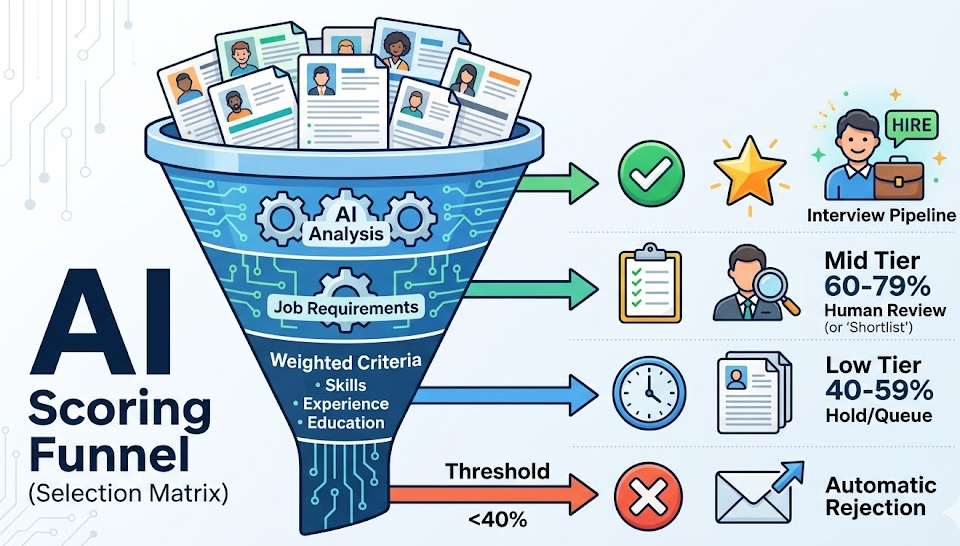
The AI uses two inputs, the extracted candidate profile and the job description to evaluate the match to your job requirements against four weighted dimensions: Required Skills (40% default), Relevant Experience (30% default), Education/Certifications (20% default), Other (10% default). The weights and knockout rules can be configured by you. The scoring criteria can be modified by you at any time; we will reconfigure within 24 hours.
- Tier 1 – Strong match (80-100%): enter interview pipeline.
- Tier 2 – Good match (60-79%): short-list for human review.
- Tier 3 – Potential (40-59%): hold in the queue until required.
- Threshold (<40%): automatic rejection email sent.
Step 4: Validation & Fraud Detection
In 2025, 74% of hiring managers are using AI-generated content in their applications. By 2028, Gartner projects that as much as 25% of all job applications will contain fraud, deepfake content. The validation module is automatically run on every application: Email deliverability check (using ZeroBounce API), Employment timeline consistency check, Gap detection (>12-month gaps flagged), LinkedIn cross-reference, Duplicate detection (across multiple candidates on multiple open job positions). Any records flagged as suspicious go to human review and are not auto-rejected.
Step 5: Smart Routing
For strong matches, the hiring manager receives notification that the candidate will enter the interview scheduling process. For borderline candidates, the candidate is placed in human review queue with an AI-generated summary. For candidates who fall below the predetermined threshold (<40%) a personalized auto-generated rejection email will be sent within minutes of submission. Any hiring decision will be made by a person. You will still always have control of the final decision, as automation will help you narrow down resumes based on certain criteria and how well each candidate meets those criteria.
Step 6: Storage Sync
Each candidate’s record will automatically be entered into Google Sheets, Notion, Airtable (or whatever tool you are using), HubSpot, etc., to create a single repository of all the information available on the candidates you have interviewed. This includes the candidate’s name, email address, phone number, AI match score, tier, extracted skills, years of experience, level of education, a link to their resume, date the candidate applied, and whether or not the candidate has met certain validation flag criteria. This will allow you to build a searchable database of all the candidates you have interviewed in real time.
Results After Automation
| Metric | Manual | With Automation |
|---|---|---|
| Time to Review 300 CVs | 8-25 hours | 10-15 minutes oversight |
| Time to Shortlist | 7-10 Business Days | 1-2 Days |
| Recruiter Hours Free | — | 75-85 Hours/Month |
| Evaluation Consistency | Variable | 100% |
| Candidate Responses | Days - Weeks | Minutes |
The average cost per hire in the U.S. according to SHRM is $4,700; using AI to screen applicants will reduce your hiring costs by 30%-35%. Therefore, if you hire 50 people per year, you will save approximately $70,000-$82,000 annually. The typical ROI is realized within 3-6 months after you begin using AI; the 18-month average ROI is 340% (SecondTalent, 2026).
Who Stands to Gain
- HR teams receiving many applications (50+) per open role.
- Recruiting agencies currently in possession of multiple active roles for many clients (10+).
- Startups with fast growth that do not have their own HR department; new technology that allows automatic processing of applications to streamline the initial screening process.
- Technical roles that require measurable qualifications (developer, data engineer and DevOps).
- Industries with compliance issues who need to demonstrate a consistent process.
- HR teams that have issues with an excessive number of fraudulent applications; a problem that is often overlooked by manual review.
Tech Stack
| Layer | Tools |
|---|---|
| Workflow orchestration | n8n (self-hosted or cloud) |
| Email trigger | Gmail API / IMAP / Microsoft Outlook |
| CV parsing | LlamaParse / PDF.co / natively extracted |
| AI analysis | GPT-4o, Claude 3.5 Sonnet and Gemini pro |
| Email verification | ZeroBounce / NeverBounce |
| Candidates’ storage | Google Sheet / Notion / Airtable / HubSpot |
| Email distribution | Gmail SMTP or SendGrid |
What's Included with ASCN.AI
Done for you; as opposed to a template that you've created by yourself.
- Custom n8n workflow specific to your job and score criteria.
- AI generated prompts targeted specifically to your role, cultural indicators, required and non-required items.
- Email templates for acknowledgement, shortlist invitations and rejections.
- Pre-formatted candidates database in Google Sheet or Notion.
- Updates to score criteria can be done at any time; updates will be made in 24 hours.
- Deployment in 48 hours from requirements call (this includes end user testing).
Optional Extras: multi-position support, HubSpot / Salesforce system integration, automatic interview scheduling and monthly performance report dashboard.
Pricing
Pricing starting at $59 / month includes a fully managed service, and all updates and monitoring. Initial setup is included in the first month and all deployments will take place within 48 hours of the requirements call; additional pricing structures may exist for agencies and enterprise-level clients.
Frequently Asked Questions
What is the accuracy level of the AI for CV Screening?
85 - 95% accuracy for standard CVs with defined qualification criteria. Accuracy on scanned PDFs tends to be around 80 - 85%. An algorithm will provide a list of short-listed candidates, who will then be reviewed by HR and all final hiring decisions will be made by HR.
Will the application work with any email provider?
Yes! The application can work with Gmail, Outlook, Microsoft 365, Yahoo and other IMAP-capable providers; average setup time is less than 2 hours.
What types of file formatting will the application support?
CV file types available include PDF (both standard and scan OCR), DOC (DOC and DOCX), TXT and image only (using OCR) with an accuracy level of 75 - 80% for image CVs.
Can I tailor my scoring levels per job?
Yes! Each job will have its own tailored scoring criteria, and these items can be updated at any time, with ASCN.AI reconfiguring your scoring in 24 hours or less.
Is this product compliant under GDPR?
Yes! Our system does not extract protected data, plus our system has configurable data retention (by default the system will auto-delete after 6 months). The final decision will be made by the human (hence, no active decision made by AI), and candidate notifications are possible. All compliance documents are provided at no cost.
What do you need to provide?
In order to begin using our service, you need to provide three pieces of information: read-only IMAP email credentials that will be used to receive CV Applications; Job Description; and at what location within our system are the CVs to be stored (Google Sheet or Notion). All other data needs to be sent to us.
Can this system screen CVs that are not in the English language?
Yes! GPT-4o can translate within 50 languages; however, the accuracy of CV fields in non-English languages will be lower between 5 - 10% than in English.
How long will setup take?
Setup takes 48 hours from the time of the requirements call to the time the workflow is live. The process includes a requirements call (30 minutes) — building & testing — customer review — going live. You do not need to hire any 1 developer.
