



- Русский
- English
- Português
Ad Creative Generator: 5 ad variants with images from one brief
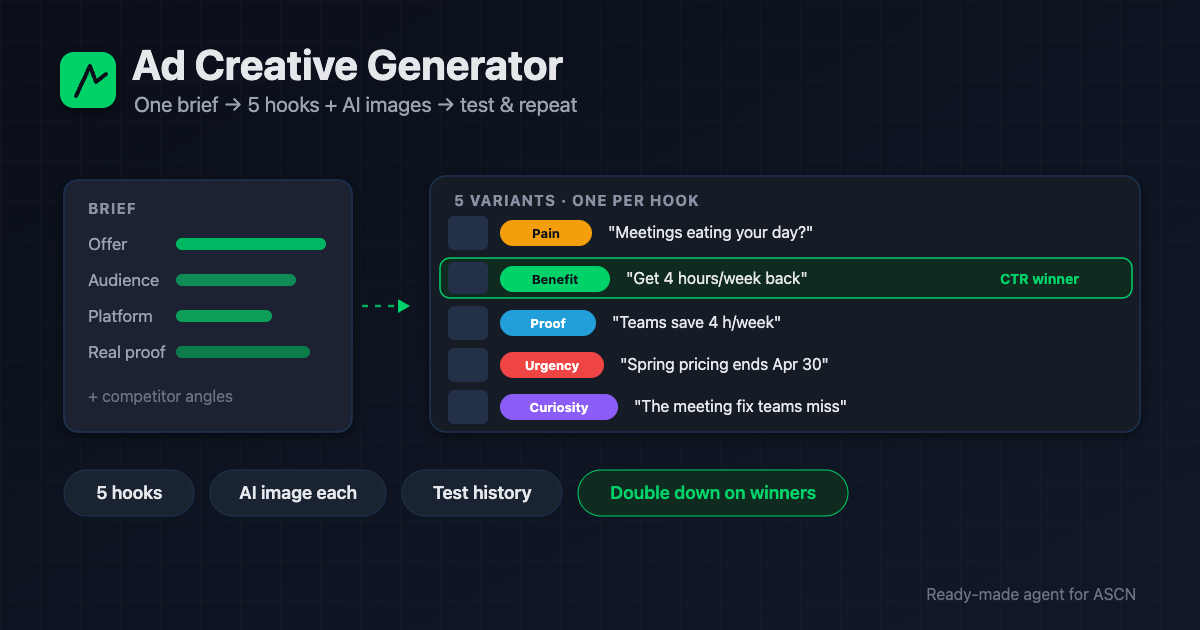
From your brief the agent builds 5 ad variants on different hooks, an AI image for each, analyzes competitors, and tracks a test history. It hands you the package.

For new users: your first ASCN subscription payment doubles the term. [Use template] [Ask a question]
Overview
Advertising runs on constant creative iteration: new hooks, new images, again and again. A copywriter charges $50–150 per ad set, a designer adds $20–50 per creative, an agency bills $500–2,000 for a campaign's creatives. Most of the cost is iterating, not the first version.
Ad Creative Generator is a ready-made AI agent for the ASCN platform that builds creatives for you:
- 🧠 Takes the brief — offer, audience, platform, real proof, constraints
- 🔎 Studies competitor ads you link — their angle and gaps, as inspiration, not copying
- ✍️ Writes 5 variants on different hooks — pain, benefit, social proof, urgency, curiosity
- 🎨 Generates an image for each via AI, in the platform's aspect ratio
- 📊 Tracks a test history — feed it your CTR and it doubles down on what won
You run it in plain chat. Packages go to Google Drive, history to Google Sheets.
How the agent works
No coding. You run everything from a chat.
- Install from the marketplace. Open the page, click "Use template" — the agent is in your account in under 5 minutes.
- Give it the brief. What you advertise, the benefit, audience, platform, real proof. The agent saves a brief template.
- Connect services in chat. The image key, Google Sheets, and Telegram in a couple of clicks.
- Get a test package. 5 variants with images, sorted by hook, plus a row in the test history.
- Then on command. "Make creatives for campaign X"; after it runs, send the CTR and the agent leans into the winning hooks.
Why it beats a copywriter plus a designer
- A package in minutes, not days. 5 texts and 5 images in one pass — you just pick and upload.
- One subscription instead of two specialists. A copywriter + designer per iteration adds up. The agent covers a round for the price of a plan plus cents per image.
- Tests that compound. The agent remembers which hook got the best CTR and never repeats the losers.
- Five angles out of the box. Pain, benefit, social proof, urgency, curiosity — five hypotheses at once, not one.
- Honest by default. No invented numbers, no fake reviews, no banned words — only real proof.
What users get
Across setups, the agent replaces hours of copywriting and design with a package of 5 testable variants in minutes and helps find a working hook faster thanks to the test history.
CTR and cost per lead depend on the offer, the platform, and how precise the brief is. The agent delivers a stream of hypotheses and creatives — your product and targeting decide how they perform.
Adoption snapshot
Small business — services
- Connected: image key, Google Sheets, Telegram
- Result: 5 Meta variants per promo, a history of hooks
- Effect: a working angle found faster, less spent on paid copy
Freelance media buyer — multiple clients
- Connected: Google Drive for packages, Sheets for tests
- Result: fresh ad sets per client on command
- Effect: more clients handled in the same time
Online store — ecommerce
- Connected: image key, Firecrawl for competitor analysis
- Result: creatives informed by competitor angles, an image per product
- Effect: a steady stream of test hypotheses with no designer
Figures are illustrative — an expected effect for the niche, not a guaranteed result.
What's included
- A ready-configured agent: role, rules, and three skills (brief, copy, package) already written.
- A brief template and a hooks library: the agent maintains them and tunes to what works for you.
- A test history in Google Sheets: which hook and headline won — so rounds compound.
- Controlled delivery: the package in Telegram and archived in Google Drive; you publish to the ad manager.
- Personal manager and community: setup help on the Personal plan and above.
While others pay for every creative iteration, get five testable variants with images in minutes — and double down on what works. 🔥🔥🔥
Set the brief once — and on command the agent delivers a fresh ad package for your campaign.
FAQ
Do I need coding skills?
No. The agent installs from the marketplace and is set up in plain chat: give it the brief, and it connects services and builds the first package.
Does the agent run the ads itself?
No. It produces creatives — text and images — and hands them to you. Uploading to the ad manager and launching is yours (direct posting to ad platforms needs separate approval and is out of scope).
How much does image generation cost?
About $0.03–0.10 per image via OpenRouter, roughly $0.25 per batch of 5. The agent shows each package's cost.
How does it analyze competitors?
From links you provide: it reads the pages (Firecrawl for JS-heavy ones) and notes the angle and gaps. Inspiration, not copying.
How is quality and honesty ensured?
Real proof only, no invented numbers or fake reviews, banned words excluded, urgency only with a real deadline.
How is my data kept safe?
Keys live in an encrypted vault and never reach chats or logs. Each agent is isolated, and you can revoke any service at any time.
Can it handle several campaigns at once?
Yes. The agent keeps a brief and history per campaign and never mixes them.
Use template · Ask a question · Order a done-for-you setup
