



- Русский
- English
- Português
How to automate a website - an honest conversation about what really works


We have been tinkering with automation for 8 years. We’ve tried 43 different variations — from simple scripts to intricate AI-driven systems. We built the infrastructure for numerous crypto projects and launched the ASCN.AI platform, which processes millions of requests daily. The core insight we gained is this: automation only truly exists when business logic, AI agents, and real data are not disjointed elements, but work as one. Scaling this manually is impossible — we’ve proven it.
Let’s look at how this works in practice, specifically and without the fluff.
Introduction to Website Automation
To put it briefly — it’s when a computer does what a human used to do. Instead of responding to clients, publishing content, or updating databases, the system handles it automatically based on set rules. Or — even more effectively — it handles it using AI. Here is what it looks like across different levels:
- Operational level — scripts handle the routine. They send emails, process forms, and synchronize data between services. It’s a basic necessity, but it saves a massive amount of time.
- Analytical level — at this stage, the system independently gathers information on user behavior, analyzes figures, and generates reports without human analysts. You see the full picture in real-time.
- Intellectual level — this is where AI agents make decisions based on context. They identify the client's mood, choose the correct response, and redirect queries between departments.
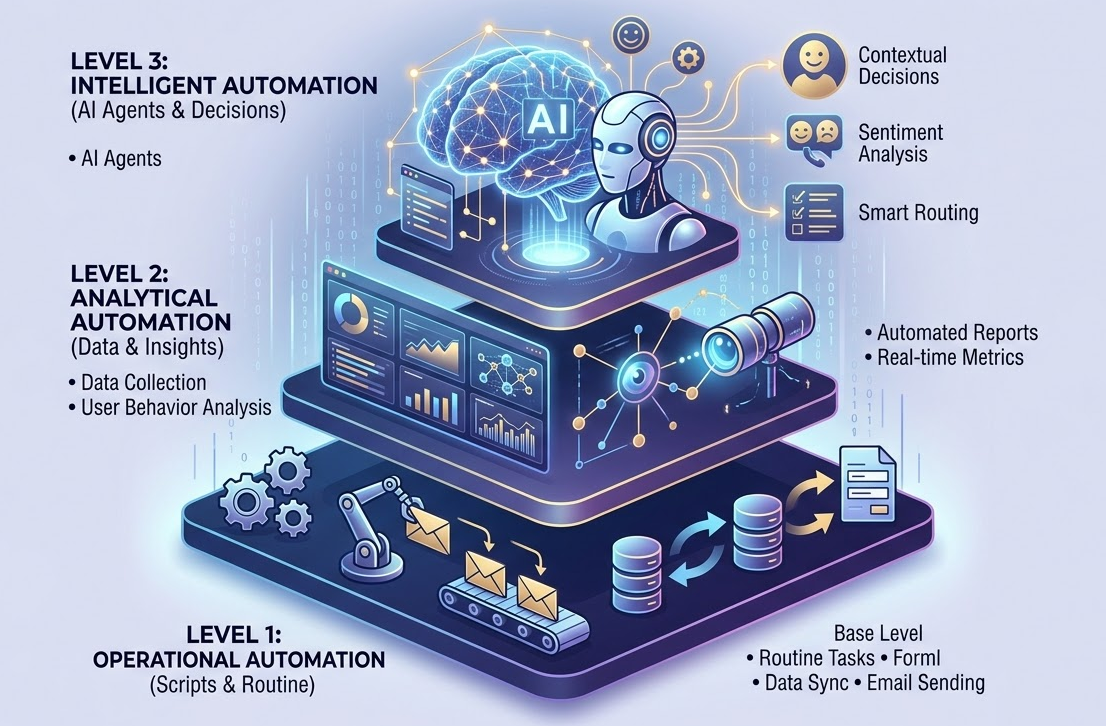
This represents true task delegation to a virtual employee. A real-life example: in the ASCN.AI project, we addressed the issue of 24/7 support for traders and crypto newcomers. Deploying a massive army of 50 support staff was financially impractical and inefficient. Therefore, in just two short months, an entire system of artificial agents was created, handling 87% of inquiries completely autonomously. Human operators only step in for the most complex cases. As a result, costs dropped fourfold, and the average response time was reduced to 10 seconds.
The Advantages of an Automated Website
Automation changes the very logic of work. It creates opportunities to invest your time and resources into the product and strategy rather than routine tasks. This increases efficiency and reduces time expenditure.
With proper automation, a new team of five can handle a workload that previously strained fifty people. Funnels, trigger sequences, and integrations with CRM and messengers reduce operational time costs by 60%. This pays off quickly. Automation eliminates intermediate pauses. A client fills out a form — confirmation and recommendations are sent instantly. They ask a question in chat — an AI agent responds in ten seconds, using up-to-date data from the knowledge base.
When a chatbot based on ASCN.AI was launched for the QuickShock project, the average response time dropped from 40 minutes to 8 seconds. The conversion from inquiry to payment increased by a staggering 23% — simply because users no longer had to wait.
Marketing and Sales Automation
Email sequences, product selections, and personal triggers on social media — all of this happens without a marketer’s intervention. The system tracks user behavior and automatically triggers scenarios.
Here’s a simple example: a client adds an item to their cart but doesn't pay. Soon, a reminder email arrives (after one hour), then another a day later with a personal discount, and two days later, reviews and case studies are sent. Every contact is an automatic trigger.
In crypto project marketing, such sequences increased the conversion from subscribers to pre-sale participants from 4% to 17%. Everyone received targeted content.
Key Methods of Implementing Website Automation
Modern content management systems offer tools for automation: scheduled publishing, image optimization, and integration with external services via API. This is the baseline level, but it is quite suitable for most standard tasks.
- In WordPress, you can set up auto-publishing, connect newsletter plugins, and integrate CRM via Zapier or Make. It’s well-suited for blogs, content projects, and small online stores.
- Tilda and Webflow — visual builders for creating landing pages and marketing sites without programming. Suitable for landing pages of any theme.
- There are other platforms — like Bitrix and 1C-Bitrix, powerful platforms for corporate websites with CRM integration and valuable warehouse and accounting software.
Automation is built on business processes that allow leads to be automatically converted into deals and employees to be notified. However, CMS platforms have their limits. The standard built-in functions, designed for standard scenarios, are usually insufficient for complex logic or data processing via AI and on-chain analytics, which is why we often require custom, individual solutions.
| CMS | Out-of-the-box Automation | Suitable for | Limits |
|---|---|---|---|
| WordPress | Plugins, publication scheduling | Blogs, content sites | Complex integrations require code |
| Tilda | Forms, email sequences | Landing pages, marketing sites | Limited logic customization |
| Bitrix | Business processes, CRM | Corporate projects | High license and support costs |
| Webflow | Visual editor, integrations | Design projects, portfolios | No built-in CRM |
CRM and ERP System Integration
CRM systems manage client data, while ERP manages internal company processes (warehouse, finance, production). Integration with a website allows for a single information flow: a lead enters the CRM, a task is created in the ERP, and stock balances are updated.
- AmoCRM — excellent for small and medium-sized businesses; integration is possible via API and ready-made widgets. It creates deals from forms and triggers email and SMS notifications automatically.
- Bitrix24 — a comprehensive solution including CRM components, tasks, telephony, and document flow. Automation via business processes: Lead → Deal → Assignee → Notification → Task.
- 1C:ERP — a system designed for large companies with extensive branch networks and complex logistics and delivery processes. It synchronizes stock, prices, and order statuses in real-time.
The main advantages are the elimination of data duplication and faster order processing. For example, in the QuickShock project, the integration of AmoCRM, the website, and a Telegram bot reduced lead processing time from three hours to ten minutes — thanks to a client card with full history.
| CRM/ERP | Core Capabilities | Suitable for | Integration Specifics |
|---|---|---|---|
| AmoCRM | Funnels, tasks, email sequences | Small and medium business | API, widgets, Zapier integrations |
| Bitrix24 | CRM, projects, telephony | Medium and large business | Built-in business processes |
| 1C:ERP | Accounting, warehouse, finance | Large companies | Multi-stage integration, specialists required |
From a functional standpoint, clients and organizations should know which CRM and ERP best suit their needs for online stores, distribution, warehouse management, or accounting. Based on the table, they can choose the product that is most important for their business. If the need for interaction and integration with a third-party system is high, a software program or robot capable of systematizing all processes becomes essential. Complex integrations will require specialists.
Implementing Bot Services
Chatbots can do more than just answer routine queries; they can collect contact information, qualify potential leads, and hand off complex questions to a human operator. Chatbots work day and night, never get tired, and don't need breaks.
Telegram bots are popular among crypto projects and startups. They are created via Botfather and connected to no-code platforms that automate scenarios. Online chat (Jivo, Carrot quest) is a widget embedded into the site where bots handle part of the queries, and a live operator takes over the complex ones.
AI agents in messengers are the next level. They understand the question and the context, and they form individual responses based on a knowledge base. If a question is complex, it is redirected to an operator with a full transcript of the conversation. When we implemented an AI agent for ArbitrageScanner, it began independently answering questions like "how to connect an exchange," "why is the funding rate on Binance negative," and others. Operators only handled non-standard cases. Teamwork, with a 70% reduced workload, became so organized that response speed increased fivefold.
Content Management and Publication Automation
Content management is the process of planning, creating, publishing, and analyzing materials. Automation helps upload posts on a schedule, cross-post to social media, automatically create drafts, and optimize SEO.
- Buffer and Hootsuite — post schedulers for automatically lining up publications a month in advance.
- WordPress with plugins (Yoast SEO, Rank Math) — auto-check of SEO parameters, meta-description generation, and internal linking.
- AI Content Generators — create drafts for articles, product descriptions, and posts based on set parameters, which a human then edits and publishes.
- ASCN.AI NoCode — a system that executes a chain of transformations: fetch data from a source → process through AI → generate post → publish to Telegram, Twitter, or a blog without human intervention (completely automatic).
For crypto marketing projects, we created an automation that allows us to collect and track token news. Using AI, a digest was quickly compiled and published to a Telegram channel — replacing what usually took a full day of manual work.
| Platform | Complexity | Price (from) | AI Agents | Crypto Integrations | Suitable for |
|---|---|---|---|---|---|
| ASCN.AI NoCode | Medium | $29/mo | Yes | Yes | Crypto, finance, sales |
| Zapier | Low | $19/mo | No | No | Basic integrations |
| Make | Medium | $9/mo | No | No | Complex scenarios |
| Bitrix24 | Medium | $39/mo | No | No | CRM, projects |
| AmoCRM | Low | $15/mo | No | No | Sales funnels |
| Jivo | Low | Free (basic) | No | No | Online chat, operators |
Marketing Campaign Automation
Marketing automation looks like personalized triggers, email sequences, and social media integrations, each responding to user behavior. It allows you to target each client with precision. In crypto market projects, this method worked particularly well — warming up the audience before a token listing helped increase pre-sale participation several times over. Importantly, the entire process functions without constant supervision from a marketer.
Practical Guide to Website Automation: Step-by-Step
Automation should start with an audit. Where is your time being wasted? Where are tasks repeated? Where are errors occurring?
- Process Mapping — create a map of your processes, visualizing every step from the client to the closed deal. For example: client fills out a form → data goes to a table → manager manually enters it into CRM → calls the client → sends an offer. Every manual step is an opportunity for automation.
- Time Measurement: how many hours do employees spend on routine (e.g., data transfer). This is your growth point.
- Error Analysis: where do failures happen most often? Missed leads? Bugs? Delays? In many cases, automation helps reduce failure rates to isolated incidents.
Typical Automation Points:
- Processing website leads — API integration replaces manual data entry.
- Sending template responses in support — a chatbot or AI agent handles up to 80% of inquiries.
- Report collection — data from different systems is automatically gathered into a dashboard.
- Task management — the CRM sets tasks based on the deal stage.
We once conducted an audit for a crypto project that was losing up to 40% of all incoming leads due to manual data entry errors during traffic spikes. We implemented an automated bot for primary lead qualification: three questions, automatic client assessment — hot leads went to managers, cold leads went into an email funnel so they wouldn't be lost. Lead loss dropped to 5%.
Selecting Tools and Services
The main selection criterion is the scope of tasks. The key is to ensure the tools fit your specific business and scale.
No-code Platforms:
- ASCN.AI NoCode: a platform designed for business automation using AI agents, crypto integrations, and ready-made scenarios for finance, sales, and marketing — suitable for those seeking flexibility without programmers.
- Zapier: a lightweight tool for simple scenarios — connecting Google Sheets to Mailchimp or a CRM. For basic tasks.
- Make (Integromat): a more powerful application compared to Zapier, designed to solve complex scenarios (with conditions and loops). For medium and large businesses.
Support Solutions:
- Jivo, Carrot quest: online chats with basic bots and human operators.
- Telegram Bot API + ASCN.AI: customized, bespoke chatbots with AI agents capable of understanding context.
CRM-ERP:
- AmoCRM — for small businesses, fast and simple integration.
- Bitrix24 — a full-featured solution for medium and large businesses.
- 1C — for companies with complex accounting systems and logistics.
Setting Up / Integrating Automated Systems
Integration is the connection of various services into a single system that can automatically exchange data: website lead → CRM → email series → Telegram notification → task manager task.
Using ASCN.AI NoCode as a step-by-step example:
- Register on the site and log in to the system.
- Go to create a Workflow: provide a name and enter the editor.
- Add a trigger (e.g., "Telegram Bot Polling" or "Webhook" to receive info from the site).
- Configure the algorithm: if the inquiry contains the word "purchase" — direct it to the specific branch of the algorithm, which in this case sends it to the sales department.
- Add more actions: send a text message in Telegram, log the inquiry text in Google Sheets, and add a new lead to AmoCRM.
- Add an AI agent: set up a prompt with the instruction "Analyze the client message and suggest a response."
- Test the scenario: send a test message and see the result.
- Set the system to "Active" mode — automation will now run continuously.
Recommendations: keep keys and passwords in the Secrets section, actively use QuickStart templates, monitor logs, and break down massive tasks into several simple workflows.
Testing and Optimization
Even a working automation must be regularly checked and optimized.
- A/B Testing: compare two scenario variants (e.g., AI agent responses vs. template messages). Analyze which converts better and is more user-friendly.
- Metric Tracking: monitor processing time, the percentage of automated closures, error counts, and team workload.
- Logging and Troubleshooting: all system activity is recorded in logs; if problems arise, scenarios are corrected.
- Feedback: gather user opinions and improve weak points. For example, after launching a consultation workflow, we found that 60% of inquiries were spam. We added a captcha and a keyword filter.
FAQ — Frequently Asked Questions
What is an automated website system?
It consists of tools and processes that perform work without human intervention — processing leads, sending notifications, synchronizing data, analyzing behavior, and responding in chats using AI.
Which automation tools are suitable for small businesses?
The simplest no-code platforms are best: Zapier for integrations, AmoCRM for client management, Telegram bots based on ASCN.AI for support, and Mailchimp for email marketing. This stack costs around $50 per month and pays for itself many times over through time savings.
How much time does automation take?
A basic form-to-CRM link can be set up in a few hours. Medium projects with multiple steps and an AI agent take from three days to two weeks. Complex integrations with API and analytics can take up to three months. For example, launching AI support for ArbitrageScanner took two weeks, while a complex marketing funnel took about a month.
What errors hinder automation?
- You cannot automate chaotic processes — they must be structured first.
- Neglecting testing — always check scenarios before launch.
- Excessive complexity — simplicity makes maintenance easier.
- Lack of support — business logic and APIs need updates.
- No fallback options — always leave an option to connect to a live operator.
One case served as a valuable lesson: AI without moderation issued fake news about a token listing and caused panic. After that, we added manual verification for key messages.
Conclusion
Website automation is an ongoing process. Start with an audit, choose your tools, set up minimal scenarios, test, and optimize. This will save your time, reduce errors, and increase conversion.
- Automation works when processes are clear and well-structured.
- No-code platforms lower the entry barrier and speed up deployment.
- AI agents handle analytics, decision-making, and content generation.
- Integration with CRM, ERP, and messengers creates a unified information ecosystem.
- Testing and optimization are mandatory; the system requires maintenance.
Recommendations:
- Start with the most labor-intensive task.
- Ready-made templates will significantly speed up project launch.
- The team must be proficient with all the tools you provide.
- Track metrics and improve processes.
- Automation should be developed gradually.
In our experience, automated processes led to a 4x reduction in operational costs, 5x faster request processing, and allowed businesses to scale without a proportional increase in staff. This is especially vital for the crypto industry and other sectors with a high volume of repetitive operations.
How AI Agents and No-Code Systems Help You Earn
Automated solutions bring stable profits. Success in the crypto industry often depends directly on decision-making speed. During the flash crash and price volatility in October 2024, an arbitrage window lasted for 2 hours. ASCN.AI users received automatic Telegram notifications with specific pairs and advice. While others were manually searching for market opportunities, our clients were calmly securing solid profits.
Regarding examples: one of our clients, a trader, earned $1,000 after asking an AI just two questions — in 10 seconds, he received a step-by-step strategy.
ASCN.AI allows you to launch automated scenarios without programmers: for instance, funding rate monitoring, whale activity tracking, market drop notifications, and report generation. Instead of hours of manual labor, you get ready-made analytics and the ability to focus on strategy.
Disclaimer: This information is intended solely for your reference and is not a substitute for consultation with IT specialists and legal counsel.