



- Русский
- English
- Português
AI Agent for Avito: What It Is and How to Use It


An AI agent for Avito is a program built on a language model that works inside your Avito seller account by your rules: it answers buyers in chat, checks stock and prices against your spreadsheet, logs every lead, hands haggling and unusual questions back to you, and sends a weekly report on your listings. It connects to Avito through the official API and runs around the clock.
This guide covers where Avito sellers lose leads, what the agent does at each step, how to set one up in ASCN, what it costs and where it falls short. Every example below illustrates a scenario; none of them is a report from a specific client.
Contents:
- Why you need an AI agent for Avito
- Advantages of using an AI agent with your Avito listings
- How the AI agent interacts with the Avito platform
- Main features and benefits of an AI agent for Avito
- AI agents for Avito: examples by seller type
- A guide to using an AI agent for Avito, step by step
- How to set up an AI agent for Avito with ASCN
- Technical features: integrating an AI agent with Avito
- Pricing and plans for an Avito AI agent
- An Avito AI agent in practice: a seller's day before and after
- Comparison of AI agents for Avito: agent vs auto-reply vs manual work
- Risks and limitations
- Most common questions (FAQ)
- Conclusion
Why you need an AI agent for Avito
So that a buyer doesn't move on to the next listing while you're busy. On Avito, people usually message several sellers at once and close the deal with whoever replies first and to the point. The agent takes over that first response and the routine around it.

Where Avito sellers lose leads
- Slow replies. You're driving, at the warehouse, with a customer or asleep. "Is this still available?" sits unanswered for two hours, and by then the buyer has already agreed to meet another seller.
- The same questions, over and over. "Is the price negotiable?", "Can you ship it with Avito Delivery?", "Can I come and see it tonight?", "Do you have it in another color?" Each one takes a minute or two, and there are dozens a day.
- Arrangements that live in your head. A buyer promised to come by on Saturday at noon. On Saturday nobody remembers who it was or which item they wanted. The contact was never written down, so nobody followed up.
- No time for the listings themselves. Descriptions go months without an update, prices drift away from the market, photos never get reshot. The listings slide down the search results and you don't notice.
A quick example: 30 messages a day at 2 minutes per reply is an hour a day on chat alone, before you touch a single listing or make a call. The numbers are illustrative, so plug in your own. The real picture is often worse than it feels.
The agent doesn't replace the seller. It answers routine questions right away, asks for missing details, writes the arrangement into a spreadsheet and calls you in when a decision is needed: a discount, a trade-in, a dispute.
Advantages of using an AI agent with your Avito listings
The two big ones are reply speed and order in your leads. Everything else follows from those.
- It answers at any hour. Overnight, on weekends, while you're on the road. The buyer gets a real answer instead of "I'll get back to you later."
- It handles several conversations at once. Ten people ask about the same sofa, and each of them gets a reply. Nobody gets buried in the chat list.
- It answers from your data. Stock, price, dimensions and delivery terms come from your spreadsheet and knowledge base, not from the model's imagination. If the answer isn't there, the agent doesn't make one up; it passes the question to you.
- It remembers context. If a buyer asked about the blue version yesterday, the agent won't start from scratch today.
- It doesn't forget. Every lead becomes a row in a spreadsheet: who, which item, what was agreed, when to follow up.
- It costs less than a hire. Paid ASCN plans start at $29 a month (details in the pricing section). Compare that with what an hour of your time, or a sales assistant's, is worth.
The honest downside: the agent is only as good as its knowledge base. Skip the delivery rules and it can't answer delivery questions, so it will keep pinging you. That's why preparing the data takes longer than the setup itself.
How the AI agent interacts with the Avito platform
Through Avito's official business API. It gives programmatic access to your seller account: listings, statistics and messages in Avito's chat. The documentation lives at developers.avito.ru (in Russian).
Integration with Avito's API and other technical capabilities
API access is granted through application credentials, a client_id and a client_secret, issued in your Avito account. The agent exchanges them for a temporary access token and uses that token to call the API on your behalf. Keep the credentials in the platform's secure storage, never pasted into the agent's instructions.
Before you start, check Avito's documentation to see which API sections your account and Avito plan can use. That decides whether the agent can read and send messages or only look at statistics.
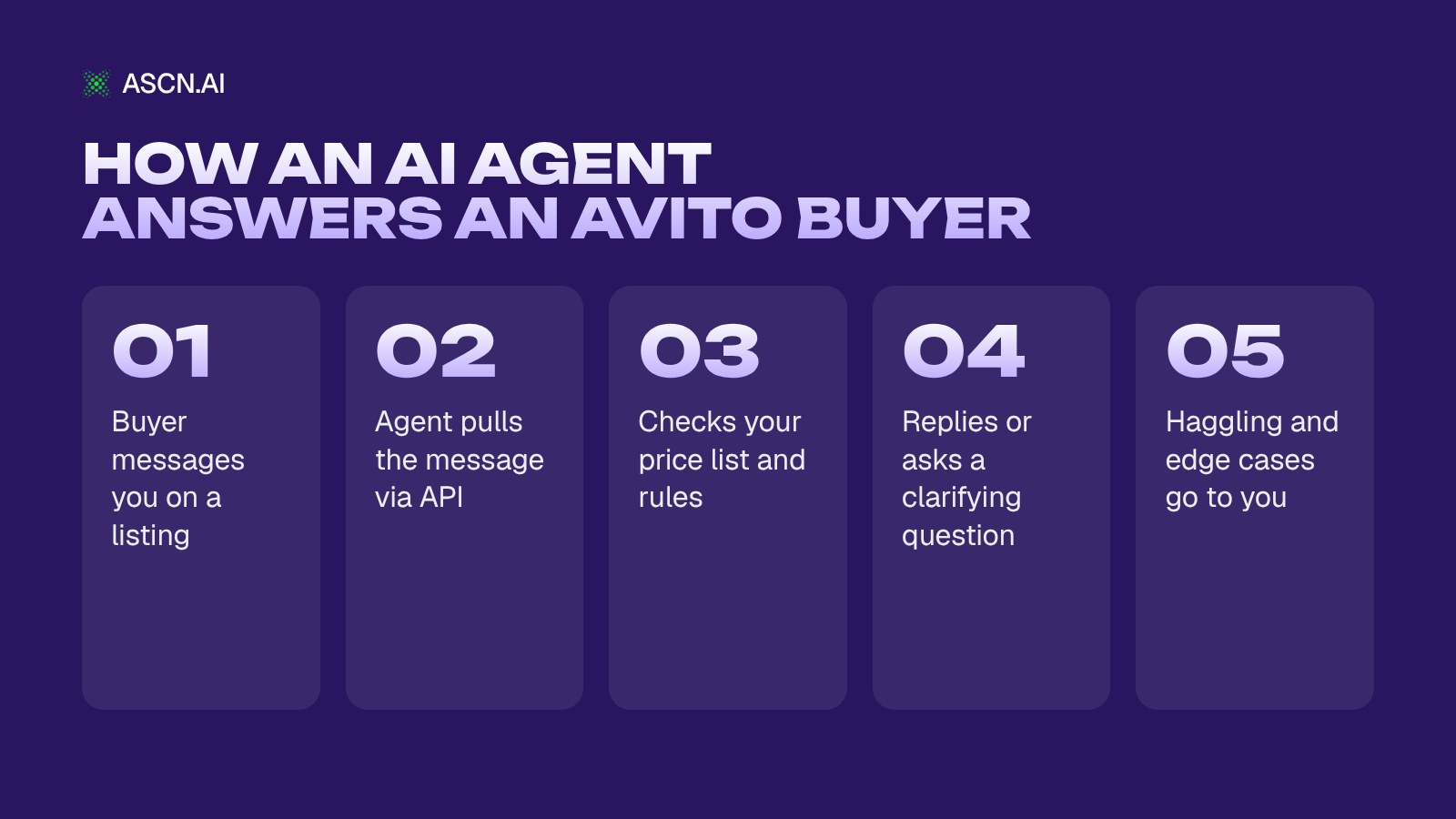
Here's how the agent handles a single buyer message:
- A buyer writes in the chat on one of your listings.
- The agent picks up the new message, either by checking chats on a schedule or immediately if you've set up a new-message notification.
- It works out which listing the message is about and looks for the answer in your data: price list, stock, terms, rules.
- It replies or asks a clarifying question: "Is this for a country house or an apartment?", "What's the make, model and year of the car?"
- If the question falls outside the rules (haggling, a trade-in, a complaint), it forwards it to you in Telegram or Slack with a short summary.
- It logs the lead and whatever was agreed in a spreadsheet.
Setting up and managing listings automatically
Bulk publishing on Avito is usually done through Autoload (Avtozagruzka), a file with your listings that the platform picks up and publishes. The agent can prepare the contents of that file, meaning titles, descriptions and prices, from your product spreadsheet. Every listing still goes through Avito moderation, so the agent needs to know Avito's rules for text and photos. Put them in its knowledge base.
- Copy. The agent rewrites titles and descriptions to a template: model, condition, what's included, terms. You review the draft and approve it.
- Prices. The agent suggests a price change and you confirm it. We don't recommend letting it change prices unsupervised: one typo in the spreadsheet and an item sells for half its value.
- Promotion. Boosts and other promotion services on Avito cost money. If you hand this to the agent, set a budget cap and require approval for every charge.
A note on competitor monitoring: automatically collecting data from other sellers' pages may break the platform's rules, so read Avito's user agreement first. A safer route is to rely on your own account statistics via the API and spend ten minutes once a week looking at 5–10 similar listings yourself.
Main features and benefits of an AI agent for Avito
The agent covers four areas: replying to buyers, preparing listings, reporting and keeping track of leads. Here's what it does in each one and where your call is needed:
| Avito task | What the agent does | Who decides | Result |
|---|---|---|---|
| "Still available?" | Checks stock | Agent | Instant reply |
| Delivery question | Answers by rules | Agent | No waiting |
| Haggling, discount | Forwards to you | You | Price stays yours |
| Viewing agreed | Logs it | Agent | Lead not lost |
| New listing | Drafts the copy | You approve | Less manual work |
| Weekly results | Builds a report | Agent | Clear what sells |
Auto-placing listings
With 50 products, filling in listing forms by hand stretches over days. With an agent the workflow changes: you keep one product spreadsheet (name, condition, price, photo links), and the agent turns it into consistent listing copy and an upload file. New items go live the same day instead of "when I get around to it."
Along the way the agent checks the things people tend to forget: whether dimensions are listed, whether the description says what's included, whether the text contradicts the photos.
Sales management
Most of the load is routine questions. The agent answers those itself and asks for details on the harder ones first. Take "Can I pay by card on pickup?" The agent answers from your payment rules. "Will you take 10,000 rubles if I collect it myself?" gets a polite "Let me check with the owner," and the message lands in your inbox.
A separate job is getting the buyer to the actual meeting: offering a time, sharing the address, sending a reminder an hour before. Without an agent, this is the stage where the most arrangements fall through.
Market analysis
Once a week the agent builds a report from your account statistics and sends it to Telegram, Slack or email:
- listings that got views but no messages, a sign to rewrite the copy or rethink the price;
- the items buyers ask about most;
- how many leads came in and how many reached a viewing or a sale;
- which questions the agent couldn't close on its own, your shortlist of knowledge base additions.
With a report like that, decisions take ten minutes: what to pull, what to mark down, what to restock.
Time saved
The savings add up from small things. You no longer open every chat, try to remember who agreed to what, or paste the same answer for the twentieth time. You read the summary, answer the questions the agent forwarded and approve prices. The freed-up hours go to sourcing, suppliers and advertising.
How much routine actually disappears depends on the share of repeat questions in your niche. Count it for one week before launch: how many messages came in and how many were repeats. That's your baseline.
AI agents for Avito: examples by seller type
Three scenarios that suit an agent best. They're illustrations without result figures, because the effect depends on your niche, message volume and the quality of your knowledge base.
Example: an auto parts store, part matching and analytics
There are hundreds of parts, and nearly every buyer asks the same thing: will this fit my car? The agent asks for the make, model and year (sometimes the VIN), checks a compatibility sheet and answers. If there's no match, it hands the question to the seller instead of guessing.
Once a week the agent summarizes which makes and parts people asked about most. That shows where demand and stock don't line up: buyers keep asking about parts for one brand while the shelf for it is half empty. That's a direct signal for the next purchase order.
Example: replying to buyers for a used appliance seller
Fridges, washing machines, TVs. The questions repeat: does it work, how old is it, is there a warranty, when can I pick it up, will you help me load it? The agent answers from the item card and the store's rules. For a vague question it clarifies: "Are you after a specific model, or should I suggest options for your budget and space?"
When the buyer is ready to come over, the agent offers open time slots, logs the viewing in a spreadsheet and sends the manager a card with the name, item and time. The manager steps in when the buyer is already warm.
Example: a handyman or service business
Repairs, furniture assembly, cleaning. Here the agent doesn't sell. It qualifies the request: what needs doing, the address or area, a preferred date, photos of the job. The handyman gets a ready-made request in Telegram and quotes the price himself. The customer doesn't have to wait until he's free just to ask the first questions.
More scenarios for sellers on different platforms are in our guide to AI agents for marketplaces.
A guide to using an AI agent for Avito, step by step
The order is the same on any platform: prepare the data, write the rules, launch with a safety net, watch the numbers. The ASCN-specific clicks are in the next section.
Step 1: Prepare
Before any setup, gather:
- your Avito API credentials (client_id and client_secret) and a clear picture of which API sections you can use;
- a product sheet: name, price, stock, condition, link to the listing;
- 20–30 questions buyers ask most often, with your answers. Just pull them from last month's chats;
- your rules: delivery, payment, pickup, warranty, returns, opening hours;
- your limits: how big a discount the agent may agree to on its own (if any), and which topics always go to you.
Step 2: Configure
Give the agent a role and a tone. For example: "You reply to buyers of a used appliance store on Avito. Be polite, brief, no emojis. Never promise discounts. If you don't know the answer, say you'll check and forward the question to the owner."
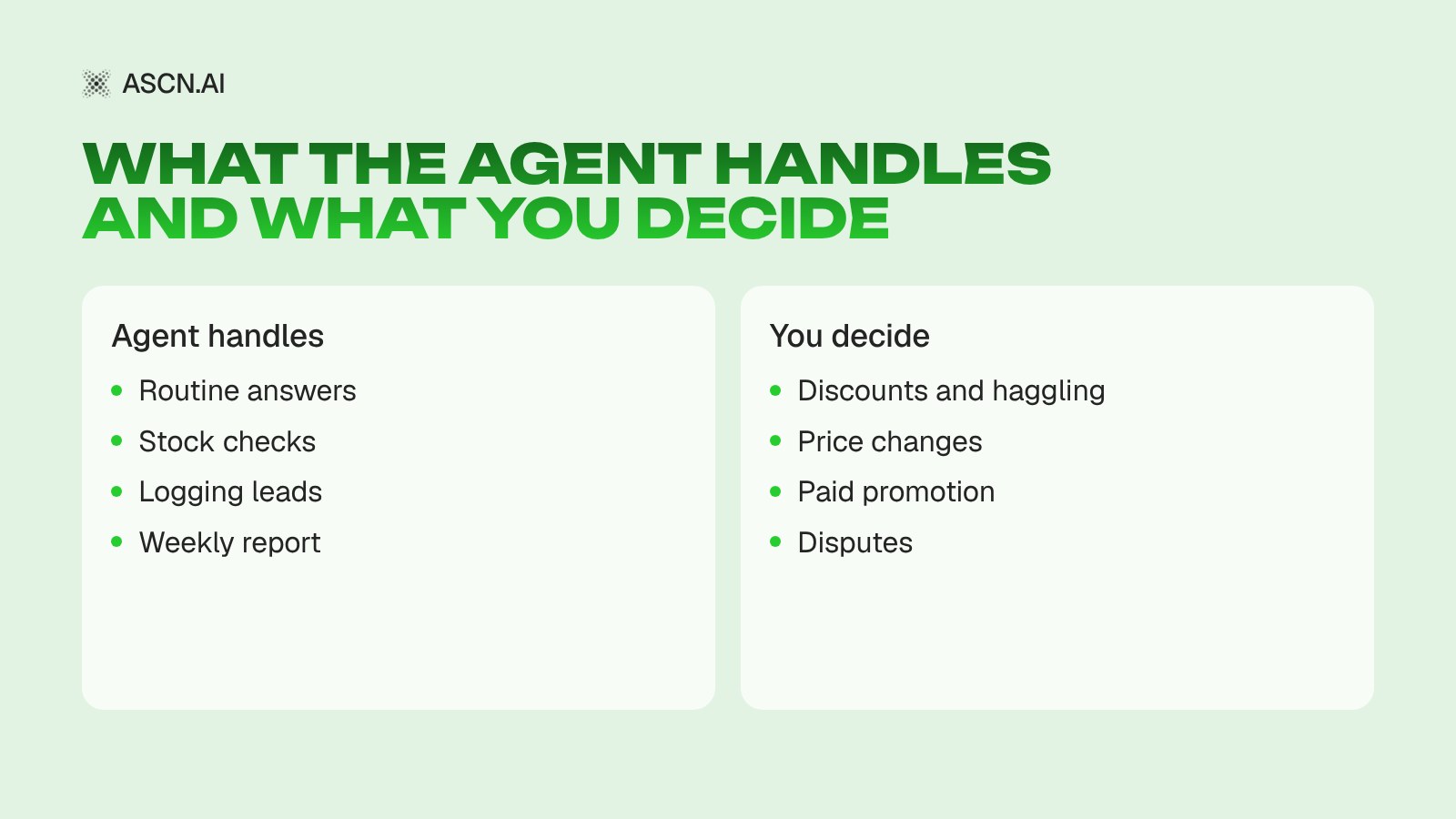
Then spell out what the agent does on its own and what needs your sign-off. The split usually looks like this:
Step 3: Launch
For the first week, run the agent with a safety net: it drafts each reply and you approve or edit it. Every edit becomes a knowledge base entry. Say the agent didn't know what to do with "Can I drop by tomorrow morning?" Add a rule: confirm the time and share the address.
Once you're barely editing anything, switch routine replies to automatic and keep haggling and complaints for yourself.
Step 4: Track results

Watch four numbers and compare them with the week before launch:
- Time to first reply. How long buyers wait, especially at night and on weekends.
- Share of conversations closed without you. If it isn't growing, the knowledge base needs more answers.
- Leads that reached a viewing or a sale. This is the number that matters. Fast replies with no sales mean the agent talks but doesn't move buyers toward a deal.
- Mistakes. A wrong price, a promise you never made. Review each one and close it with a rule.
Step 5: Keep improving
- Update the knowledge base every time your stock or terms change.
- Try two versions of the answer to a common question and see which one leads to more agreed viewings.
- Get alerts for errors and odd questions in Telegram, Slack or email.
- Don't hesitate to leave tricky conversations to people. Better to forward a question to you than lose a buyer over a clumsy answer.
How to set up an AI agent for Avito with ASCN
In ASCN you build an agent by chatting with it: you describe the job in plain words, no code. There's currently no ready-made Avito template or built-in Avito connector in the ASCN marketplace (we checked on October 7, 2026), so Avito connects through its API, using credentials stored in the agent's secrets.
- Create the agent. Sign up at ascn.ai/agent ("Try free") and click "+ Create new". For the sales conversation logic you can start from the AI Sales Agent for Telegram template: it finds out what the buyer needs, handles objections and moves the conversation toward payment.
- Describe the job in chat. For example: "Every 15 minutes, check for new messages in my Avito chats via the API. Answer questions about stock, price and delivery using the product sheet and the rules document. Forward haggling, trade-ins and complaints to me in Telegram. Log every agreed viewing in the leads sheet."
- Add your Avito credentials. Open "Settings → Secrets and keys", click "+ Add secret" and save AVITO_CLIENT_ID and AVITO_CLIENT_SECRET. In the job description, tell the agent which variables to use. Secret values are encrypted, never shown in plain text, and stay out of chat history and logs (docs).
- Load the knowledge base. Under "Brain → Knowledge", add documents: price list and stock, delivery and payment terms, common questions with answers, haggling rules. The agent reads them before it replies.
- Set the schedule and test it on yourself. Scheduled tasks support "every N minutes or hours", and every run uses credits, so match the interval to your message volume. Send alerts about tricky questions to Telegram or Slack. For the first week, let replies go out only after your approval.
If you need an instant response rather than a scheduled check, you can pass Avito's new-message event to the agent through the ASCN API ("Settings → API"): your own script or automation service receives the notification from Avito and forwards it to the agent. Access to the agent's API starts on the Start plan.
You can try it for free: build your agent on ascn.ai and start with a single job, answering "Is this still available?"
Technical features: integrating an AI agent with Avito
Under the hood, the setup has three parts: Avito's API is the source of messages and account data, the agent holds the logic and writes the replies, and spreadsheets plus your messenger handle records and alerts.
API
Avito's API works over HTTP: the agent sends a request with the token in the Authorization header and gets JSON back. Without a valid token the request is rejected with an authorization error, which is the most common reason an agent "goes quiet". The token is temporary, so add a line to the agent's instructions: if the token stops working, request a new one with the credentials.
The API also has request rate limits. Current values and the full list of methods are in the documentation at developers.avito.ru. Don't schedule checks more often than the limit allows.
Compatibility
An ASCN agent connects to Google Sheets, Google Drive, Google Docs, Google Calendar, Telegram, Slack, Notion and other services through built-in integrations, MCP and API. For an Avito seller that means leads go to Google Sheets, viewings to your calendar and alerts to Telegram or Slack.
A sample chain: a buyer confirms they'll come by on Saturday. The agent adds a row to the leads sheet, creates a calendar event and messages the manager with the name, item and time. If you run your own CRM with an API, it connects the same way Avito does: credentials in secrets, rules in the job description.
System requirements
The agent runs in the ASCN cloud. There's nothing to install; you manage it from a browser or from Telegram.
Data security
According to the ASCN documentation:
- each agent is isolated, so one agent's data isn't available to another;
- keys and passwords are stored encrypted and stay out of logs;
- you decide which actions the agent may take without asking;
- your data isn't used to train AI models;
- you can revoke access at any time by deleting a secret, disconnecting a service or deleting the agent.
What not to give the agent unless you must: buyers' passport details, bank details, your Avito account password. The API doesn't need your password, only the application credentials.
Pricing and plans for an Avito AI agent
ASCN is free to try, and paid plans start at $29 a month. Prices below are from ascn.ai/pricing as of October 7, 2026, billed monthly:
| Plan | Price/mo | Credits | Active agents | Good for |
|---|---|---|---|---|
| Free | $0 | 500 | 1 | Testing a scenario |
| Start | $29 | 10,000 | 5 | Solo seller |
| Personal | $99 | 35,000 | 10 | Small store |
| Business | $299 | 100,000 | 20 | Store with a team |
Paying for 3, 6 or 12 months up front is cheaper. Credits are spent on every task run and every call to an external service, so how often you check messages drives your usage directly: checking every 15 minutes costs more than checking once an hour.
Budget for Avito's side separately: your Avito business plan and any paid listing promotion. If you'd rather not build the agent yourself, there's turnkey automation: you describe the task, vetted builders put it together, and you pay by the hour.
An Avito AI agent in practice: a seller's day before and after
Example: a solo seller of used furniture with around 40 active listings. Here's the day without an agent and with one.
Before
- The morning starts with 15 unread chats from overnight. Half of them say "Is this still available?" Three of those buyers have already bought elsewhere.
- During the day, replies happen in snatches between loading the van and phone calls. A couple of buyers wait three hours for an answer.
- In the evening the seller can't remember who's coming tomorrow and scrolls back through the chats.
- The listings haven't been touched in a month. There's simply no energy left for them.
After
- Overnight messages were answered within one check interval. In the morning, a summary in Telegram: who asked what, what the agent replied, three questions waiting for a decision.
- During the day the seller only handles what was forwarded: haggling, delivery of a bulky item, a trade-in request.
- Tomorrow's viewings are all in the sheet with name, item and time, and the agent reminds each buyer an hour before.
- Monday brings the weekly report: which listings get views but no messages. The seller rewrites two of them using the agent's drafts.
This isn't a specific client's story; it's the typical pattern for a one-person operation. For how large companies, Avito included, use AI agents, see our breakdown T-Bank and Avito: how AI agents freed employees from routine.
Comparison of AI agents for Avito: agent vs auto-reply vs manual work
The real choice is usually not between platforms but between three approaches: answer everything yourself, set up a canned auto-reply, or bring in an AI agent.
| Criterion | Manual | Canned auto-reply | AI agent |
|---|---|---|---|
| Replies at night | No | Yes | Yes |
| Free-form questions | Yes | No | Yes |
| Stock check | By hand | No | From your sheet |
| Lead tracking | From memory | No | In a sheet |
| Weekly report | By hand | No | Automatic |
| Setup | None | One message | Knowledge base |
A canned auto-reply is fine as a polite "I'll get back to you within the hour," but it can't answer an actual question. Doing it all by hand gives you full control and eats your time. An AI agent sits in the middle: it closes the routine and leaves the decisions to you. The price is preparation: the product sheet, the answers to common questions and the rules take longer to pull together than the setup itself. For more on the difference between a chatbot and an agent, read From chatbot to AI agent.
Risks and limitations
The agent is a working tool, and it has weak spots. Better to know them before launch.
- Bad data. The agent answers from your sheet. If stock is out of date, it will say "yes, we have it" when you don't. Keep the sheet current or give the agent access to the live one.
- Promises in your name. Without an explicit ban, a model may agree to a discount or a delivery option you don't offer. List what the agent must never promise.
- Platform rules. Avito watches for spam and pushy mass messaging. The agent replies to people who wrote to you first; it doesn't blast messages to everyone.
- API access. Avito sets the API terms, and they can change. If an API section becomes unavailable to your account, the agent stops receiving messages, so set up error alerts.
- Credit usage. Checking messages too often burns credits for nothing if buyers rarely write. Start with a longer interval and shorten it as needed.
Most common questions (FAQ)
Do I need programming skills to build an AI agent for Avito?
No. In ASCN you build the agent through chat: describe the job in plain words and the agent suggests which services to connect. The only technical step is getting API credentials from your Avito account and saving them under "Secrets and keys". If you'd rather skip even that, order a turnkey setup.
How do I get Avito API credentials?
The application credentials (client_id and client_secret) are issued in your Avito business account. The steps and the list of available API sections are described at developers.avito.ru. Copy the credentials and save them in ASCN under "Settings → Secrets and keys"; in the agent's job description, refer only to the variable names.
Can the AI agent haggle with buyers?
It can if you allow it and set limits, for example "no more than 5% off items listed over a month ago." We'd suggest a different setup: let the agent find out what price the buyer has in mind and whether they can collect today, and keep the discount decision for yourself. That way one awkward phrasing never costs you margin.
Can I connect several Avito accounts?
Yes, but each account has its own API credentials. Save them as separate secrets with different names and spell out in the job description which credentials belong to which account. Another option is one agent per account: the Start plan allows up to 5 active agents and Business up to 20.
What should I do if the agent stops replying to buyers?
Check in this order: is the scheduled task still active in the "Tasks" section, are there credits left, are the Avito API credentials still valid, and has your API access changed on Avito's side? To hear about a failure right away, ask the agent to message you in Telegram whenever a request returns an error.
Does the agent work with platforms other than Avito?
Yes. An ASCN agent connects to services through built-in integrations, MCP and API, so the same approach works for other platforms with an open API. For Ozon sellers, the ASCN marketplace has a ready-made Ozon Analyst template that calculates profit per SKU and warns you about stock running out.
Tips for fixing common issues
- Replies sound robotic. Give the agent 5–10 of your real replies from past chats as a tone sample and ask it to write shorter.
- Answers miss the point. Almost always it's missing data. Add the answer to the knowledge base, or a rule for when to forward that question to you.
- Replies arrive late. Shorten the check interval, or pass new messages through the API if your volume is high.
Conclusion
What an AI agent on Avito gives you
An AI agent for Avito takes the first response, the repeat answers and the bookkeeping of arrangements off the seller's plate. The buyer gets an answer before moving on to someone else, and you get a summary plus only the questions that need your call. It works exactly as well as your product sheet and rules are put together.
For the bigger picture of agents across a whole sales team, beyond Avito, read our practical guide to AI agents for sales teams. For setting up customer replies in general, see how to create an AI assistant for customer support.
Quick start: set it up today
- Pull the 20–30 most common questions from your chats and write down your answers.
- Get API credentials in your Avito account.
- Create an agent at ascn.ai/agent, add the credentials to secrets and upload your product sheet.
- Run a week with approvals on, then let routine replies go out automatically.
Start on the free plan with a single scenario. Need help with the setup? Message our manager on Telegram.

T-Bank and Avito: How AI Agents Freed Employees from Routine and Increased Efficiency by 21% and 14% Respectively

Marketplaces on Autopilot: How AI Agents Increase Sales and Free Sellers from Routine

AI Agents for Sales Teams: A Practical Guide to Automation

AI Agents for Marketplaces: What They Are and How They Work

How to Create an AI Assistant for Customer Support: A Real Guide to Automation That Works