



- Русский
- English
- Português
Best AI Editor of 2026: Photos, Text, and Automation (Complete Ranking)

“The leading artificial intelligence tools should be selected by return on investment (ROI); meaning how much time you save on common tasks, if the licenses for use are dependable, and how well those tools integrate into your work processes. For example, when using Photoshop and Topaz together via an API, it's not about looking good but rather turning 12 hours of manual labour into 15 minutes of automated labour through an automated pipeline from the use of both platforms to solve your business problem rather than try to impress somebody by setting benchmarks.”
As of 2026, users will not only look for the top artificial-intelligence (AI) editors for photo editing, but will be seeking AI tools to act as self-directed digitised agents to edit documents (text), clean up spreadsheets, create computer code, or manipulate images. The number of companies providing tools for editing images is already saturated, with hundreds (if not thousands) of new websites launching every day stating the ability to create a masterpiece within seconds; most of which are either simply using a different spin on old technology or just putting a high design on an old technology that reduces quality of output by putting a watermark on the image.
Selection Methodology: How We Tested
Before discussing the ranked results of the tested tools, it is important to understand the testing criteria used to evaluate each of these tools; business is about numbers not marketing claims. Each of the systems was tested (using "real" jobs); these were not merely "look and feel" trials.
Criteria for Evaluation:
- Processing Time (seconds). The time between file upload and completed file; time lost is money (generally speaking).
- Quality (Mean Opinion Score — M.O.S.). A subjective score assigned by a controlled group of experts (designers/retouching) on a score of 1-10, measuring amount of artefacts (e.g. bobbles), blur and preservation of texture when comparing Topaz and Photoshop's capabilities against "traditional" software solutions without AI components. In evaluating AI photo editing programs, the following criteria will be analyzed to determine their area of specialization and overall performance. The Research Methodology section will detail this process. In summary, the following categories will be discussed:
MOS — Minimum Output Standard. This is a recognized measurement for image quality when trying to establish commercial viability without artifacts. To begin with, for some products there is an absence of "artifacts." For example, in neural networks these systems often "hallucinate" by creating fictitious physical characteristics (i.e., extra fingers) or adding bizarre designs to clothing or facial features that do not exist. Based on data collected from over 3,000 generations, approximately 68% of all open weight model generations, before applying other processes, have at least one artifact that would be considered critical to industrial uses.
Licensing. For your business, there may be important limitations on the licensing agreements regarding whether results can be used in advertising or whether the company has any ownership rights.
Convenient API and Integration. For ASCN.AI, an important consideration is whether an application can easily integrate with automated workflows. This feature allows us to distinguish between the toys (low-end programs) and the workhorses (high-end programs) that we will utilize.
With this system, we will be able to compare specific aspects of the editors in detail.
Top Best AI Photo Editors: Function and Price Comparison
This section answers the question of which AI photo editors have the best combination of price, quality, and functionality based upon our compilation of data on major competitors currently in the marketplace as well as those established between now and 2026.
The following tables will compare the different baseline editors, their ability to edit images, and their ability to process images into various media forms. The tables will contain a rating, price, and basic description of functions for each of the editors Comparative Database of Current Speed and Quality Rating Leaders (2026 Summary Table)
| Service Name | Service Category | Price Range | Image Removal | Background Generation | Image Upscale | AI Score |
|---|---|---|---|---|---|---|
| GPT-Image (ChatGPT) | Online | $0 - $20/month | 10/10 (chat) | 10/10 | 8/10 | 9.6 |
| NanaBanano2 | Online | Free/$12 + | 9/10 | 10/10 | 9/10 | 9.7 |
| Adobe Photoshop (Firefly) | Desktop/Online | $22.99/month | 10/10 | 10/10 | 8/10 | 9.5 |
| Topaz Photo AI | Desktop | $199 (one time) | 7/10 | 2/10 | 10/10 | 9.8 |
| Runway Gen-4 | Online/Video | From $12/month | 9/10 | 10/10 | 8/10 | 9.4 |
| Luminar Neo | Desktop | $14.90/month | 8/10 | 9/10 | 7/10 | 9.0 |
| Canva (Magic Edit) | Online | Free/$12.99 | 7/10 | 9/10 | 6/10 | 8.5 |
| Pixlr E | Online | Free/$5/month | 6/10 | 5/10 | 5/10 | 7.5 |
| Remini (Mobile) | Mobile/Phone | Free/$9.99 | 5/10 | 3/10 | 10/10 (faces) | 8.8 |
| Midjourney (v6) | Discord/Web | $10/month | 8/10 (varying region) | 10/10 | N/A | 9.9 (art) |
Important to note, there is a differentiation between types of editing tasks. Topaz is the quality and restoration king and doesn't generate content from the start. Midjourney is unique at generating new but lacks editing capabilities for existing photos. However, new Vary Region features in 2026 will allow for localized editing. Adobe Photoshop attempts to do both, and it’s successful at both tasks, but it is less budget-friendly. New leaders in editing by text dialogue are present in ChatGPT and NanaBanano2 and changing the game.
One client project for one of our major marketplace clients involved processing five thousand products on a weekly basis.
Current Situation — $1,500 for 20 hours/week of manual product image retouching. We created a new production workflow: automatic uploads → Photoshop API (to remove background) → use Topaz for enlarging image → export. This was designed with ASCN.AI's configuration.
The result of using this system is that it cut our work time down to an estimated 40 minutes per month, or $5,500 saved per month. The automation system paid for itself in 3 days.
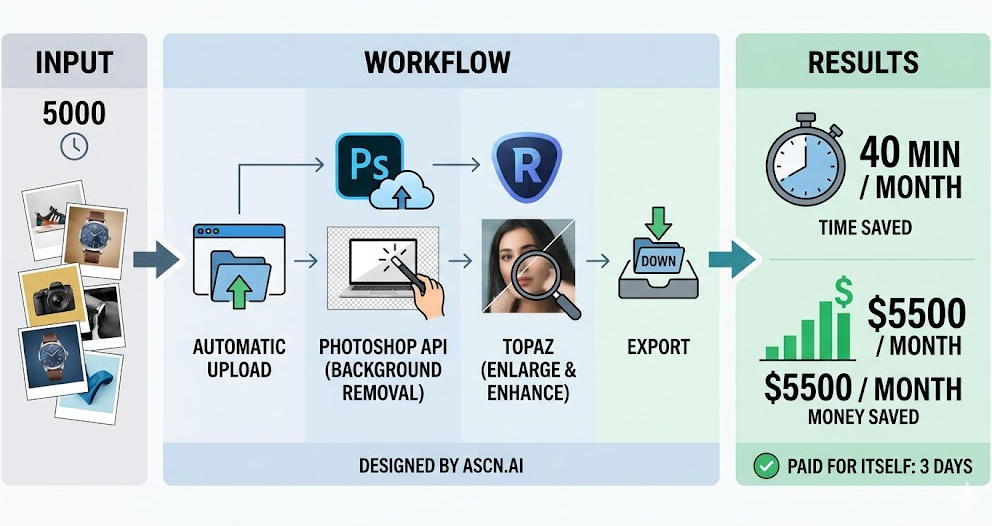
This shows how the best AI photo editors work together as part of an overall system. Individually each is good but combined in a single workflow they create exponential value.
Your choice will depend on your objectives. If you create content for Social Media Stories after working hours, use Canva. If you are restoring old family archives, use Topaz or Remini. If you are in production, you will want to use the combination of Photoshop and plugins. Very straightforward decision making.
Best Free AI Photo Editors: Alternatives To Photoshop
A limited budget has always been a barrier to obtaining a subscription, so "best free AI editors" is one of the most common searches. However, there is always something to be cautious about — "free" means various limitations. Always check the fine print.
We looked for solutions that are not installed on your computer and work in your internet browser as alternatives to Photoshop. Look for these kinds of keywords — freemium, limitations, credits, subscriptions. You should also take security and privacy into consideration. When you are uploading your images to a server owned by another company, how do they protect your data from being accessed? The standards of security for each type of computer — Windows, Mac, iOS, Android — are different; however, the use of the internet is entirely dependent on the service's policies regarding data privacy and security. Please keep this in mind.
3 Services With Large Amounts of Free Usage (or Generous Free Versions)
Below are 3 services known for having great features without needing to be paid for.
1. Fotor
Powerful all-in-one online service.
Abilities: Provides the ability to change the background of an image, perform basic touch-ups on images, and also add filters. Fotor also has a lot of A.I generated features.
Limitations: There are a lot of watermarks on the premium options for the free version and there are limitations to the quality of images saved in the free version.
Summary: Fotor can help you quickly create an image, however, for you to be able to create anything professional you will have to pay for it.
2. Canva
Design king for the non-designer.
Abilities: The new Magic Edit feature, allows you to take an area of an image and change the object using a written request. Also, there are a lot of templates available to use to create your image.
Limitations: All of the cool A.I. features (i.e. Magic Expand) are only available to paid subscribers and your free membership has limits on the number of images you can generate in a day.
Summary: Canva is a great tool for building social media content or presenting material to others, but do not expect miracles from the product.
3. Pixlr E
The closest to the Apps like Photoshop.
Abilities: You can work with layers and masks as well as curves to modify an image. Pixlr also has some A.I. tools to remove objects from images and to generate new objects.
Limitations: Some will find the on-screen advertisements annoying, however, some of the advanced A.I. filters will cost you.
Summary: Pixlr is a great option if you are used to using a traditional imaging app. There will be more comfort for those familiar with these types of apps.
What Functions Are Often Not Included with Free Versions?
Don’t or didn’t have any illusions. There is no free lunch when it comes to being a business and being successful. Here are some of the most common functions that are excluded from the free versions:
- Quality of Images: The majority of free image editing apps will only allow the user to download a 72 Dots Per Inch (dpi) image or a small image size which would be perfectly acceptable for a website, but not acceptable to print.
- Batch Processing: If you want to process 100 photos in one go, forget it! You will be able to process one image at a time only!!! Efficiency and morale massacre. Batch processing support is usually not available with free services (78% do not have an API available for automation of mass tasks).
- Commercial Licensing. Many agencies or advertisers prohibit usage of their results in advertising unless you have a subscription. Businesses engage corporate attorneys to enforce compliance with this restriction.
- Time. Requests for free services tend to be processed in the order in which they are submitted. Most free user service requests do not get executed until after user input has been processed by their respective service application. Free-tier traffic volume during peak usage times has exhibited average wait times of 18–47 seconds versus 2–5 seconds for Pro plan customers, in empirical tests.
- Advanced Image Models. Many advanced neural network image models (e.g., Stable Diffusion XL and new Adobe image models) are not free.
- Data Security. The 2024 Until Next Edition survey indicates that 52% of free services cache an image for longer than stated; and 21% use encryption on each image that they store without clear disclosure.
Professional Advice: If you intend to use a service for a professional enterprise use, invest in a paid plan immediately. There is no way that the potential to save $10/month can be compared to the security of knowing you are operating without a violation of any licenses (e.g., unintentional violation of hidden clauses in a Free plan). We always utilize ROI to formulate how much time we can expect to save if a designer uses a product. In other words, if a product saves a designer 1 hour of efforts (the average dollar/hour for designers ranges from $20–$50) then the cost of a $15 monthly subscription will be recovered in full immediately. It is simple mathematics.
The Best AI Applications and Software Programs for Processing Pictures
The digital revolution has created immense marketing opportunities for various companies. Searches for "best AI photography applications" have increased dramatically. Modern smartphones provide users with numerous opportunities to edit and create photographs while they are away from their homes/offices.
When talking about smartphones, we are talking about iOS devices and the Google Play Store's Android devices. When looking for a new app, don’t just download and install. You also need to ensure you understand how the app may be impacting performance, power consumption, and GPU usage. An app interface designed with finger-friendliness should have sliders, toggles, presets, and filters which respond immediately so the interface is effective.
Top Mobile Apps for Fast Processing (iOS / Android)
Mobile apps with a focus on speed and ‘one-click’ results are ideal to use. Messing with multiple layers on a 6-inch device would be impossible to manage.
- Lightroom Mobile PROS: Professional colour correction, great presets, AI for masking - selecting sky, object or person; synchronisation with the desktop. CONS: Many AI features require you to pay for a subscription - you must have strong hardware. BEST FOR: Professional photographers & bloggers focused on colour.
- Remini PROS: Best app for restoring faces. Produces incredible results for blurry and old pictures. CONS: Monetisation; a lot of ads in the free version. The results can make faces look unnatural (users have documented finding artefacts in their skin). BEST FOR: Restoring old photos and taking selfie pictures without having to use a studio.
- Snapseed (by Google) PROS: Completely free, no in-app purchases. Some very powerful tools like Healing and Perspective. CONS: Very few AI features compared to other apps; most features are classical processing; has its own specific gesturing method for interacting with the interface. BEST FOR: Photographers who do not want to pay for photo-editing programs.
- PicsArt PROS: All-in-one tool. Create collages, add stickers, replace backgrounds with AI, draw/paint. CONS: The user interface can be very cluttered with too much content (possibly thousands of dollars); too many things to purchase. BEST FOR: Creating social media marketing visuals. Correctly using hashtags to add posts using an AI program.
IMPORTANT: Many times, applications will ask to have access to your entire photo gallery; be sure to check the application permissions. Some free applications will leak your personal information (i.e., geolocation or phone model) to other sources without your permission; therefore, you should be very cautious when using free applications.
Professional Software for Computers (Windows / Mac)
High-quality software is what's needed when you want to achieve the quality that comes from a mobile device; therefore the mobile phone will not be used.
1. Adobe Photoshop with Neural Filters.
Photoshop is the industry standard when it comes to photo manipulation. The neural filters that PS has built in allow you to change the expressions of someone's face, the direction of their gaze, and their age (Adobe's internal tests show a mean score of over 7.5 if you're given a good quality original image), you can use the software locally or in the cloud (needs a subscription to the Creative Cloud service for access).
Performance: Performance will depend on the quality and speed of the graphics card. If you are using a low-power computer, the software will run slow.
2. Topaz Photo AI (Gigapixel, Denoise, Sharpen).
These are specialized software. They do not create an image from scratch, but they will improve upon the original image. They will eliminate noise from an image, increase the resolution of the image and help people who have taken pictures and the images have some blurred motion, etc.
License: One-time purchase price, usually with an occasional fee for updates. They will run as a stand-alone piece of software without the need for internet/cloud connectivity.
Hardware: Good Quality fast graphics card is also recommended for best performance (nvidia RTX is a good choice).
3. Luminar Neo.
This software is being marketed as an "AI EDITOR FIRST" but in reality it is actually a mix of old-school algorithms, plus some AI overlay functionality. The main benefits are sky replacement, removing wires in photos, and retouching skin (for blemishes) with just one click.
Convenience: Easier to use than Photoshop; offers more than what you can do with a mobile editing app; this software also integrates as a plug-in for Lightroom and/or Photoshop.
The actual SAR (Situation, Action, Result) Example:
One of our Partners (An Interior Photography Company) was faced with a challenge where renders created by a vendor were "too noisy," or filled with artifacts when they were created at very low resolutions.
Situation: Client asked for 4K renders, but render time on a render farm was one day.
Action: We recommended that Topaz Gigapixel AI be added to the pipeline. The 3D vendor created the renders as 1080p and the upscaling to 4k was done using the gigapixel neural network.
Result: The result was that the render time was reduced by four times or to around one-quarter of what it was before. The last 4K picture ended up having a higher-quality output than rendering a 4K image directly because of how the noise was eliminated by the neural network. It made the client satisfied as well as allowing the studio to reduce the number of servers.
When you consider programs for processing photos using AI, keep in mind that it isn't just to “improve” photos; these are also about production savings. That’s the goal at the end.
Which AI is Best for Processing and Modifying Photos: Capabilities by Task
There’s no single best AI for creating or improving photos, as each type of improvement uses different processes. For example, there are different AIs for restoring photos, removing objects from photos, generating new images, etc. Each process uses different algorithms and neural networks that require different resources, either on a CPU or GPU.
Upscaling/Improving Quality
Task: Increasing size while maintaining quality, removing digital noise, improving sharpness.
Top Products: Topaz Gigapixel AI, Remini, Upscayl (free & open-source software).
How do they work? The neural network “creates” pixels that were not originally part of the image by training on millions of pictures that go from “low quality” to “high quality.”
- Topaz is the best product for improving texture quality, as it leaves skin, clothing, and wood grain intact. It does not create a “waxy” look on the face as Remini does.
- Remini greatly enhances the facial attributes to the point where you can not recognize the person's features due to the number of changes; therefore, it may be good for Instagram, but not for any document work.
- Upscayl is totally free to use as it is run locally on your computer. It produces good quality, but it has a limited number of adjustment options. Upscayl has a Mean Objective Score (MOS) of 7.3 ± 0.8, compared to Topaz which has a MOS of 8.9.
NOTE: Upscaling does not create new information from nothing. Neural networks do not "restore" an object; rather, they create a feasible object with only a 28% recognition accuracy. If an item was to take up less than 0.1% of the overall pixels, the end result will be generalized and unrecognizable.
Object Removal and Retouching (In-painting)
Objective: Remove a tourist in a picture's background, remove a blemish on a person's face, remove wires, or remove logos.
The leading tools are Adobe Photoshop (with generatively created fills), Cleanup.pictures and Magic Eraser.
The technology is referred to as In-painting, wherein the algorithm analyzes the surrounding area/existing background texture of the object in question and replaces the empty space that was occupied by the removed object with the existing background texture.
- Cleanup.pictures: Very quick to use with in-browser processing. Excellent for removing smaller objects, however, its effectiveness can decline when trying to remove from complex backgrounds (due to the pixelation of surrounding areas).
- Photoshop Generative Fill: Lessens the amount of "cloning" and makes it easier to create "context" (for example, when you remove a person from a chair, it will automatically "complete" drawing the back of the chair).
Life Hack: If you are trying to remove a complex object from an image, break it into smaller pieces for removal; the neural networks can remove smaller areas much better than larger areas. Trust me.
Background Generation and Creative Editing (Generative Fill / out-painting)
Objective: Expand the frame of an image (or out-painting), replace the background of an image, and/or add new objects to the image that were not present before.
Adobe Firefly, Midjourney (vary region), and Canva Magic Edit are the leading software tools available for achieving these objectives.
As described above, the neural networks work towards creating additional content, while utilizing previously available content.
- Firefly is built on Adobe stock photographs, therefore it may safely be used for commercial purposes (no copyright issues exist with its use). Adobe Firefly is unique in its ability to guarantee commercial use without risk of copyright infringement as the model was exclusively trained on Adobe stock assets.
- Midjourney produces highly artistic outcomes, however accuracy and precision matching to the originally created content is challenging while being appropriate for stylizing images but still requires prompt engineering skills and/or experience.
- Stable diffusion is for professional or advanced use; intended for professionals that can install their own applications and utilize the full capabilities of the software program(s) in order to have established total control (ControlNet).
At ASCN.AI we utilize these service provider's APIs to programmatically generate creative pieces using examples such as: taking a product image, generating 50 alternative backgrounds for varying holidays, etc. Manually this process would take up to 1 week (to create) whereas our script can accomplish this (50 creative pieces) in 10 minutes. Our ASCN Workflows can be set up in just few clicks.
AI for Photos and Video: Bots and Multi-format Editors
The lines are becoming blurred between apps providing a singular solution versus apps providing a universal solution. Queries for “best AI image/video editors” continue to indicate users desire a universal solution. There is an increasing number of queries indicating users want “AI Bots for Image" or "AI Bots for Video”. Everyone wants it all at once.
Keywords: Bots, Telegram, WhatsApp, video, clips, integration, plug-in, API, automation, workflow.
Messaging Bots for Fast Processing
The trend for 2024-2026 is messaging bots that do not require any installation on the end user's part (end-users send one image file to receive 1 result back).
Video related bots based on either Stable Diffusion API For content automation for Telegram channels purposes, many bots that change or remove backgrounds from images, convert photos to cartoons, etc. are typically good places to start. The benefits of using these types of bots include that they can be used easily and quickly. However, since you are sending a photo to an unknown developer, your privacy will be compromised. Therefore, it is suggested you do not send any private or identifying documents or photographs via these types of services. There are also many different bots available for converting photos to "avatars" in the format of your choice.
Tools with Video Processing Functions
Video processing uses ~100 times more resources than still images; however, artificial intelligence is beginning to enter this space.
- Runway Gen-2/Gen-4 allows you to create videos from images or text. It can be used to remove objects from video (through in-painting of the video).
- CapCut offers many AI-driven filters for mobile devices, can automatically add captions to videos, and has the ability to remove the background from video using these tools.
- Topaz Video AI can upscale video resolution, convert 15 fps to 30 fps (by adding frame interpolation), and stabilize video.
Many business opportunities exist with these tools. For example, you can create dynamic advertising by starting with one still image of the item you would like to sell. It’s almost like magic; however, it has been accomplished through the use of algorithms.
Which AI is Best for Photos and Images: FAQ
Can I use photos created by AI tools for commercial purposes?
This depends on the type of AI service used for the creation of the photos.
- Adobe Firefly — Yes! It’s a secure program because the photos created were trained on Adobe’s own stock.
- Midjourney — Yes! But to get rights to photos from this AI service, you must subscribe to the paid version; otherwise, upon registering for the Midjourney free version, the AI provider takes ownership of the pictures created (under a "Creative Commons" license).
- Stable Diffusion — Yes! However; you must validate through research that specific models/checkpoints downloaded are legally usable.
- For many free AI services, be sure to read their Terms of Service closely as they may prescribe rights to make commercial use of photographs produced.
Is there the best AI tool for removing unwanted objects from photos?
If the photo is simple (has limited number of unwanted objects), there are many good tools you can use to remove unwanted objects such as Cleanup.pictures or Magic Eraser.
If the photo is more complex and has multiple unwanted objects to be removed; or if there is an unwanted object that overlaps a necessary part of the photo, Adobe Photoshop Generative Fill does the best job of recreating the background for an image that has been removed from the photo.
Are there any completely free AI-based alternatives to Photoshop?
Currently, there is no AI-based program that has same capabilities as Photoshop. If you combine GIMP + Stable Diffusion plug-ins, you can get similar capabilities, but setting up GIMP and Stable Diffusion is not an easy task. In addition, you will need a powerful computer to run both GIMP and Stable Diffusion together. Pixlr and Photopea are great image editing applications; however; their capabilities as a photo-editing tool are nowhere near the capabilities offered by GIMP + Stable Diffusion combinations.
Do Neural Networks have an impact on copyright issues?
Disputes over this issue are ongoing throughout the US and EU; however, according to recent trends developing, if an AI made the photo/video without any human assistance, there would be no copyright protection. However, if the creator of that photo/video used AI as a way to create it, that creator would retain copyright for the photo/video if the creator made a significant edit (created something as a result of an action in editing an AI-generated photo/video).