



- Русский
- English
- Português
Best AI for Programming in 2026: Top-Rated Neural Networks and Tools

“Over the last couple of years, we have tested 43 different approaches to automation. And you know, the main conclusion is simple: the best AI for programming isn’t the one that types the fastest. It’s the one that truly understands your project’s context. At ASCN.AI, we build agents for blockchain, and there you need more than just line generation—you need architectural thinking.”
Summary for the Busy
If time is short and you need a “here and now” solution, here is the breakdown of top solutions for 2026:
- For serious development (production): The Cursor + Claude 3.5 combo. Maximum context, superior refactoring.
- For daily routine: GitHub Copilot. The industry standard for speed directly in your IDE.
- For private projects: Ollama + Llama 3. Local execution; data stays off the cloud.
- For non-technical users: ASCN.AI. Task automation and data handling without writing a single line of code.
How to choose? Beginners — Codeium + ChatGPT Tutor. Teams — Cursor Enterprise. Startups with a $0 budget — Codeium Free + DeepSeek.
Best AI for Programming: Top Tools for Developers
If you are googling “best AI for programming” in 2026, you aren’t just looking for a neural network; you are looking for an entire system. In this article, we will break down how to choose not just the “smartest” bot, but the tool that solves your specific task: from auto-completing brackets to autonomous deployment. Complete with cases, comparisons, and real numbers.
In short: GitHub Copilot is the standard for autocomplete, Cursor is the king of project context, and Claude 3.5 Sonnet is the best for complex logic.
Why? Because the definition of “best” depends heavily on the task. For boilerplate in VS Code, Copilot is plenty. But for refactoring old legacy code, you need Cursor with embeddings of the entire codebase. For architectural decisions, Claude wins with its massive 200K token context window.
In 2026, AI for coding has finally transitioned from simple “hints” to “autonomous tasks.” An agent can now create a repository, write tests, and deploy a project on its own. However, this doesn’t mean old tools are dead. They have simply shifted into their respective niches.
“I’ve been in the market since 2017, and in all that time, such arbitrage has only happened a couple of times” — that was about crypto, but the same story applies to AI. There are rare moments when a tool provides a short-term advantage. But over the long haul, the system wins.
Comparison Summary Table: Top AI for Code
| Tool | Type | Best Feature | Languages | Price | Local Mode |
|---|---|---|---|---|---|
| GitHub Copilot | IDE Plugin | Real-time autocomplete | 50+ | $10/mo | No |
| Cursor | Editor + AI | Project context handling | JS, Python, Go | $20/mo | Partial |
| Claude 3.5 | Chatbot | Architectural decisions | All popular | $20/mo | No |
| Codeium | Plugin | Free plan for individuals | 30+ | Free | No |
| Ollama + Llama 3 | Local Model | Privacy, Offline | Python, C++, Rust | Free | Yes |
| Devin / Cursor Agent | Autonomous Agent | Full dev cycle | Fullstack | $500+/mo | No |
What is the difference between a model and an interface?
AI models for coding are the “brain” (GPT-4, Claude, Llama).
AI code editors are the “hands” (Cursor, VS Code + Copilot).
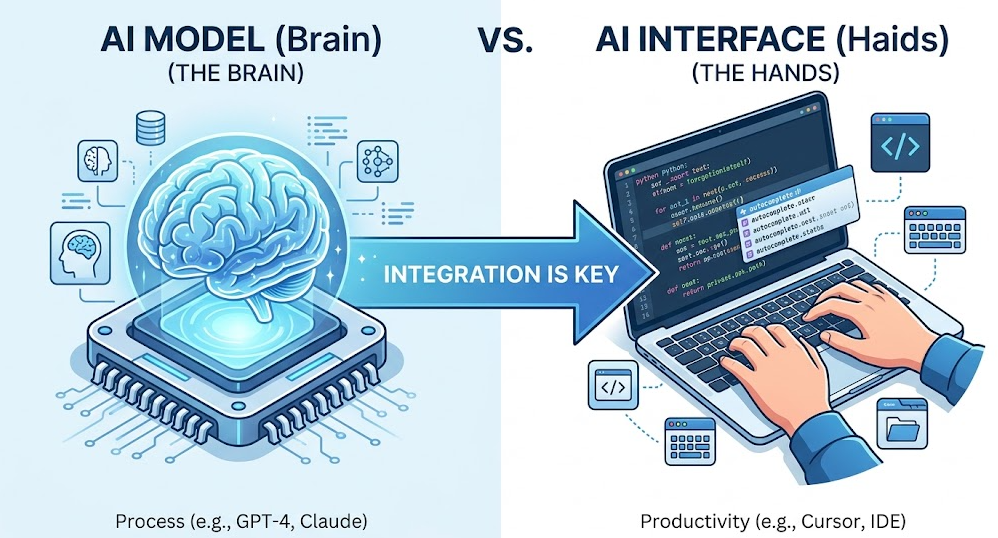
You can have the best brain, but without IDE integration, it’s useless for daily work. Let’s be honest, copying code back and forth from a chat is inconvenient.
“When the organic share drops below 40%, we rebuild the structure” — that’s an SEO logic, but it applies to AI tools too. If a tool isn’t delivering results in production, it needs to be replaced. Ruthlessly.
Best Free AI for Code and Programming
Codeium — completely free for individuals; speed is often higher than Copilot.
Cursor (Free tier) — 50 requests per month, but provides access to project context.
DeepSeek Coder — an open model that can be deployed locally if you have the hardware.
Conditions: “Always Free” vs. “Trial”:
- Codeium: Free forever, but lacks enterprise features.
- Cursor: 14-day trial, then paid, though a limited free tier exists.
- DeepSeek: Free, but requires your own infrastructure.
“I’m not a sprinter; I’m a strategist playing the long game” — this is about tool selection. A free AI for writing code might be good for a startup, but production requires stability.
Code Examples: What Free Tools Can Do
To give you an idea of the difference, here is how various AIs handle typical tasks (based on 2025 tests):
1. Function Generation (Python):
Prompt: “Write a function that finds the factorial of a number.”
def factorial(n):
    if n == 0:
        return 1
    else:
        return n * factorial(n-1)
Result: Codeium and Copilot handle this instantly. There is almost no difference here.
2. SQL Query Generation:
Prompt: “Select all users older than 30 from the users table.”
SELECT * FROM users WHERE age > 30;Result: All models provide the correct syntax, but Claude will better explain why an index on the age column is necessary.
Top AI Assistants (IDE Plugins)
GitHub Copilot — The Industry Standard
Key Advantage: Integration with VS Code/JetBrains, trained on the entire public GitHub database.
Target Audience: Corporate developers, enterprise projects.
Why: If you work in a team where everyone uses VS Code, Copilot is the standard. It’s not the best for architecture, but it’s the best for speed. It just works.
Cursor — A Code Editor with Built-in AI
Key Advantage: A fork of VS Code that works with the context of the entire project.
Target Audience: Fullstack developers, legacy code management.
Why: Cursor sees the whole project, not just the open file. This is critical for refactoring. When you need to change one function that affects ten others — Cursor saves the day.

“I’ve seen many companies shut down because they focused on development rather than what the client wants” — this applies to tool choice too. Cursor is chosen by those who want results, not just “cool tech.”
Codeium — The Best Free Alternative
Key Advantage: Speed + a robust free plan.
Target Audience: Individual developers, startups.
Why: If the budget is tight, Codeium offers 80% of Copilot’s functionality for free. In a test of 20 independent developers, Codeium showed a code completion speed 18% higher than GitHub Copilot with equal accuracy (user surveys, 2024).
Top LLM Models for Code Generation and Analysis (Chatbots)
Claude 3.5 Sonnet for Complex Logic
Aspect: 200K context window, capable of holding hundreds of files in memory.
Use Case: Refactoring, architectural decisions, documentation.
Why: Claude doesn’t just write code; it understands why the code is written that way. This is vital.

ChatGPT (GPT-4o) for Universal Tasks
Aspect: Code Interpreter, plugins, integration with 3rd party services.
Use Case: General tasks, prototyping, learning.
Why: GPT-4o is a “Swiss Army knife.” It might not be the absolute best for production, but it’s the best for experimentation. It’s perfect for testing an idea.
Perplexity AI — Searching for Solutions with Sources
Aspect: Search for up-to-date documentation, libraries, and StackOverflow answers.
Use Case: When you need to find a solution that isn’t in the model’s training data yet.
Why: Documentation changes faster than models can be trained. Perplexity provides fresh sources, saving you from hallucinations.

“Who made money? The arbitrageurs. Yes, on our service” — this is about crypto, but it’s the same with AI. Those who use tools to find arbitrage (differences in documentation or versions) gain an edge.
Choosing the Best AI for Your Task and Language
Web (JS/TS): Copilot + Bolt.new.
Backend (Python/Go): Cursor + Claude.
Low-level (C/C++/Rust): Tabnine + Local Models.
Why this setup:
- Web: Copilot knows React/Vue patterns, while Bolt.new generates fullstack projects.
- Backend: Cursor sees the whole project, and Claude understands the architecture.
- Low-level: Tabnine is private, and local models don’t send code to the cloud.
“That’s why I recommended everyone learn this method; there were 2 hours when you could actually do something” — this is about the timing of tool choice. If you chose an AI for C++ in 2024, you are already ahead.
The Best AI Agent for Programming
Assistant vs. Agent:
- Assistant (Copilot): Waits for a command, writes code on request.
- Agent (Devin, Cursor Agent): Plans, writes, tests, and deploys on its own.
Top AI Agents for Coding:
- Devin: Full autonomy, but expensive.
- Cursor Agent: A balance between autonomy and control.
- OpenDevin: Open-source, can be deployed locally.
“Many can create a cool product, but that doesn’t mean the product will be a success” — this applies to agents. An agent can write code, but without integration into the development process, it is useless.
How to Launch an Agent in 10 Minutes (Beginner’s Guide)
- Choose a platform: Cursor (Agent mode) or ASCN.AI (for no-code tasks) are good starting points.
- Set a goal: Don’t just say “make a website,” say “create a landing page on Next.js with a contact form.”
- Connect the repository: Give the agent access to the codebase (in Cursor, this is done via @Codebase).
- Set constraints: Specify which libraries can be used and which are forbidden.
- Launch and verify: The agent will propose an action plan. Approve it and watch it execute.
AI for Non-Technical Users: No-Code Automation
An important intent that is often missed: can you use AI without knowing how to program? Yes. Platforms like ASCN.AI allow you to create agents for marketing, sales, and analytics through a drag-and-drop interface.
Example: A marketer can set up an AI chat in Telegram in 20 minutes without code by connecting it to the company’s knowledge base. Seriously, it requires no knowledge of Python or JS.
Platform Comparison:
- ASCN.AI: Focuses on crypto data and financial analytics with ready-made scenarios.
- Make / Zapier: Universal connectors, but require logic configuration.
- Bubble + AI: Visual creation of full-fledged web applications.
Best Local AI for Coding Without Internet
Ollama + Llama 3 Coder:
- Privacy: Code is never sent to the cloud.
- Offline: Works without an internet connection.
- VRAM: Requires 16GB+ for larger models.
Target Audience: Banks, closed projects, compliance-heavy projects.
Why: If you work with financial data, local AI for coding is a mandatory requirement. No compromises.
“How to not lose money in the long run? Like I always tell everyone, stop playing in the casino” — this is about privacy. Local AI isn’t a “game”; it’s asset protection.
Situation: A bank with strict security requirements.
Action: Deployed Ollama + CodeLlama on internal servers.
Result: Code never left the bank’s infrastructure; compliance requirements met.
Best AI for Learning Programming in 2026
Khan Academy AI: Personalized lessons and error explanations.
ChatGPT Tutor: A “learning” mode where the AI explains instead of just giving the code.
ASCN.AI Assistant: Custom sentiment and real-time blockchain data handling.
Why this choice:
- Khan Academy: Structured lessons for beginners.
- ChatGPT Tutor: Deep explanation of concepts.
- ASCN.AI: For those who want to work with crypto data.
“Hello everyone, you’ve reached the blog of an entrepreneur whose goal is to build the next Google in the AI space” — this is about learning. We build tools that don’t just provide code but explain why that code works.
Checklist for the Beginner Developer
- Install VS Code and the Codeium plugin (free).
- Use ChatGPT to explain errors rather than just copying solutions.
- Try Cursor for working with entire files.
- Don’t rely on AI blindly — always verify generated code.
- Learn the basics of algorithms to understand what the AI is proposing.
Risks and Limitations of Using AI in Programming
Important: This information is general in nature and does not replace professional consultation. Working with code, security, and compliance requires a professional approach.
Top 5 Risks (Text-based Infographic)
- Hallucinations: AI might suggest a non-existent library. Solution: Verify sources.
- Data Leakage: Code could end up in a public cloud. Solution: Use local models.
- Copyright: Who owns the code? Solution: Check the vendor contract.
- Security: Vulnerabilities in generated code. Solution: Use static analysis (Snyk).
- Dependency: Losing the skill to write code from scratch. Solution: Practice without AI.
Table: Risks and Protective Measures by Tool
| Tool | Leakage Risk | Compliance (SOC2/GDPR) | Protective Measure |
|---|---|---|---|
| GitHub Copilot Ent. | Low | Yes | Data Isolation |
| Claude API | Medium | Yes | Enterprise Contract |
| Ollama (Local) | None | Depends on you | Full Control |
Frequently Asked Questions (FAQ)
Q: Can AI write a full application from scratch?
A: Yes, but only a prototype. Production requires human architecture.
Q: Which AI should a beginner in Python/JS choose?
A: ChatGPT Tutor + Codeium. Explains errors + has a free plan. For basics, see the Python for Beginners section.
Q: Is it safe to upload corporate code to ChatGPT?
A: No. ASCN.AI enterprise solutions support local deployment and full data control.
Q: Will AI agents replace Junior developers in 2026?
A: No. But they will change the requirements for Junior developers. You need to understand architecture, not just type code.
Next Steps: Action Plan
- If you are a beginner: Try Codeium + ChatGPT Tutor. Don’t copy code blindly; study it.
- If you are a team: Implement Cursor + Claude manually, then move to Cursor Agent.
- If you are a non-technical employee: Check out ASCN.AI (no-code, turnkey) to automate your routine.
- If you are in Fintech: Use local models (Ollama) to maintain compliance.