



- Русский
- English
- Português
How to Automate Browser Actions with AI and GPT

The first time I created my own Selenium script to extract data from the exchange took me three days—just to figure out the right selectors and write error-checking routines. Then, when the exchange made changes (even minor), all my hard work was wasted! Now, an AI bot can complete the same job in twenty minutes. In addition, the bot can adapt to changes in the site since it understands the context of what it’s doing, rather than just looking for elements in the fixed order of a DOM. This is not just a time-saver—it’s an entirely new way of thinking about how to code for the web!
“Traditional web research and traditional script development are obsolete. We used to spend dozens of hours writing code that would be unusable whenever the sites changed. Many thanks to browsers powered by GPTs, the model itself knows what the page is, how to find its elements, and how to perform the desired operation without having to change any code. In eight months, we have analyzed 43 different ways to do crypto-analytics and have determined that both Selenium and Puppeteer only function successfully when combined with large language models; otherwise, there would be an infinite loop of continual updates needed to maintain the code.”
Introduction
Browser automation (sometimes referred to as browser scraping) refers to when a computer can perform actions on your behalf (clicking buttons, entering information into forms, navigating to different pages, and collecting data) without needing input or assistance from a human user. Historically, to automate a web interface, you had to write static scripts with very specific selectors for the specific elements of an interface you wanted to target—often resulting in extremely brittle (and, therefore, easily broken) code. The entire structure would immediately come down if there was even a slight modification to the interface. Today, there is the availability of GPT and AI. This affords us the ability to write flexible scenarios that do not always follow the step-by-step model of development, but instead can comprehend what is occurring on the page. This allows for variable changes to be accounted for and modified even though the markup has changed.
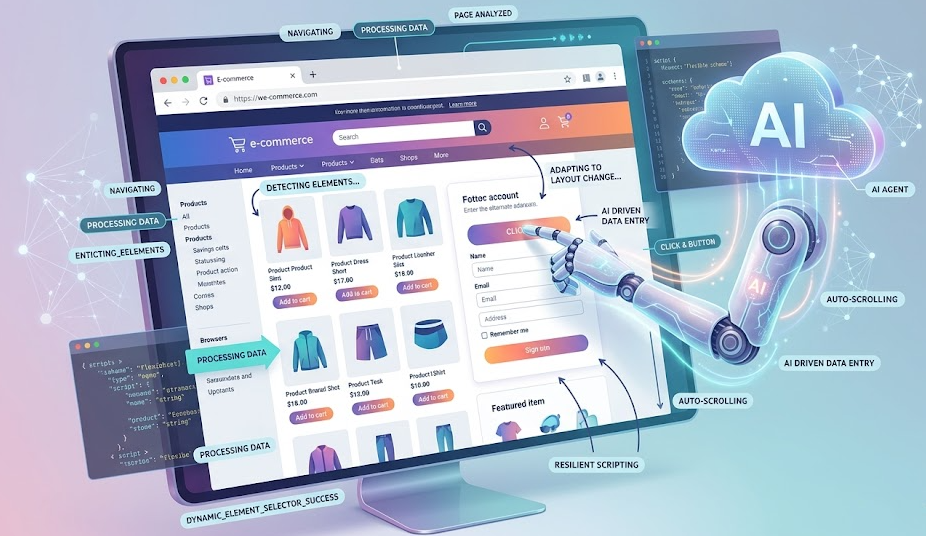
Traditional scripts (which are broken with any advancement to the code) have a fundamental challenge, which is that they are typically very time-consuming to maintain since code modifications break the logic of the script and fixing this logic generally requires many hours of work. Automation using GPT technology does not have this issue, as it analyzes the semantics of the elements as well as their technical data. This is a vitally important factor when considering that there are times when maintaining the code can be entirely more costly than utilizing automation. By utilizing the GPT methods of developing scripts, the time spent maintaining the scripts can be virtually eliminated, while the time used to develop the scripts would increase by up to ten times.
Principles of Browser Automation
Automating browser actions is the use of an automatic program to perform actions that you would normally do manually (i.e., clicking, filling out forms, pressing buttons). The primary tools for performing browser automation include:
- Selenium — the most widely used/oldest of the tools, and works with all browsers using the WebDriver and can be written in Python, JavaScript, or Java, although the installation of a driver is required and often can be difficult and sometimes incompatible.
- Puppeteer — a Google library that allows you to programmatically control Google Chrome and Chromium; it is the easiest to use when developing in Node.js, but can only be used with Chromium-based browsers.
- Playwright — a new, very modern cross-browser automation tool, which allows for the automation to be performed on three popular browsers: Chrome, Firefox, and Safari; and, it is uniquely able to wait and handle a dynamically created element while processing the automation. Although it only has a few out-of-the-box solutions available, the demand for such tools is increasing at an exponential rate.
There are two categories of automation methods: imperative automation requires you to write out every single action in code, while declarative automation requires you to describe the desired outcome and allow the system to define the steps needed to achieve it. A good example of declarative automation is GPT, which allows you to state a task using natural language, and then automatically execute all necessary actions via DOM analysis. When it comes to testing webpages in the cryptocurrency industry, Playwright frequently exhibits a much higher level of performance than Selenium, especially with data updated every hundredth of a second via WebSockets. Selenium will not have enough time to retrieve page updates in real time, while Playwright, with its automatic wait times, makes test executions more manageable. However, if a webpage has too many business rules, an AI agent is the better option.
What is GPT and how it is utilized to control web browsers
GPT is an extremely large, trained Natural Language Processing (NLP) model based on generative, transformer architecture. GPT allows you to identify concepts, respond to questions, and write code in programming languages. When working with browser automation, the browser agent will analyze the DOM (Document Object Model) by utilizing an analysis of its HTML element types and CSS rules to determine the correct command to execute for each specific element (click the submit button, etc.)
When using GPT to issue a command to the browser, you typically pass either a DOM snapshot or part of a DOM snapshot, and specify: when an element changes, rather than finding an element that matches the original selector, the model will look for another element. That is, if an element is added or modified.
A great example of this is how ASCN.AI’s token listing utility works via the twelve different exchanges. This functionality originally required 8 hours of staff time each week for manual selector editing. After the implementation of GPT-4, the GPT-4 agent obtains the HTML (and sometimes, a screenshot) for the listing page, locates the table from the structure and header of the table, extracts the required data, and inserts that data into the database. Currently, the agent has reduced maintenance to zero since the agent can self-modify.
Using Artificial Intelligence for Browser Automation
When using AI in browser automation, we are referring to the use of AI to execute browser automation via machine learning, primarily with large language models (LLMs), which develop and execute browser automation without the use of hard-coded scenarios or selectors. Instead of creating a list of instructions for the user to use to complete a task on a website, the user simply provides the AI a verbal description of a task that they want the AI to assist them with and the AI can use that description to move through the user interface and determine what actions are needed. An AI-based browser automation system comprises of:
- DOM Analyzer – can scan & provide an overview of all interactive elements on the page, without needing to know all of its capabilities; flag all interactive objects on a page;
- Language Model - can decompose a user-provided task description into sub-tasks and link those sub-tasks together by their interactive components;
- Command Executor – will send commands to the browser via Puppeteer / Playwright;
- Feedback Loop - can confirm that the command was executed successfully by the browser. If it is not successful, the AI will learn from this experience and attempt to execute the command differently.
The Role of GPT and Other AI Systems in Automation
GPT and other AI models are capable of streamlining workflows and providing great support in automating any processes. As an example, here are the main functions of GPT and related LLM (Claude, Llama, Gemini):
- Translate user intent into a series of actions.
- Use function elements as navigation aids based upon meaning instead of just using selectors.
- Allow the model to find error recovery by offering alternate action suggestions in the event that the performed action fails;
These tasks become even more important when considering that most SPA type applications are created with React or Vue, because these frameworks render their browsers in a fluid/flexible DOM. In the case of using machine vision technology, AI engine such as the Anthropic Claude will also provide image processing of snapshots providing users with additional capabilities to work with browser automation tools. Also, most agent models will run continuous cycles - observe / act / check / adjust.
Real-World Scenarios for Browser Automation with GPT
Three different methods currently exist for joining GPT into the process automation workflow:
- Browser extensions - this will work within the active browser tab but is limiting because of browser policy.
- API libraries - the typical user will need programming experience to implement these kinds of automation as they contain a significant amount of programming and will allow an individual access to API’s allowing much greater control over process automation; examples would be creating API code using LangChain (playwright) or AutoGPT (plugin architecture) at the server level as long as there are enough scalable instances.
- No-Code Platforms - lets non-programmers build / automate processes without having to write software code; usually involves creating / modifying OCR workflow; examples include ASCN.AI NoCode, n8n, Zapier.
In summary, implementing process automation has been made so much easier thanks to AI technology that by building on to your current platform as long as you can describe your process' objective in the same way that we discuss with each other you will be provided a pre-built automated workflow solution- automation with a graphical assign build where the assigned solutions will encompass everything from triggers and API integrations of the processed application and services such as Google Sheets, Telegram, etc. In many cases where the user does not have programming knowledge of either the Playwright or OpenAI API, they won't be needed when building those automated workflow solutions.
Automation of Typical Tasks
Navigating through the menus of most websites today involves either using an interface (a navigation bar) or directly using the semantic model to find the desired section. When a website's page is updated or changed in some way the way the page was set up potentially will have changed the way you navigate to get there.
Form Filling - The definition of filling out the form is finding the mapping between the fields of the form (like name or address) and what you're putting in those fields.
Clicking on Items - The methods for locating the elements on the page and clicking them depend on whether you are successful in clicking them or not. If you can't find the element that you want to click, you'll have to access the methods for retrying until you have accessed it.
Data Extraction and Storage - To gather information from a previous automation script, you will need to extract tabular information (like dates of previous purchases) as well as extract information from a website that contains the same type of information (like downloads) and store that information in a protected area on your own computer. You will then need to structure that information (like dates of purchases and downloads) and save it in the appropriate format.
Scenario Examples Using GPT
Scenario 1 - Monitoring for New Token Listings
- Your automation script will look at the token listing every hour or you can use HTTP or Playwright.
- An AI Agent's Logic is to help identify New Pair Listing based on a Review of the DOM structure.
- Use of a filtering mechanism for new Listings and a Logic to Detect Newly created Tokens.
- Using Google Sheets to capture Token Name / Price / Volume / Supply.
- Releasing a Notification to our Telegram group.
This was successful in identifying a Binance listing 12 Min before other traders were able to see the Listing and subsequently it increased by 34% in value within minutes of the Listing.
Scenario 2 is the Automation of KYC Forms Uploaded to Exchanges
- Triggered manually when adding new exchanges.
- Playwright will load the KYC Form.
- AI Agent will analyze Mapping, Syntax and Retrieve Corporate Information from the database.
- AI Agent will use this Information to Populate the KYC Form and upload all Required Documents.
- AI Agent will Receive a CAPTCHA and purchase/solve the CAPTCHA using the 2Captcha API.
- Submit the KYC Form and Wait for Notification of Verification.
- Once Verified the AI Agent will Send an Update to the Telegram Group of Verification Status.
Overall we have reduced the amount of time required to complete a KYC Form from 15-20 minutes to 3 minutes, representing a Total of 11+ Hours Saved Per Month.
Scenario 3 relates to # Whales (TX) Information
- There is a Daily Execution Using Playwright which will filter all transactions greater than $1M on Etherscan.
- Used to parse and Classify Transactions.
- Create Reports grouped by the Token and Summarize the Total Account Balance Associated with the Token.
- Reports are generated by the AI Agent and sent to both Google Sheets and Twitter.
Workflow throughout the above procedures allowed us to identify Capital Outflows from an Exchange through 48 hours prior to the Market Collapse.
Integration and Tools
The agent begins by dividing a given objective into small tasks or task components, completes those tasks and returns the output of the tasks back to the user upon completion of all of the tasks. Therefore, the user will connect to the agent by (1) defining how to access the agent, (2) defining the task(s) to be completed by the agent, and (3) the agent will create a plan to accomplish the user-defined request and perform the created Plan to fulfill the request made by the user while validating the completion of the Plan to accomplish the user's request. The ChatGPT standard provides the user with an assistant function. For example, the user may use a command performed by the agent by way of a DOM and then execute that command through another execution environment. ASCN.AI is built on top of custom agents and Web3 data and the built-in GPT API and provides a reliable and versatile method for accomplishing the user´s request.
Scripts and Extensions for Integrating GPT with the Browser
Scripts can run on the client side through a browser extension (Manifest V3) or the same scripts can be run server-side (Node.js) using the OpenAI and Playwright APIs. Each script run on the client (using a browser extension) will run the script within the current tab and then provide the DOM to the agent through a request to execute the user's command in the browser. The only limitation of the client-side execution of the script is that the request can only be executed in the current tab of the browser. The server-side execution of the script will allow the user to run all requests using the OpenAI and Playwright APIs from a server-based location as well as provide an increased number of concurrent requests and efficiently respond to multiple users.
Users can also use pre-determined solutions to configure their request. Some existing methods to configure a user's request are LangChain, BrowserGPT (open-source) or the ASCN.AI NoCode (with visual editor).
APIs and Libraries for Custom Solutions
Core APIs for Automation:
- OpenAI API (GPT-4) for command generation and interpretation of tasks;
- Anthropic's Claude API for command generation including image analysis;
- Playwright API for executing browser commands including navigation, data entry, button clicks, image creation, etc.;
- Puppeteer API for executing browser commands including those within the Chrome browser similar to the Playwright API;
- Selenium WebDriver API for executing browser commands using all web browsers, which is considered a legacy method of executing web browser commands.
Everything explained above defines standard automation architecture:
- Open your web browser
- Go to the page you want to automate
- Extract the HTML or capture a screenshot of the page
- Send the data and tasks to the GPT API
- Get GPT's response and parse it for execution
- Execute the command in your web browser
- Validate the result and log it
To obtain dynamic data, you will use WebSocket interception or making an API call. ASCN's own Blockchain API will give you access to on-chain data and allow you to bypass UI parsing issues.
Limitations and Security
Main Threats:
- Credential Leakage - Always try to store your keys and passwords in a secure vault and update them frequently
- Site Blocking - Use human-mimicking behaviour with proxies and captcha solving services
- Malicious Commands from LLMs - Always validate LLM responses
- High API Costs - Use cache to store results, optimising API queries
- Legal Risks - Always adhere to site policies and adhere to the GDPR and Terms of Service
Technical Limitations and Issues
Recommended Practical Measures:
- Store your credentials in a Cloud Manager or environment variables
- Use Playwright with stealth plugins to simulate human behaviours
- Interface captcha services like 2Captcha or AntiCaptcha via API
- Cache analysis and send only the necessary part(s) of the DOM structure to LLMs rather than sending the whole DOM structure each time
The technical limitations and issues: When automating with LLM, you need to remember that LLM latency (which is between 0.5 and 3 seconds) is not a good fit for high-volume requests and that you are limited by the context size (as of now, GPT-4 has an approx max of 128k tokens of context size; however, it is much less in practice). The DOM is sometimes quite complicated, which can affect how accurately LLMs interpret it. The cost of scaling can become very significant.
Recommendations:
- For mission-critical and/or high-frequency job functions, the use of hard-coded logic is advisable, while reserving the use of LLM for ad-hoc jobs
- Before sending the DOM to an LLM, process and trim it down as much as possible
- Comply with the legal requirements and the website's terms of service for where you plan on performing automation
Data collection without permission, or in violation of regulated guidelines is illegal and can result in fines. It's important to check "robots.txt" and the terms of use, and to comply with any time delays and request limits. This is not intended to be an incentive to violate any rules whatsoever; the ultimate responsibility rests with the executor. Please note that the information contained herein does not constitute legal advice.
Guide to Creating Your Own AI Automation Scenario
- Define: Define the task to be automated by defining the goal (what you want to achieve), the source (where the information will come from), the data type (how you want to store the information), and the success criteria (how you will measure your success).
- Build Your Stack: The ASCN.AI NoCode assists people who are new to the automation arena. Playwright + OpenAI API can assist developers. n8n is a combination of both large and small systems to create an automation stack.
- Design Your Workflow: Break the task into a specific number of steps, build a workflow with conditionals and error handling.
- Test and Debug: Manually execute the steps in your automated procedure, then check logs to identify issues, inspect selectors and address any errors identified.
- Launch, Monitor and Stop If Necessary: Schedule and automate your launches; set up notifications and monitor to ensure that your executions were correct.
Best Practices
- Begin with an MVP; then gradually add complexity.
- Utilize Version Control to easily revert to an earlier version of your automation.
- Write an automation workflow that is readable - provide meaningful names and comments in your automation.
- Be explicit in handling all errors and failures.
- To reduce token cost, trim your DOMs.
Frequently Asked Questions (FAQ)
Can GPT be used for automation in any browser?
Sure, GPT Automation is run in browsers and tool-dependent browsers, such as Selenium, Puppeteer, and Playwright. Playwright running on Chromium is generally the most stable option for 95% of your tasks, while Firefox and Safari are comparable, you will need to use an alternative to Puppeteer for mobile automation such as Appium.
Which Programming Languages Can Be Used for Development?
JavaScript/TypeScript should be used for Puppeteer and Playwright projects; while there is Python typically used to integrate with the GPT API and Selenium. C# and Java are used in enterprise environments. No-code options are also available.
What Are the Differences Between GPT Automation and Traditional Automation?
| Feature | Traditional Automation | GPT Control |
|---|---|---|
| Selector Dependency | Rigid (CSS, XPath) | Flexible (Semantic) |
| Adaptability to Change | Manual Code Changes | Automatic DOM Interpretation |
| Barrier To Entry | Requires Coding | No-Code and Natural Language |
| Speed of Execution | High Speed, No Latency | Medium Speed, Due to LLM Calls |
| Cost | Low Cost, Free Tools | Medium/High Cost due to API Calls |
| Exception Handling | Explicitly Defined, Complex | Automated Attempts with Alternatives |
Conclusion
GPT and AI Browser Automation are a substantial step forward from brittle and labor-intensive scripting processes to adaptive methods that offer flexible responses to inconsistent user interactions. The long process of troubleshooting bugs in Selenium (and fixing them) has been replaced by an accelerated development of finished workflows built in under 10 minutes using no-code platforms. Since the advent of GPT, we now see the equivalent of hundreds of lines of code being streamlined down to a single command; we anticipate soon GPT will be recognized as standard-setting for automation. Other innovations that are just around the corner include multimodal agents, autonomous browser-based assistants, and combining blockchain data with smart contracts. With the assistance of GPT, you should be able to save dozens of hours or more each month; soon the entire business could be effectively automated.
Disclaimer
All information in this article is general information and does not take the place of suggestions, advice, or recommendations regarding investment, legal, or financial decisions. A thorough understanding of the functions of each platform and their associated AI assistants is a prerequisite to utilizing an AI assistant.